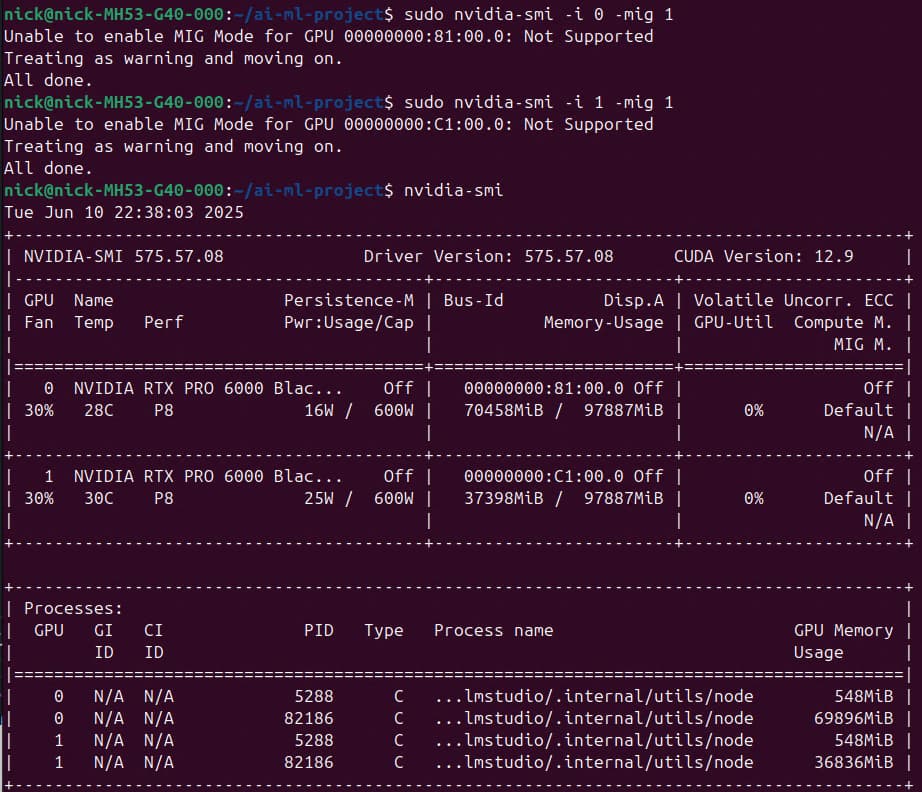
I sympathise. It may be worth posting over on this forum also.
Clutching at straws here: I note the following in the MIG doc,
“▶ All daemons holding handles on driver modules need to be stopped before MIG enablement.
▶ This is true for systems such as DGX which may be running system health monitoring services
such as nvsm or GPU health monitoring or telemetry services such as DCGM.”
I wondered if persistenced or similar may be preventing enablement?
As far as I can tell there’s nothing other than the Nvidia driver even being aware of the card’s existence.
So far I’ve tried kernels 5.15, 6.8 and 6.11, with the nvidia apt repo’s 575 drivers and the slightly newer-but-570 .run driver from the “download graphics drivers” website. On two different 6000 Blackwells and 3 different systems. No desktop environment running (or even installed). They all just show “N/A” in the nvidia-smi summary for MIG, and they all say “not supported” when trying to enable the feature. Even tried the Nvidia systems-management python library but unsurprisingly the API just says the same thing that nvidia-smi does: “not applicable” when querying and “can’t do that” when enabling.
Thanks for taking an interest in this but at this point I’m just going to assume that MIG support is purposefully blocked by the drivers. And if anyone from Nvidia is reading, it’d super nice to get some insight into this.
I saw in the MIG doc they specifically mentioned the driver for PRO 6000 had to be => 575.51.03. I see there’s a 575.57.08 here.
This situation and another I’ve seen recently is inexplicable, given the money you shelled out, from a trillon dollar company. Rather than mention the problem’s being worked on or have a note in the MIG doc, they’d rather disrespect users.
Given you have made a serious investment, is there any chance your dealer can pry an answer out?
Hey thanks! I didn’t go looking for a bleeding edge driver; figured that >= means that 575.51.03 was good - which is what they have in the apt repo. I did give this a shot but unfortunately:
marton# sudo nvidia-smi -i 0 -mig 1
Unable to enable MIG Mode for GPU 00000000:41:00.0: Not Supported
Treating as warning and moving on.
All done.
Tue Jun  3 04:08:04 2025
+-----------------------------------------------------------------------------------------+
| NVIDIA-SMI 575.57.08              Driver Version: 575.57.08      CUDA Version: 12.9     |
|-----------------------------------------+------------------------+----------------------+
| GPU  Name                 Persistence-M | Bus-Id          Disp.A | Volatile Uncorr. ECC |
| Fan  Temp   Perf          Pwr:Usage/Cap |           Memory-Usage | GPU-Util  Compute M. |
|                                         |                        |               MIG M. |
|=========================================+========================+======================|
|   0  NVIDIA RTX PRO 6000 Blac...    Off |   00000000:41:00.0 Off |                  Off |
| 40%   33C    P0             66W /  600W |       0MiB /  97887MiB |      0%      Default |
|                                         |                        |                  N/A |
+-----------------------------------------+------------------------+----------------------+

+-----------------------------------------------------------------------------------------+
| Processes:                                                                              |
|  GPU   GI   CI              PID   Type   Process name                        GPU Memory |
|        ID   ID                                                               Usage      |
|=========================================================================================|
|  No running processes found                                                             |
+-----------------------------------------------------------------------------------------+
Well one person’s “serious investment” is another’s “you don’t have 10 racks full of our products so why should we care”. And with my dealer being Newegg, I really doubt that’s even worth trying.
But good news! It also doesn’t work on Windows. This officially qualifies for real support now. :)
Hi, I would like to chime in here. I have two of these cards, and the newest driver 575.57.08. Card performance has been amazing, but I cannot get mig support to work. Collectively, we have quite a few people with this issue on multiple systems. Why sell a feature and not allow it?
Agreed, check out the bug I filed. NVIDIA is pretty responsive. Can you try filing a bug if you haven’t already so we can ping them from multiple angles?
I do have developer program access. Not sure what’s expected beyond that.
I have to question their responsiveness too. Chat support was forced to acknowledge that something is broken due to it also being broken on Windows. The guy still insisted that I post on the forums instead, but when I told him I have, a week prior, and he reviewed this very thread, an incident was begrudgingly escalated.
This Monday (so about a week later) a nice lady from Nvidia emailed me with some copypasta about updating drivers and reading the documentation. I emailed her back, explaining specifics yet again. And now I wait, but breath is not bated.
According to my bug status, this is labeled as a low priority item, so will probably take some time to get support. Not sure why you don’t have access. In my experience, I have 2 (maybe 3) NVIDIA accounts. 1. for marketplace and 2. for NVIDIA Developer. If I’m logged into the wrong one, I have access to the forum but not the developer portal. Not sure if you tried logging out of all instances, clearing cookies, then trying again? I’m not an NVIDIA employee so that would be my base guess.
See below ticket update from 4:47AM cst, not sure what timezone they are in
My support incident’s resolution isn’t looking very promising. In my response to the initial copypasta about upgrading drivers, I provided screenshots of a) failing to enable MIG on the RTX Pro 6000, and b) successfully enabling MIG on an A30.
Five days later I got a response, completely ignoring the RTX 6000 issue and asking me if I have an Nvidia Enterprise License for the A30.
While one might charitably think that the rep suspects the existence of a licensing requirement that the A30 satisfies but the RTX Pro 6000 does not, and that’s why the behavior is different, it doesn’t sound like that is her motivation:
“Could you please confirm whether an NVIDIA Enterprise License was purchased with your A30 card? Since you mentioned that you’re familiar with enabling MIG on the A30, it’s important to ensure that the required enterprise license is in place. If you’re unsure, we recommend checking with your company or IT department for confirmation regarding the license details.”
Correct me if I’m wrong, but MIG doesn’t have any sort of licensing requirement on either card.
I’d be upset if I didn’t find the whole thing entertaining.
This entire experience has been really unfortunate and clearly Nvidia was not well prepared for this release. I too purchased an RTX Pro 6000 through consumer retail channels and came to a very sudden realization that as a consumer level user, you are locked out of a lot of the marketed features (ie: vgpu).
The features you are supposedly not locked out of (like MIG) are simply not working at all and furthermore they are totally undocumented. I spent 12+ hours yesterday debugging the same issues described above with no success. The entire time, I was wondering how it was possible to sell a GPU for $10k with no disclaimers required in consumer retail, then lock it’s documentation and support behind enterprise paywalls/licenses.
However, the truly enlightening experience was that I spoke with someone going through the same issues, but that person did in fact have enterprise support and access to the exclusive drivers specifically for vgpu. vGPU AND MIG do not work. This is astounding.
Well, sort of. My windows support ticket got escalated to Enterprise, and a very nice gentleman informed me that 1) I should update VBIOS to 98.02.55.00.00 or later 2) use display mode selector to disable dispay output 3) proceed with enabling MIG.
Then we immediately got stuck at step 1, since he’s not able to get me access to the bios. and OEMs never heard of the thing.
Apparenly it’s a mystery, because, as one OEM put it:
"This is what I got back from our RTX team. ‘I’m not aware of ‘greater than or equal to 98.02.55.00.00’ 900-5G144-2200-000, RTX PRO 6000 BLACKWELL ships with 98.02.52.00.02’ "
I sincerely apologize, I know it must be very frustrating and stressful for you, but as an unrelated person reading this thread, I find it truly hilarious how pathetic Nvidia support is: you just can’t make this sh*t up :DDDDD