Hi,
In the programming guide, it says the device tree file (.dtsi) can be found or created in the board support package. Is the board support package referred to the L4T package?
I also checked my TX2 L4T version and found that it has not installed this package. Through the L4T package installation process, I need to put the TX2 in force recovery mode to flash the rootfilesystem into eMMC. Will this recovery mode remove the current contents existing on the TX2?
Yes, if you flash the file system all of contents will be erased. However you can only update the DTB partition.
If that’s the case, how can I update the DTB partition without putting it into force recovery mode, isn’t installing the L4T package require that?
You need install sdkmanager and issue the flash.sh command as below to flash dtb.
sudo ./flash.sh -r -k kernel-dtb jetson-xxx mmcblk0p1
You can find detail in l4t document.
Does it require a host computer to do that or can I flash the dtb without a host computer?
One thing i got quiet confused with is that, in order to update the DTB partition, I need to first have or create a device tree file in the L4T package, don’t I? I currently do not have the L4T installed on the TX2, does this mean flashing the rootfilesystem into eMMC during L4T installation is unavoidable? Is it necessary to connect TX2 to a host computer during this process?
Yes, you need an host device to do that, also you may need build your dtb on it.
Please check the L4T document carefully, I believe there have lots of information you need.
You can replace the dtb file at …/Linux_for_Tegra/kernel/dtb/tegra186-quill-p3310-1000-c03-00-base.dtb by below command to update it.
sudo ./flash -r -k kernel-dtb mmcblk0p1
Just want to make it clear for myself since I am still learning, if I want to update this file: tegra186-camera-e3322-a00.dtsi. I should cd in the directory containing this file, and use this command: sudo ./flash.sh -r -k tegra186-camera-e3322-a00.dtsi mmcblk0p1 . Please correct me if I am wrong. Also, by .dtb, do you mean .dtsi instead?
Thanks.
Hi Shane,
I know that the reg(slave address) in the device tree node needs to match the address of the sensors’ onboard EEPROMs to load the correct device tree file to the sensor. In order to do that, do I need to write the address info to sensor EEPROMs before connecting the camera interposer module to TX2 or is there is a way to write the address to EEPROMs through TX2? The hardware design guide showed the sensor EEPROM address, which is 7h57, but it doesn’t specify how to update the EEPROM information through TX2.
You need to compile the dts to dtb and replace it at …/JetPack_4.5_Linux_JETSON_TX2/Linux_for_Tegra/kernel/dtb/tegraxxxxxx.dtb then issue the sudo ./flash.sh command to update it.
Hi,
I was not able to locate the device tree source (dts) file. I would like to modify and reuse the device tree source include (dtsi) file: tegra186-camera-e3322-a00.dtsi, which is located at …/Linux_for_Tegra/source/public/hardware/nvidia/platform/t18x. Should I compile this file instead?
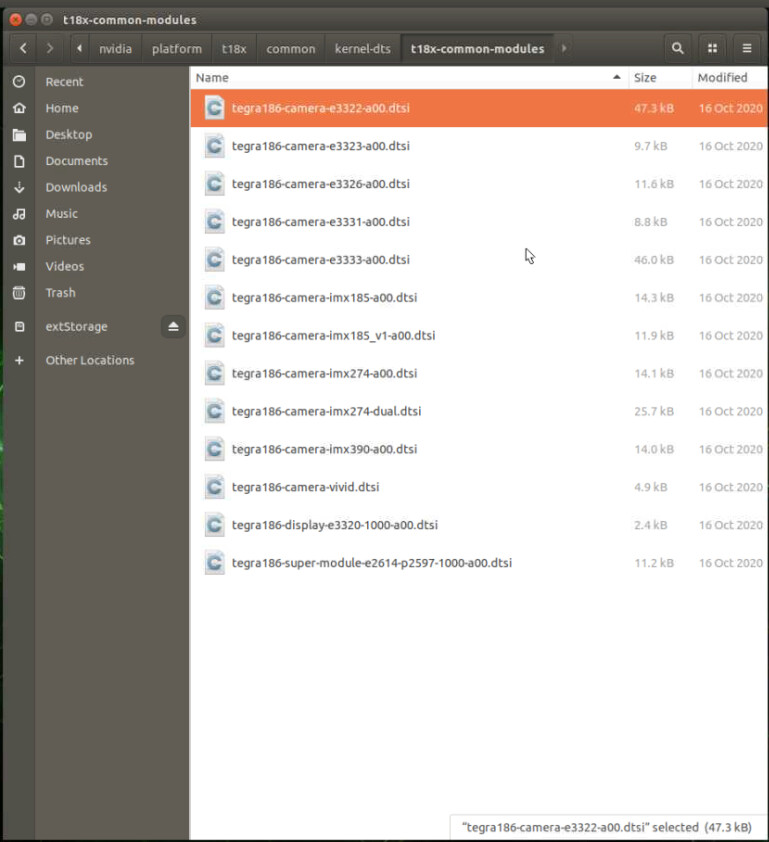
I was also not able to locate the dtb directory under kernel directory or Linux_for_Tegra directory, where should I replace with the dtb file after compiling the device tree?
I also noticed that I do not have permission on modifying the Linux_for_Tegra directory, will this affect anything?

The Linux_for_Tegra was generate by sdkmanager instead of from public_source.tbz2
Will it make any difference?
Yes, the Linux_for_Tegra gen from sdkmanager used for flashing system image for specific partition, the public_source content the source code only.
Sorry, I still didn’t quite understand. If I want to compile the dts to dtb, which directory should I do it under? I still couldn’t find the dts file you mentioned before, only dtsi files, is it because I did something wrong when setting up the TX2 using JetPack or is dts referred to .dtsi file? Isn’t JetPack supposed to set up the board support package and configure the device automatically?
Have a check the l4t document, below tell how to get the source and how to build the kernel and dtb.
Hi Shane,
Thanks for the direction. I followed the document and was trying to build the kernel on the device storage, but the process terminated due to no space left on device error. I am going to build the kernel on the external storage instead, will it work if it is built on the external storage? How should I remove the kernel I just built to free up the internal space, without accidently removing other useful kernels?
I think you need a x86 PC as host to build the source and install sdkmanager.
Isn’t the skdmanager installed by JetPack during setup? I am not able to provide details since I didn’t set up the TX2 with JetPack myself but here is a info pic:

Do I need to install sdkmanager again? Will the host PC running on Ubuntu 16.04/18.04 mentioned in the document work?