YuliaW
June 27, 2023, 7:06pm
1
Hi Team
I recently got a red prohibition flag error showing that : the application py3compile has stopped unexpectedly.
The whole error shown like this:
I’ve try to sudo apt --fix-broken install but got the following error:
And I can nether install python3-minimal or ligblig2.0-dev-bin. Cannot do sudo apt-get update either.
Does anyone have ideas how to fix this broken pacakge? Thank you in advance for your time and help!!!
YuliaW
June 27, 2023, 8:04pm
2
Some updates:
Hi,
Could you share the exact command you use so we can check it in our environment?
YuliaW
June 28, 2023, 5:47pm
5
Hi Aasta, thanks for replying.
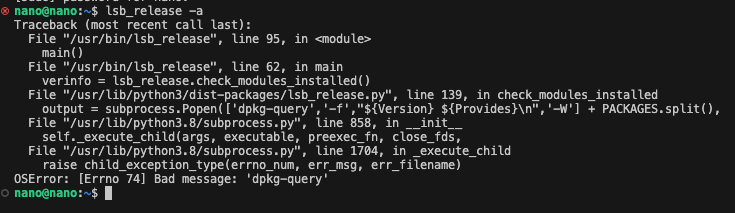
jtop (it used to be work but now it will keep showing following thing:)
lsb_release -a
sudo apt --fix-broken install: it works now after delect broken package and reinstall all of them
sudo apt reinstall lsb-release
lsb_release -a
My os detials:
So currently, the problem is I cannot run lsb_relase -a and jtop, even I reinstall lsb-release and fix-broken install.
Hi,
Have you tried to restart the jtop.service?
$ sudo systemctl restart jtop.service
Thanks.
YuliaW
June 29, 2023, 3:40pm
7
Yes, I’ve try that and even reboot the board.
I solved the jtop issue by open the /usr/bin/lsb_release and edit the firs line to be " #! /usr/bin/python3.8.16 -Es " which used to be python3, and python3.8.16 is the current virtual environment I’m using. But actually I do not have this python3.8.16 folder… …
However, lsb_release -a keeps showing this, even I reinstall lsb-release and dpkg and --fix-broken
Is that because pyhon3 was broken?
Hi,
The command work without issue in our environment.
$ lsb_release -a
No LSB modules are available.
Distributor ID:	Ubuntu
Description:	Ubuntu 20.04.5 LTS
Release:	20.04
Codename:	focal
Thanks.
Thanks for your reply.
It seems like the error still persist
YuliaW
July 3, 2023, 8:18pm
10
I think may have the issue with dpkg, so I cannot install any software pacakge. I may have to flash the system… …
Hi,
Is reflash an option for you?
It seems your environment has some issues.
Thanks.
YuliaW
July 12, 2023, 5:27pm
13
Yes, I have tried reflash the nano to get a clean environment. Thank you for help!
system
July 26, 2023, 5:27pm
14
This topic was automatically closed 14 days after the last reply. New replies are no longer allowed.