We are facing a frustrating USB3 Port deadlock issue on our custom carrier board (Jetson Orin Nano). The issue specifically happens with USB 3.2 Gen 2 (10Gbps) devices.
The Symptom: When we perform a “surprise removal” (physically unplugging) of a Gen 2 SSD:
No “USB disconnect” message appears in dmesg.
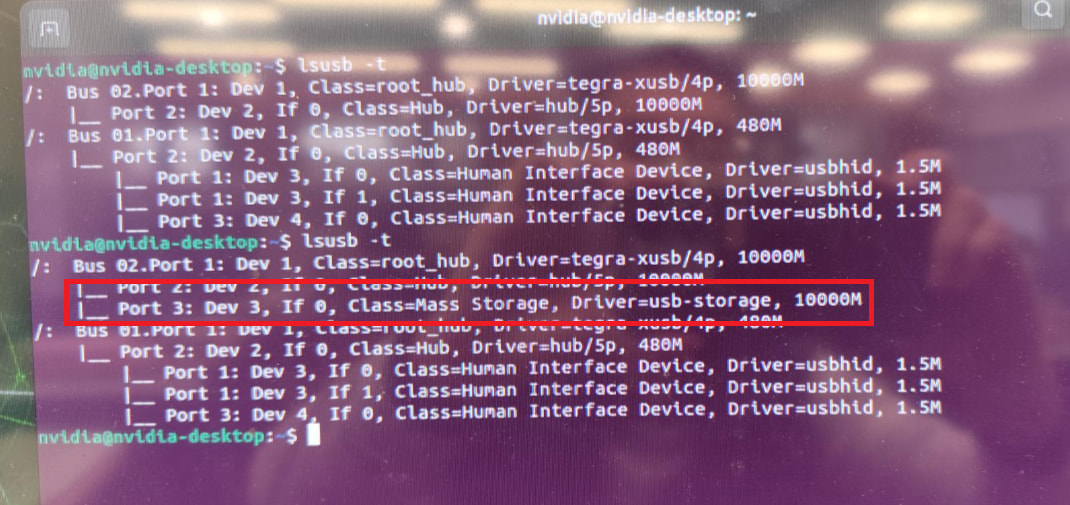
lsusb -t still shows the device as if it’s still connected.
The port becomes “dead”—plugging the device back in (or any other device) does nothing.
Our Workaround: We found that the hardware is actually fine because we can “revive” the port without a reboot by:
Manually toggling the authorized attribute: echo 0 > .../authorized then echo 1.
Or by unbinding and re-binding the 3610000.usb controller. After these steps, the port starts working again immediately.
What we’ve checked:
CC Logic: We are using TUSB322 for DRP. The interrupts are firing correctly when we unplug.
Comparison with EVM: On the NVIDIA EVM (which uses FUSB301), the disconnect is handled instantly and the port never locks up.
Driver: Our software team is using the standard NVIDIA driver/DTS structure. They believe the code is identical to what’s provided by NV.
10G SI (Signal Integrity): Verified PASS with margin.
Gen 2 vs. Gen 1: Issue occurs ONLY at 10G. Gen 1 (5Gbps) works normaly.
Via Adapter (PASS): Type-C Port → C-to-A Cable/Adapter → Gen2 SSD. If we connect the adapter first and then the Gen2 SSD, the port works perfectly and never locks up upon unplugging the SSD or the adapter.
The Problem: It seems the tegra-xusb driver is losing track of the link state only on this custom board. Since the hardware recovers after a manual reset, we suspect there’s a missing “handshake” or notification between the Extcon (TUSB322) and the xHCI controller during a Gen 2 unplug event.
Questions:
Why does the controller get stuck in a state where it stops performing “Receiver Detection” after a Gen 2 unplug?
Is there a specific link reset or Warm Reset logic in the tegra-xusb driver that depends on Extcon notifications?
Are there any known issues where the xHCI state machine (LTSSM) hangs if the CC logic doesn’t explicitly tell the controller to “Clear the Port” during a high-speed disconnect?
Any guidance on where to look in the driver code or DTS to ensure the xHCI controller correctly resets the link would be greatly appreciated!
*** Please note that this reply is generated by LLM automatically ***
The issue you’re experiencing with the USB3 port deadlock on your custom carrier board with the Jetson Orin Nano module seems to be related to the handling of Gen 2 SSD unplug events. The fact that the port becomes unresponsive after a surprise removal of a Gen 2 SSD, but not with Gen 1 SSDs, suggests that there might be a specific issue with the link state management during high-speed disconnect events.
Based on the information provided, here are some potential reasons and areas to investigate:
Missing handshake or notification between the UPHY and the xHCI controller: It’s possible that the UPHY (Universal Physical Layer) is not sending the correct notifications to the xHCI controller during a Gen 2 unplug event, causing the controller to lose track of the link state. You can investigate the UPHY driver code and the xHCI controller driver code to see if there are any specific notifications or handshakes that are missing.
Link reset or logic in the driver: The xHCI controller might require a specific link reset or logic to be executed during a high-speed disconnect event. You can check the xHCI controller driver code to see if there are any specific reset or logic functions that are not being executed correctly.
Extcon notifications: The Extcon (External Connector) framework is used to manage external connectors, such as USB ports. It’s possible that the Extcon notifications are not being sent correctly during a Gen 2 unplug event, causing the xHCI controller to lose track of the link state. You can investigate the Extcon driver code to see if there are any issues with the notifications.
CC logic: The CC (Configuration Channel) logic is responsible for managing the USB port configuration. It’s possible that the CC logic is not correctly telling the xHCI controller to clear the port during a high-speed disconnect event. You can investigate the CC logic driver code to see if there are any issues.
xHCI state machine (LTSSM): The xHCI state machine (LTSSM) is responsible for managing the USB link state. It’s possible that the LTSSM is hanging due to incorrect notifications or handshakes during a Gen 2 unplug event. You can investigate the xHCI state machine driver code to see if there are any issues.
To troubleshoot the issue, you can try the following:
Check the UPHY driver code: Investigate the UPHY driver code to see if there are any specific notifications or handshakes that are missing during a Gen 2 unplug event.
Check the xHCI controller driver code: Investigate the xHCI controller driver code to see if there are any specific reset or logic functions that are not being executed correctly during a high-speed disconnect event.
Check the Extcon driver code: Investigate the Extcon driver code to see if there are any issues with the notifications during a Gen 2 unplug event.
Check the CC logic driver code: Investigate the CC logic driver code to see if there are any issues with the CC logic not correctly telling the xHCI controller to clear the port during a high-speed disconnect event.
Check the xHCI state machine driver code: Investigate the xHCI state machine driver code to see if there are any issues with the LTSSM hanging due to incorrect notifications or handshakes during a Gen 2 unplug event.
In terms of specific areas to look in the driver code or DTS, you can start by investigating the following:
UPHY driver code: Look for any specific notifications or handshakes that are missing during a Gen 2 unplug event.
xHCI controller driver code: Look for any specific reset or logic functions that are not being executed correctly during a high-speed disconnect event.
Extcon driver code: Look for any issues with the notifications during a Gen 2 unplug event.
CC logic driver code: Look for any issues with the CC logic not correctly telling the xHCI controller to clear the port during a high-speed disconnect event.
xHCI state machine driver code: Look for any issues with the LTSSM hanging due to incorrect notifications or handshakes during a Gen 2 unplug event.
In terms of DTS, you can check the following:
USB port configuration: Verify that the USB port configuration is correct and that the xHCI controller is properly configured.
UPHY configuration: Verify that the UPHY is properly configured and that the notifications are being sent correctly.
Extcon configuration: Verify that the Extcon is properly configured and that the notifications are being sent correctly.
By investigating these areas and checking the driver code and DTS, you should be able to identify the root cause of the issue and implement a fix to ensure that the xHCI controller correctly resets the link during a Gen 2 unplug event.
*** Please give the thumbs up if you get answers you like. Or provide feedback to help us improve the answer. ***
Thanks for the suggestions. Given that our 10G SI measurement is verified PASS and the adapter test works (pre-establishing Host role), we suspect the port is falling into a locked state during a direct Gen 2 unplug.
Since our internal software resources are currently limited, could you please provide:
The Register Address: What is the specific address for the xHCI Port Status and Control Register to check the current link state? We want to see if the port is stuck in a “Disabled” or “Inactive” status after unplugging.
The Reset Logic: Where in the tegra-xusb driver is the link reset (Warm Reset) triggered when a Detach event is received from the CC logic?
Having these specific pointers will allow us to verify the hardware state immediately with a simple register dump.
Please find the attached relevant picture for your review.
The components used for CC Logic differ from the NV EVM, but the behavior is identical.
Cap TC5 on the VBUS path has been removed. When the USB is disconnected, the measured discharge time from 5V to 0V is approximately 6ms.
Deadlock issue is specific to USB3 Gen2 (Gen1 functions correctly). The F/R varies between 10% and 80%, depending on the connected device’s brand and model.
Hi,
The issue looks to be in CC controller. We have FUSB301TMX on developer kit. Please check if your controller works identically. If behavior is different, you may need to modify device tree accordingly. Also removing cap TC5 may also have impact, if our developer kit has the capacitor.
We have further verified the CC Logic and VBUS timing to compare our carrier board with the NVIDIA EVM. Here are the results:
CC Logic & Protocol: Using a CC Analyzer, we confirmed that our board’s CC signaling (Attach/Detach sequence) is identical to the EVM. Both show the same Charge/Discharge behavior during the unplug/replug cycle.
VBUS Timing: Our measured VBUS discharge time is 6ms, which is well within the 650ms requirement ($tSafe0V$ max) per USB Type-C Spec Table 4-29 (page 237).
Observation: Since our hardware behavior and timings match the EVM and meet all compliance standards, the deadlock at 10Gbps appears to be independent of the physical CC/VBUS implementation.
Could you please help check if there are any specific controller or driver state machine (LTSSM) configurations we should look into for Gen 2 recovery, given that the physical layer signals are correct?
We would like to further investigate whether the USB issue we are observing could be related to an unexpected warm reset event occurring on the USB controller or PHY?
To help us confirm this, we would like to ask:
Is there any specific log pattern (e.g. in dmesg, xhci, tegra-xusb, or Type-C stack) that indicates a USB warm reset has occurred?
Are there any debug points in the Jetson USB software stack where a warm reset would be triggered or handled?
According to the screenshot, an abnormal behavior is observed when using a Type-C USB 3.2 Gen2 storage device. After unplugging the device, it is still shown in the output of the lsusb -t command.
Under normal conditions, the USB device should be removed from the system and no longer appear in the device list after unplugging. This behavior differs from the expected result.
Notably, when performing the same unplug operation with a USB 3.2 Gen1 storage device, this issue does not occur, and the device is properly removed as expected.
Based on the information I have reviewed, the behavior of the CC pins should not differ between USB 3.2 Gen1 and Gen2 devices. Therefore, the question arises as to which specific mechanism or signal is responsible for notifying the system that the USB device has been unplugged and confirming its removal.
Given this understanding, it is unclear why the device removal is not correctly detected in the Gen2 case during the plug/unplug operation, while the Gen1 device behaves as expected.