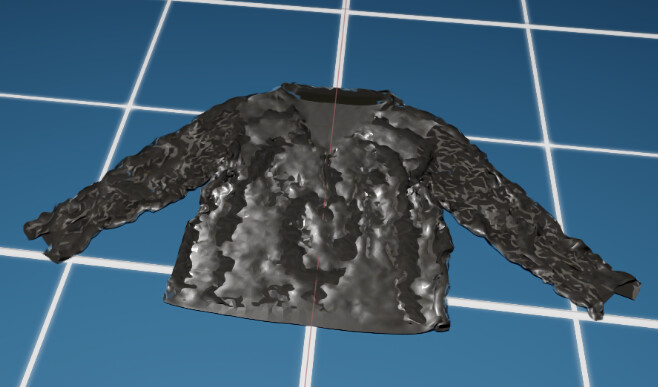
I’m currently conducting research on cloth folding simulation using NVIDIA Isaac Sim, but I’ve encountered an issue where the visual results vary depending on the simulation settings. I’d like to ask for advice from anyone who might have experienced similar problems.
Here are the Cloth Simulation Parameters I’m using:
However, with these settings, self-collision does not seem to be working properly, and the cloth appears visually distorted or unstable during simulation.
I’m using the DexGarmentLab dataset for this experiment.
If anyone has insights or suggestions on how to fix this issue — particularly regarding parameter tuning or Isaac Sim’s cloth collision handling — I would really appreciate your help.
@lyx010318 i don’t want to hijack the thread away from the OP, so if you can make another thread about creating subdivided mesh programmatically, i can point you to the extension that you can look into.
The visual instability and self-collision issues in your cloth simulation are likely related to a combination of overly high stiffness parameters, insufficient solver settings, or improper collision settings in Isaac Sim, especially when using complex garments like those in the DexGarmentLab dataset. Here’s how to address the most likely causes:
1. Parameter Tuning: High Stiffness Values
Your stretch and bend stiffness values (10,000 N/m and 8,000 N/m) are very high for typical cloth simulation (values in the hundreds or thousands are more common). Excessive stiffness can cause numerical instability unless the simulation is configured with a very small timestep and a high solver iteration count.
Solution: Gradually reduce stretch and bend stiffness (try 1,000~3,000 N/m to start) and observe if stability improves.
2. Simulation Settings
Reduce the physics simulation timestep if possible (e.g., set to 1/120 sec instead of 1/60 sec).
3. Self-Collision Settings
In the cloth asset or simulation component, ensure that self-collision is enabled (physxCloth.selfCollisionsEnabled = True).
Adjust self-collision distance and self-collision stiffness parameters; the defaults might be too low for stiff cloth.
Make sure no exclusion tags or layers prevent self-contact.
4. Mesh Quality for Simulation
Confirm the simulation mesh (not the visual mesh) is not too coarse; a very coarse mesh can miss self-collisions or look distorted if parameterized with high stiffness.
For fine garments, use sub-meshing or a remeshed version of your cloth, balanced for real-time performance.
5. Mass and Damping
The cloth mass at 0.2 kg is reasonable, but if you reduce stiffness dramatically, adjust mass and damping cautiously for realism.
Consider raising the damping value (try 0.5 or above) if the cloth appears jittery or overly oscillatory.
Example in Isaac Sim GUI or Scripting
# Enable self-collision:
cloth_prim.GetAttribute("physxCloth:selfCollisionsEnabled").Set(True)
# Example of adjusting stiffness
cloth_prim.GetAttribute("physxCloth:stretchStiffness").Set(1500)
cloth_prim.GetAttribute("physxCloth:bendStiffness").Set(1200)
cloth_prim.GetAttribute("physxCloth:shearStiffness").Set(10)
cloth_prim.GetAttribute("physxCloth:springDamping").Set(0.5)
6. Debugging Tips
Start with low stiffness and ramp up.
Enable cloth visualization overlays in the Sim UI to inspect self-collision responses.
Thank you, that information was really helpful. Setting the timestep to 200 and adjusting the stiffness solved the issue. However, I’ve run into another problem: I’m using the LeRobot SO-ARM-100 arm, and the arm is penetrating through the clothing. Even with convex decomposition, it either slips or passes through the garment even when the gripper is fully closed. Do you know any potential solutions for this?