Device Tree Modification on Host

This post is related to the thread here:

Overlay and ExtLinux.Conf post

but focuses on rebuilding the device tree on the host and reflashing rather than using modifying overlays on the target and using extlinux.conf to apply them.

I have tried to rebuild in two ways, first by using the following command inside ~/nvidia/nvidia_sdk/JetPack_6.2_Linux_JETSON_AGX_ORIN_TARGETS/Linux_for_Tegra/source: ./source_sync.sh -k -t jetson_36.4.3. In this case the JetPack_6.2_Linux_Jetson_AGX_ORIN_TARGETS folder is supplied by SDK Manager. Secondly by downloading and extracting the sample root file system, driver package, and driver source packages manually.
Regardless of whether or not I used the folder provided by SDK Manager or Downloaded Manually the results were similar. The rest of this document focuses on the downloaded manually case because I think the fact that the source_sync based method relies on GIT created some additional confusion since some of the folders ended up with the --dirty suffix once I modified them locally. I placed the files in the downloaded manually case at ~/nvidia/jetson_build

I attempt to make the modifications @KevinFFF suggested we make in the previous post at this link: KevinFFF Link for Porting MCP2515

I modified Lines 130-170 of tegra234-p3768-0000+p3767-xxxx-nv-common.dtsi at ~/nvidia/jetson_build/Linux_for_Tegra/source/hardware/nvidia/t23x/nv-public/nv-platform/

	can_clock: can_clock {
                    compatible = "fixed-clock";
                    #clock-cells = <0>;
                    clock-frequency = <10000000>;
                    clock-accuracy = <100>;
            };

	/* SPI1, 40pin header, Pin 19(MOSI), Pin 21(MISO), Pin 23(CLK), Pin 24(CS) */
	spi@3210000{
		status = "okay";
		spi@0 {
			compatible = "microchip,mcp2515";
			reg = <0x0>;
			spi-max-frequency = <2000000>;
			interrupt-parent = <&gpio>;
			interrupts = <TEGRA234_MAIN_GPIO(B, 0) IRQ_TYPE_LEVEL_LOW>;
			clocks = <&can_clock>;
			nvidia,enable-hw-based-cs;
			controller-data {
				nvidia,enable-hw-based-cs;
				nvidia,rx-clk-tap-delay = <0x10>;
				nvidia,tx-clk-tap-delay = <0x0>;
			};
		};
		spi@1 {
			compatible = "microchip,mcp2515";
			reg = <0x1>;
			spi-max-frequency = <2000000>;
			interrupt-parent = <&gpio>;
			interrupts = <TEGRA234_MAIN_GPIO(E, 3) IRQ_TYPE_LEVEL_LOW>;
			clocks = <&can_clock>;
			nvidia,enable-hw-based-cs;
			controller-data {
				nvidia,enable-hw-based-cs;
				nvidia,rx-clk-tap-delay = <0x10>;
				nvidia,tx-clk-tap-delay = <0x0>;
			};
		};

	};

`

Then I modified defconfig here (I also tried this with tegra_prod_defconfig at the same location):
~/nvidia/jetson_build/ Linux_for_Tegra/source/kernel/kernel-jammy-src/arch/arm64/configs/

By placing these lines at the end of the file :

CONFIG_CAN_MCP251X= m

CONFIG_CAN_MCP251XFD= m

At this point I issued the following commands :

`export CROSS_COMPILE=aarch64-linux-gnu-
export ARCH=arm64
make O=out defconfig
make O=out -j$(nproc) Image dtbs modules

sudo mkdir -p ~/nvidia/jetson_build/Linux_for_Tegra/rootfs/boot/dtb/

sudo cp out/arch/arm64/boot/Image ~/nvidia/jetson_build/Linux_for_Tegra/rootfs/boot/

sudo cp out/arch/arm64/boot/dts/nvidia/*.dtb ~/nvidia/jetson_build/Linux_for_Tegra/rootfs/boot/dtb/

sudo make O=out INSTALL_MOD_PATH=~/nvidia/jetson_build/Linux_for_Tegra/rootfs/ modules_install`

Before the modules_install step the only folder here : ~/nvidia/jetson_build/Linux_for_Tegra/rootfs/lib/modules
is 5.15.136-tegra, a new folder 5.15.136 is created when I use make O=out defconfig , and a new folder is created called 5.15.136-prod if I use make O=out tegra_prod_defconfig. But ultimately my objective is to flash my jetson using the following commands and regardless of whether or not I use tegra_prod_defconfig or defconfig the module files I build do not end up on the target. I am assuming this is because they appear in 5.15.136-prod or 5.15.136 and not 5.15.136-tegra.

cd ~/nvidia/jetson_build/ Linux_for_Tegra/

sudo ./flash.sh jetson-agx-orin-devkit nvme0n1p1

So my questions are as follows:
1. Why is the defconfig file that would place module files in the 5.15.136-tegra folder not included in the sources ?
**2. Is there a way to force the flash.sh script to flash one of my modules builds as opposed to the modules build that is included by default in the sample rootfs? ****
**3. Is there a better way to execute this command that would force the modules into the 5.15.136-tegra folder? **
sudo make O=out INSTALL_MOD_PATH=~/nvidia/jetson_build/Linux_for_Tegra/rootfs/ modules_install`
4. I’m hesitant to just rename the folders produced by my build process to 5.15.136-tegra because it seems like I’m missing something with the defconfig file I’m using, but would that be a reasonable next step to try?

Thank you

I have since learned that if I add the following line in defconfig:

CONFIG_LOCALVERSION="-tegra"

Then my modules will end up in the 5.15.136-tegra folder as desired.
After modules_install you need to issue the following command as well:

`sudo depmod -b ~/nvidia/jetson_build/Linux_for_Tegra/rootfs 5.15.136-tegra’

However, when I do all this after I flash sync my kernel version is not .136 despite the fact that flash.sh says it completed successfully.

cd ~/nvidia/jetson_build/ Linux_for_Tegra/

sudo ./flash.sh jetson-agx-orin-devkit nvme0n1p1

So my remaining questions are:

  1. Am I missing something in my flash.sh command? I am not convinced that a new rootfs has been flashed when I enter that command as shown. My user name and password are still accepted from before the flash event, even though I never configured them in this rootfs and when I sudo modprobe mcp251x I get the following error:

‘modprobe FATAL: Module mcp251x not found in directory /lib/modules/5.15.148-tegra’

**So obviously the kernel is newer than the one I tried to flash as well. **
Is there some modifier to the flash.sh command I should be using if I need to downgrade?

Hi m.gallagher0109,

Are you using the devkit or custom board for AGX Orin?

It is not the expected command to me that you should use initrd flash script for external NVMe SSD.

Please refer to orinNano Kernel added other driver, and need to modify the device tree, how do I need to operate - #20 by KevinFFF for the correct steps to update kernel config.

Actually, for the change in kernel or dtb, you can just replace the /boot/Image and /boot/dtb/kernel_xxx.dtb on your board to apply the change.
For the flash script, you can specify the -k option for specific parition.

I would suggest just referring to the steps we shared in the document.

Yes, 5.15.136-tegra should be the expected string.

5.15.136-tegra is from L4T r36.3.0 (Jetpack 6.0)
5.15.148-tegra is for L4T r36.4.0 (Jetpack 6.1) and r36.4.3(Jetpack 6.2)
Please check if you have mis-match kernel version no matter in flash or kernel source.
You can also run the following command to check.

$ uname -r
$ cat /etc/nv_tegra_release

Thank you for the advice @KevinFFF
This has been very helpful.
I have been able to flash the full root file system using initrd as you suggested. this is the command I used:

sudo ./tools/kernel_flash/l4t_initrd_flash.sh--external-device nvme0n1p1 -c ./tools/kernel_flash/flash_l4t_external.xml -p “-c bootloader/generic/cfg/flash_t234_qspi.xml” –showlogs --network usb0 jetson-agx-orin-devkit nvme0n1p1

This did move the mcp2515 kernel module drivers over to the target finally and it definitely cleared out the SSD because I had to set up a new user name and password on boot. So great news!

I saw that I was modifying the wrong DTSI folder at Linux_for_Tegra/source/hardware/nvidia/t23x/nv-public/nv-platform/

I was able to figure out which dtb file my Jetson is using via the following command : ls – l boot/dtbwhich yields the following file as one of the responses:

tegra234-p3737-0000+p3701-0000.dts

I have begun modifying this file and finally I am getting some relevant warnings that we can debug when I issue the command : make O=out -j$(nproc) Image dtbs modules

I added this content from lines 767 to 806 of tegra234-p3737-0000+p3701-0000.dts

			can_clock: can_clock {
			    compatible = "fixed-clock";
			    #clock-cells = <0>;
			    clock-frequency = <10000000>;
			    clock-accuracy = <100>;
			};

			spi@3210000 {
			    status = "okay";
			    #address-cells = <1>;
			    #size-cells = <0>;

			    spi@0 {
				compatible = "microchip,mcp2515";
				reg = <0>;
				spi-max-frequency = <2000000>;
				interrupt-parent = <&gpio>;
				interrupts = <TEGRA234_MAIN_GPIO(B, 0) IRQ_TYPE_LEVEL_LOW>;
				clocks = <&can_clock>;
				controller-data {
				    nvidia,enable-hw-based-cs;
				    nvidia,rx-clk-tap-delay = <0x10>;
				    nvidia,tx-clk-tap-delay = <0x0>;
				};
			    };

			    spi@1 {
				compatible = "microchip,mcp2515";
				reg = <1>;
				spi-max-frequency = <2000000>;
				interrupt-parent = <&gpio>;
				interrupts = <TEGRA234_MAIN_GPIO(E, 3) IRQ_TYPE_LEVEL_LOW>;
				clocks = <&can_clock>;
				controller-data {
				    nvidia,enable-hw-based-cs;
				    nvidia,rx-clk-tap-delay = <0x10>;
				    nvidia,tx-clk-tap-delay = <0x0>;
				};
			    };
			};

This is the error message I am getting ;

make O=out -j$(nproc) Image dtbs modules
make[1]: Entering directory '/home/michael/nvidia/jetson_build/Linux_for_Tegra/source/kernel/kernel-jammy-src/out'
  GEN     Makefile
  DTC     arch/arm64/boot/dts/nvidia/tegra234-p3737-0000+p3701-0000.dtb
../arch/arm64/boot/dts/nvidia/tegra234-p3737-0000+p3701-0000.dts:779.15-791.11: Warning (spi_bus_bridge): /bus@0/aconnect@2900000/ahub@2900800/spi@3210000/spi@0: incorrect #address-cells for SPI bus
../arch/arm64/boot/dts/nvidia/tegra234-p3737-0000+p3701-0000.dts:779.15-791.11: Warning (spi_bus_bridge): /bus@0/aconnect@2900000/ahub@2900800/spi@3210000/spi@0: incorrect #size-cells for SPI bus
../arch/arm64/boot/dts/nvidia/tegra234-p3737-0000+p3701-0000.dts:793.15-805.11: Warning (spi_bus_bridge): /bus@0/aconnect@2900000/ahub@2900800/spi@3210000/spi@1: incorrect #address-cells for SPI bus
../arch/arm64/boot/dts/nvidia/tegra234-p3737-0000+p3701-0000.dts:793.15-805.11: Warning (spi_bus_bridge): /bus@0/aconnect@2900000/ahub@2900800/spi@3210000/spi@1: incorrect #size-cells for SPI bus
arch/arm64/boot/dts/nvidia/tegra234-p3737-0000+p3701-0000.dtb: Warning (spi_bus_reg): Failed prerequisite 'spi_bus_bridge'
  CALL    ../scripts/atomic/check-atomics.sh
  CALL    ../scripts/checksyscalls.sh
  CHK     include/generated/compile.h
make[1]: Leaving directory '/home/michael/nvidia/jetson_build/Linux_for_Tegra/source/kernel/kernel-jammy-src/out'

Do you have any thoughts on what I may be doing wrong in my DTSI modification?

Please configure them in tegra234-p3768-0000+p3767-xxxx-nv-common.dtsi instead.

And try to load mcp251x driver, check the dmesg.

$ sudo modprobe mcp251x 

@KevinFFF thank you for the quick feedback!

I have found that if I the following lines at line 142 of tegra234-p3737-0000+p3701-xxxx-nv-common.dtsi :

can_clock: can_clock {
				    compatible = "fixed-clock";
				    #clock-cells = <0>;
				    clock-frequency = <10000000>;
				    clock-accuracy = <100>;
				};

				spi@3210000 {
				    status = "okay";
				    #address-cells = <1>;
				    #size-cells = <0>;

				    spi@0 {
					compatible = "microchip,mcp2515";
					reg = <0>;
					spi-max-frequency = <2000000>;
					interrupt-parent = <&gpio>;
					interrupts = <TEGRA234_MAIN_GPIO(B, 0) IRQ_TYPE_LEVEL_LOW>;
					clocks = <&can_clock>;
					controller-data {
					    nvidia,enable-hw-based-cs;
					    nvidia,rx-clk-tap-delay = <0x10>;
					    nvidia,tx-clk-tap-delay = <0x0>;
					};
				    };

				    spi@1 {
					compatible = "microchip,mcp2515";
					reg = <1>;
					spi-max-frequency = <2000000>;
					interrupt-parent = <&gpio>;
					interrupts = <TEGRA234_MAIN_GPIO(E, 3) IRQ_TYPE_LEVEL_LOW>;
					clocks = <&can_clock>;
					controller-data {
					    nvidia,enable-hw-based-cs;
					    nvidia,rx-clk-tap-delay = <0x10>;
					    nvidia,tx-clk-tap-delay = <0x0>;
					};
				    };
				};

And then I return to Linux_for_Tegra/source/kernel/kernel-jammy-src/ and issue the following commands:

export CROSS_COMPILE=aarch64-linux-gnu-
export ARCH=arm64
make O=out  defconfig
make O=out -j$(nproc) Image dtbs modules

Then I get no indication in the output that any DTB files have been generated:

make O=out -j$(nproc) Image dtbs modules
make[1]: Entering directory '/home/michael/nvidia/jetson_build/Linux_for_Tegra/source/kernel/kernel-jammy-src/out'
  GEN     Makefile
  CALL    ../scripts/atomic/check-atomics.sh
  CALL    ../scripts/checksyscalls.sh
  CHK     include/generated/compile.h
make[1]: Leaving directory '/home/michael/nvidia/jetson_build/Linux_for_Tegra/source/kernel/kernel-jammy-src/out'

Conversely if I add the same code block beginning at line 767 to tegra234-p3737-0000+p3701-0000.dts at ~/nvidia/jetson_build/Linux_for_Tegra/source/kernel/kernel-jammy-src/arch/arm64/boot/dts/nvidia/ I receive an indication that something has been built:

make O=out -j$(nproc) Image dtbs modules
make[1]: Entering directory '/home/michael/nvidia/jetson_build/Linux_for_Tegra/source/kernel/kernel-jammy-src/out'
  GEN     Makefile
  DTC     arch/arm64/boot/dts/nvidia/tegra234-p3737-0000+p3701-0000.dtb
../arch/arm64/boot/dts/nvidia/tegra234-p3737-0000+p3701-0000.dts:779.15-791.11: Warning (spi_bus_bridge): /bus@0/aconnect@2900000/ahub@2900800/spi@3210000/spi@0: incorrect #address-cells for SPI bus
../arch/arm64/boot/dts/nvidia/tegra234-p3737-0000+p3701-0000.dts:779.15-791.11: Warning (spi_bus_bridge): /bus@0/aconnect@2900000/ahub@2900800/spi@3210000/spi@0: incorrect #size-cells for SPI bus
../arch/arm64/boot/dts/nvidia/tegra234-p3737-0000+p3701-0000.dts:793.15-805.11: Warning (spi_bus_bridge): /bus@0/aconnect@2900000/ahub@2900800/spi@3210000/spi@1: incorrect #address-cells for SPI bus
../arch/arm64/boot/dts/nvidia/tegra234-p3737-0000+p3701-0000.dts:793.15-805.11: Warning (spi_bus_bridge): /bus@0/aconnect@2900000/ahub@2900800/spi@3210000/spi@1: incorrect #size-cells for SPI bus
arch/arm64/boot/dts/nvidia/tegra234-p3737-0000+p3701-0000.dtb: Warning (spi_bus_reg): Failed prerequisite 'spi_bus_bridge'
  CALL    ../scripts/atomic/check-atomics.sh
  CALL    ../scripts/checksyscalls.sh
  CHK     include/generated/compile.h
make[1]: Leaving directory '/home/michael/nvidia/jetson_build/Linux_for_Tegra/source/kernel/kernel-jammy-src/out'

I noticed at the top of tegra234-p3737-0000+p3701-xxxx-nv-common.dtsi there is this include: include “tegra234-p3737-0000.dtsi” where spi@3210000 is initialized. I replaced that initialization with the block of code above and in this case I also do not see build output

make O=out -j$(nproc) Image dtbs modules
make[1]: Entering directory '/home/michael/nvidia/jetson_build/Linux_for_Tegra/source/kernel/kernel-jammy-src/out'
  GEN     Makefile
  CALL    ../scripts/atomic/check-atomics.sh
  CALL    ../scripts/checksyscalls.sh
  CHK     include/generated/compile.h
make[1]: Leaving directory '/home/michael/nvidia/jetson_build/Linux_for_Tegra/source/kernel/kernel-jammy-src/out'

So in summary the only file that I modify that produces any DTC output during the make process is: tegra234-p3737-0000+p3701-0000.dts .

Regardless, I have tried modifying all three of these files individually ((tegra234-p3737-0000+p3701-0000.dts , tegra234-p3737-0000+p3701-xxxx-nv-common.dtsi, tegra234-p3737-0000.dtsi ) then reflashing the Jetson with changes in place in one of the files. No matter which of the 3 files here I modify the result on the Jetson is the same.

sudo modprobe mcp251x returns nothing. sudo dmesg | grep mcp returns nothing. lsmod | grep mcp returns:

mcp251x                28672  0
can_dev                40960  2 mcp251x,mttcan

sudo dmesg | grep spi returns:

[ 10.104036] spi-tegra114 3210000.spi: Adding to iommu group 1
[ 10.164140] spi-tegra114 3230000.spi: Adding to iommu group 1

I used the following command to generate a live device tree:

sudo dtc -I fs -O dts -o live.dts /proc/device-tree

In this file , spi@3210000 is not present.

Any idea what I should try next? Thanks in advance for the help.

When I was trying something similar this is what ultimately worked.

Here’s how to create a dtb individually

dtc -I dts -O dtb -o ./optee/tegra234-optee.dtb ./optee/tegra234-optee.dts


Here’s what you are already doing? #comments are docs for me.

# Create build directory
mkdir -p ~/kernel_build_output

# Apply the defconfig
make ARCH=arm64 O=~/kernel_build_output tegra_prod_defconfig

# Build the kernel
make -j$(nproc) ARCH=arm64 O=~/kernel_build_output

# Build the Kernel Image
make -j$(nproc) ARCH=arm64 O=~/kernel_build_output Image

# Build modules
make -j$(nproc) ARCH=arm64 O=~/kernel_build_output modules

# Build the Device Tree Blobs (DTBs):
make -j$(nproc) ARCH=arm64 O=~/kernel_build_output dtbs

# Install modules
sudo make ARCH=arm64 O=~/kernel_build_output modules_install

# Copy the new kernel Image
sudo cp ~/kernel_build_output/arch/arm64/boot/Image /boot/Image

# Install the DTBs
sudo cp ~/kernel_build_output/arch/arm64/boot/dts/*.dtb /boot/

# Update initramfs
sudo update-initramfs -c -k 5.15.148-tegra

# Reboot
sudo reboot

# Check kernel version
uname -r

# Check loaded device tree
sudo dtc -I fs /proc/device-tree > loaded_device_tree.dts

You can check if the time of the dtb you used has been updated after you run the make command.

It seems mcp251x driver has been probed and loaded.
Please share the full dmesg for further check.

I would also like to check this live.dts in your case.

You can also refer to the steps shared from whitesscott to check if they could help for your case.

I’m pointing out one difference in case it may be relevant; m or y ?

Your defconfig config listed above
CONFIG_CAN_MCP251X=m
CONFIG_CAN_MCP251XFD=m

defconfig from elinux webpage
CONFIG_CAN_MCP251X=y
CONFIG_CAN_MCP251XFD=y

Can you explain why you suggest the file tegra234-p3768-0000+p3767-xxxx-nv-common.dtsi as opposed to tegra234-p3737-0000+p3701-xxxx-nv-common.dtsi for my 64 GB AGX Orin Development Kit? I assumed that tegra234-p3737-0000+p3701-xxxx-nv-common.dtsi was the right file based on the compatibility table here, although earlier in the thread I had been mistakenly using tegra234-p3768-0000+p3767-xxxx-nv-common.dtsi :

Jetson Compatability Table

@whitesscott I believe the process you list here is nearly the same as my process, except in my case to avoid any confusion about what is running on the Jetson, I am trying to build and flash from my host PC. my output folder is just out and I do not issue :

sudo update-initramfs -c -k 5.15.148-tegra

Because I am not recompiling on the Jetson.

So I first construct the release from tarballs:

Sample Root File System (Tegra_Linux_Sample-Root-Filesystem_R36.3.0_aarch64.tbz2)
Driver Package (Jetson_Linux_R36.3.0_aarch64.tbz2)
Drive Package (BSP) Sources (public_sources.tbz2)

mkdir -p ~/nvidia/jetson_build
cd ~/nvidia/jetson_build

Move all those files to jetson_build , then inside jetson_build 

tar -xpf Jetson_Linux_R36.3.0_aarch64.tbz2

cd Linux_for_Tegra/rootfs/

sudo tar -xpf ../../ Tegra_Linux_Sample-Root-Filesystem_R36.3.0_aarch64.tbz2

cd ..
sudo ./apply_binaries.sh

cd ~/nvidia/jetson_build/
tar -xpf ./public_sources.tbz2

Then extract all the tarballs in the source folder 

for f in *; do
  case "$f" in
    *.tbz2|*.tar.bz2) tar -xjf "$f" ;;
    *.tar.gz|*.tgz)    tar -xzf "$f" ;;
    *.tar.xz)          tar -xJf "$f" ;;
    *.tar)             tar -xf "$f" ;;
  esac
done

Them modify defconfig and dtsi files. Once complete

cd /home/michael/nvidia/jetson_build/Linux_for_Tegra/source/kernel/kernel-jammy-src/
export CROSS_COMPILE=aarch64-linux-gnu-
export ARCH=arm64
make O=out  defconfig
make O=out -j$(nproc) Image dtbs modules

sudo cp out/arch/arm64/boot/Image /home/michael/nvidia/jetson_build/Linux_for_Tegra/rootfs/boot/
sudo cp out/arch/arm64/boot/dts/nvidia/*.dtb /home/michael/nvidia/jetson_build/Linux_for_Tegra/rootfs/boot/
sudo make O=out INSTALL_MOD_PATH=/home/michael/nvidia/jetson_build/Linux_for_Tegra/rootfs/ modules_install
sudo depmod -b /home/michael/nvidia/jetson_build/Linux_for_Tegra/rootfs 5.15.136-tegra
cd /home/michael/nvidia/jetson_build/Linux_for_Tegra/ 
cd Linux_for_Tegra

sudo ./tools/kernel_flash/l4t_initrd_flash.sh --external-device nvme0n1p1 -c ./tools/kernel_flash/flash_l4t_external.xml -p “-c bootloader/generic/cfg/flash_t234_qspi.xml” --showlogs --network usb0 jetson-agx-orin-devkit nvme0n1p1


I didn’t get the compilation “Warning (spi_bus_bridge)”. I also haven’t applied this to my kernel as don’t have the hardware and mine is
uname -r = 5.15.148

#env vars set

./kernel_src_build_env.sh 
export CROSS_COMPILE_AARCH64_PATH="/home/scott/kernel_build/l4t-gcc/aarch64--glibc--stable-2022.08-1/bin/"
export CROSS_COMPILE="/home/scott/kernel_build/l4t-gcc/aarch64--glibc--stable-2022.08-1/bin/aarch64-buildroot-linux-gnu-"
export CROSS_COMPILE_AARCH64="/home/scott/kernel_build/l4t-gcc/aarch64--glibc--stable-2022.08-1/bin/aarch64-buildroot-linux-gnu-"
export UEFI_STMM_PATH="/home/scott/nvidia/nvidia_sdk/JetPack_6.2_Linux_JETSON_AGX_ORIN_TARGETS/Linux_for_Tegra/bootloader/tos_t234.img"

./rootfs/lib/modules/5.15.148-prod/kernel/drivers/net/can/spi/mcp251x.ko
./rootfs/lib/modules/5.15.148-prod/kernel/drivers/net/can/spi/mcp251xfd/mcp251xfd.ko

Jun 16 11:56 arch/arm64/boot/dts/nvidia/tegra234-sim-vdk.dtb
Jun 16 11:56 arch/arm64/boot/dts/nvidia/tegra234-p3737-0000+p3701-0000.dtb

Above two mcp251x.ko files and .dtb were created from adding block below at lines 130-170 to

source/hardware/nvidia/t23x/nv-public/nv-platform/tegra234-p3768-0000+p3767-xxxx-nv-common.dtsi

can_clock: can_clock {
                    compatible = "fixed-clock";
                    #clock-cells = <0>;
                    clock-frequency = <10000000>;
                    clock-accuracy = <100>;
            };

        /* SPI1, 40pin header, Pin 19(MOSI), Pin 21(MISO), Pin 23(CLK), Pin 24(CS) */
        spi@3210000{
                status = "okay";
                spi@0 {
                        compatible = "microchip,mcp2515";
                        reg = <0x0>;
                        spi-max-frequency = <2000000>;
                        interrupt-parent = <&gpio>;
                        interrupts = <TEGRA234_MAIN_GPIO(B, 0) IRQ_TYPE_LEVEL_LOW>;
                        clocks = <&can_clock>;
                        nvidia,enable-hw-based-cs;
                        controller-data {
                                nvidia,enable-hw-based-cs;
                                nvidia,rx-clk-tap-delay = <0x10>;
                                nvidia,tx-clk-tap-delay = <0x0>;
                        };
                };
                spi@1 {
                        compatible = "microchip,mcp2515";
                        reg = <0x1>;
                        spi-max-frequency = <2000000>;
                        interrupt-parent = <&gpio>;
                        interrupts = <TEGRA234_MAIN_GPIO(E, 3) IRQ_TYPE_LEVEL_LOW>;
                        clocks = <&can_clock>;
                        nvidia,enable-hw-based-cs;
                        controller-data {
                                nvidia,enable-hw-based-cs;
                                nvidia,rx-clk-tap-delay = <0x10>;
                                nvidia,tx-clk-tap-delay = <0x0>;
                        };
                };
        };

@KevinFFF please see attached 3 test cases.

Prior to running the first test, I started from scratch as described in my previous post here:

I first modified tegra234-p3768-0000+p3767-xxxx-nv-common.dtsi that resides here: Linux_for_Tegra/source/hardware/nvidia/t23x/nv-public/nv-platform/. I’ve attached the modified file to this thread but I renamed it to have a .txt extension so it could be uploaded.

All live DTS traces were collected using the following command:

sudo dtc -I fs -O dts -o live.dts /proc/device-tree

tegra234-p3768-0000+p3767-xxxx-nv-common.txt (8.2 KB)

dmesg_output_live_modified_tegra234-p3768-0000+p3767-xxxx-nv-common.txt (65.9 KB)

live_modified_tegra234-p3768-0000+p3767-xxxx-nv-common.txt (393.5 KB)

Lines 131-170 are modified. I then followed the steps defined in my previous post here:

Once flashing was complete I logged into the Jetson and collected a DMESG file and a live DTS tree.

I then repeated this process for the DTSI file named : tegra234-p3737-0000+p3701-xxxx-nv-common.dtsi that resides here: Linux_for_Tegra/source/hardware/nvidia/t23x/nv-public/nv-platform/. I have attached the modified DTSI file to this thread but I renamed it to have a .txt extension so it could be uploaded. In this file I changed lines 150-190 and repeated the process, ultimately collected a DMESG file and a live DTS tree.

tegra234-p3737-0000+p3701-xxxx-nv-common.txt (5.4 KB)

dmesg_output_modified_tegra234-p3737-0000+p3701-xxxx-nv-common.txt (66.7 KB)

live_modified_tegra234-p3768-0000+p3767-xxxx-nv-common.txt (393.5 KB)

I then repeated the process for the DTSI file named tegra234-p3737-0000.dtsi that also resides at : Linux_for_Tegra/source/hardware/nvidia/t23x/nv-public/nv-platform/. On this file I changed lines 6-45. I have attached the modified file to this thread but I renamed it to have a .txt extension so it could be uploaded.

tegra234-p3737-0000.txt (4.1 KB)

dmesg_output_live_modified_tegra234-p3737-0000.txt (66.2 KB)

live_modified_tegra234-p3768-0000+p3767-xxxx-nv-common.txt (393.5 KB)

In all cases I issued the following command before collecting the dmesg trace:

sudo modprobe mcp251x 

And there was no response from that command.

In each of the test cases documented here the resulting live DTS file is identical. So clearly none of the changes I made to the above listed DTSI files had any impact on my live device tree.

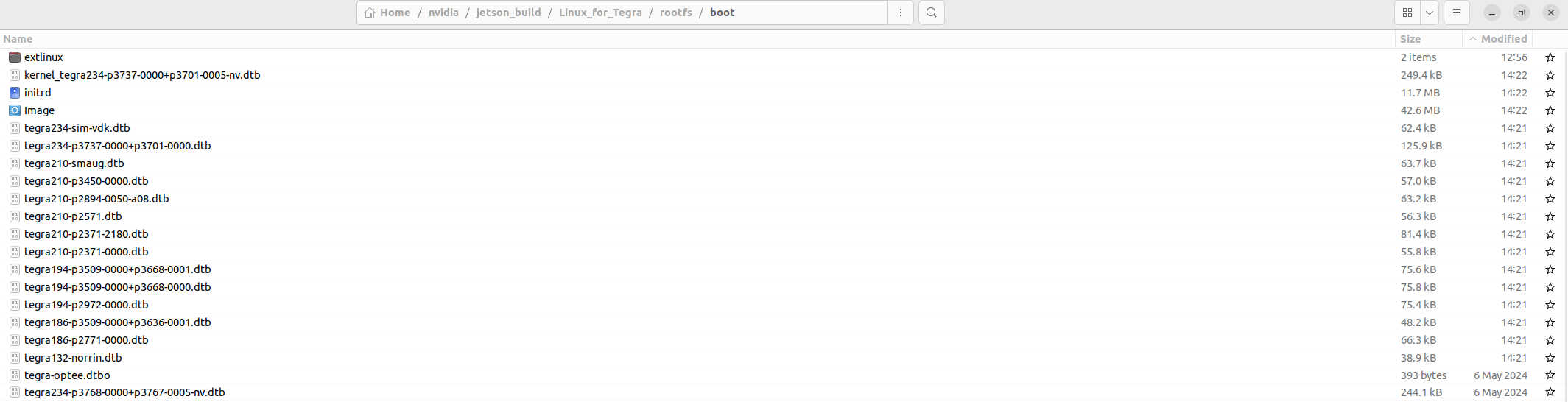
Here are the files that are modified by my build process and placed in the boot folder, you can see the data stamps are more recent on the ones that are modified:

So with that said, @KevinFFF:

Can you please confirm the DTSI or DTS file I should be modifying and the location that file resides in assuming that I will compile it from source on the host using the steps described in my previous post here?

These might be helpful.

jetson-can-mcp251x.dtsi

36.4.3 jetson-can-mcp251x.dtsi

nvidia/nvidia_sdk/JetPack_6.2_Linux_JETSON_AGX_ORIN_TARGETS/
Linux_for_Tegra/source/kernel/kernel-jammy-src/Documentation/devicetree/bindings/net/can/

microchip,mcp251xfd.yaml
microchip,mcp251x.txt

I’ll try this tomorrow in menuconfig to see if it makes any additional changes.

[*] Networking support --->
    <*> CAN bus subsystem support --->
        <*> Raw CAN Protocol (raw access with CAN-ID filtering)
        <*> Broadcast Manager CAN Protocol (with content filtering)
        <*> CAN Gateway/Router (with netlink configuration)
        CAN Device Drivers --->
            <*> Platform CAN drivers with Netlink support
            CAN SPI interfaces --->
                <*> Microchip MCP251x SPI CAN controllers

I’ll try this too. I had not a human review the above and suggest a solution.

/ {
	/* 20-MHz crystal on the MCP2515/-FD board */
	can_clock: can_clock {
		compatible = "fixed-clock";
		#clock-cells = <0>;
		clock-frequency = <20000000>;	/* 20 MHz */
		clock-accuracy  = <100>;	/* ppm */
	};
};

/*
 * SPI1 on the 40-pin header
 *  ├─ MOSI  = PIN19
 *  ├─ MISO  = PIN21
 *  ├─ SCLK  = PIN23
 *  ├─ CS0   = PIN24  (GPIO_PBB.0)
 *  └─ CS1   = PIN26  (GPIO_PBB.1)  2nd CAN controller
 */
&spi1 {				/* spi@3210000 */
	status = "okay";
	pinctrl-names = "default";
	pinctrl-0 = <&hdr40_spi1>;	/* Jetson pinmux set */

	/* CAN controller on CS0 */
	can0: can@0 {
		compatible = "microchip,mcp2515";       /* use “…xfd” if FD variant */
		reg              = <0>;                 /* CS0 */
		spi-max-frequency = <10000000>;         /* MCP2515 ≤ 10 MHz */
		clocks           = <&can_clock>;

		/* INT line on GPIO_B.0 → 40-pin header Pin 31 */
		interrupt-parent = <&tegra_main_gpio>;
		interrupts       = <TEGRA234_MAIN_GPIO(B, 0) IRQ_TYPE_LEVEL_LOW>;

		vdd-supply     = <&vdd_3v3_sys>;        
		xceiver-supply = <&vdd_3v3_sys>;

		nvidia,enable-hw-based-cs;

		controller-data {
			nvidia,cs-setup-clk-count = <30>;
			nvidia,cs-hold-clk-count  = <30>;
			nvidia,rx-clk-tap-delay   = <0x10>;
			nvidia,tx-clk-tap-delay   = <0x0>;
		};
	};

	/* second MCP2515/FD on CS1 (Pin 26) */
	can1: can@1 {
		compatible = "microchip,mcp2515";
		reg              = <1>;                 /* CS1 */
		spi-max-frequency = <10000000>;
		clocks           = <&can_clock>;

		/* INT line on GPIO_E.3 → 40-pin header Pin 32 (adjust to suit) */
		interrupt-parent = <&tegra_main_gpio>;
		interrupts       = <TEGRA234_MAIN_GPIO(E, 3) IRQ_TYPE_LEVEL_LOW>;

		vdd-supply     = <&vdd_3v3_sys>;
		xceiver-supply = <&vdd_3v3_sys>;

		nvidia,enable-hw-based-cs;

		controller-data {
			nvidia,cs-setup-clk-count = <30>;
			nvidia,cs-hold-clk-count  = <30>;
			nvidia,rx-clk-tap-delay   = <0x10>;
			nvidia,tx-clk-tap-delay   = <0x0>;
		};
	};
};

So here’s a dtsi
tegra234-p3768-0000+p3767-xxxx-nv-common.dtsi.txt (8.3 KB)

My problem is that there is not a Makefile rule to build it. I’ve tried mulitple revisions of and I can’t figure it out.

Linux_for_Tegra/source/kernel/kernel-jammy-src/arch/arm64/boot/dts/nvidia/Makefile

Do you know how to add a Makefile rule to build dts/dtsi into dtb ?
@KevinFFF

Thank you @whitesscott ! I have not come across these but we have also attempted an overlay based approach with limited success. We have documented that effort here: Overlay Based MCP2515
I’d like to try and keep this post focused on modifying the primary DTSI or DTS file that drives the live DTS and the other post on the overlay based approaches. But thanks again we will give this suggestion a shot and document results over there!

@KevinFFF looking at this from the perspective of ‘modifying the makefile’ to build the DTSI we have modified as @WhiteScott aludes to below would be a a reasonable approach if you agree that there’s an error in the makefiles in the Jetpack 6.0 sources and that is the root cause for why the DTSI files we are modifying have no effect on the live DTS tree. To date and in my previous posts I have assumed that we are simply modifying an incorrect DTS or DTSI file as described in detail in this post:

If you could please provide us some guidance on either 1) which DTSI /DTS files we should be modifying, recognizing that I have tried 3 of the files proposed in this forum and elsewhere to date in my post above with no luck. Or 2) how to modify the makefile in the Jetpack 6.0 sources if you think the makefile is incorrect.
Thanks as always for your time.
Mike

created

source/kernel/kernel-jammy-src/arch/arm64/boot/dts/nvidia/tegra234-p3737-0000+p3701-mcp251x.dtsi

edited

source/kernel/kernel-jammy-src/arch/arm64/boot/dts/nvidia/tegra234-p3737-0000+p3701-0000.dts
and added very last line

include “tegra234-p3737-0000+p3701-mcp251x.dtsi”

Build the dtb

~/kernel_source/Linux_for_Tegra/source$ make -C kernel/kernel-jammy-src ARCH=arm64 \
O=~/kernel_build_output nvidia/tegra234-p3737-0000+p3701-0000.dtb

Dump the dtb

dtc -I dtb -O dts
~/kernel_build_output/arch/arm64/boot/dts/nvidia/tegra234-p3737-0000+p3701-0000.dtb
-o dump.dts

Query the dump.

grep -n “spi@” dump.dts | head
2433: spi@3270000 {
2534: spi@3300000 {

grep -n “gpio@” dump.dts | head | grep -m1 -E “gpio@[0-9a-f]+”
2276: gpio@2200000 {


Attached are 2 versions of tegra234-p3737-0000+p3701-mcp251x.dtsi, one that builds and one that fails to find pinmux and is close to your dt above.

And the edited tegra234-p3737-0000+p3701-0000.dts
tegra234-p3737-0000+p3701-mcp251x.dtsi_builds_dtb.txt (1.1 KB)

tegra234-p3737-0000+p3701-mcp251x.dtsi_pinmux_not_found.txt (1.5 KB)

tegra234-p3737-0000+p3701-0000.dts.txt (36.3 KB)


The problem of no .dtb wasn’t the Makefile.
It was that the dts in ./source/hardware/nvidia/t23x/nv-public/nv-platform/ aren’t in the Makefiles path.
./source/kernel/kernel-jammy-src/arch/arm64/boot/dts/nvidia/ is in the Makefiles path.

If you haven’t seen these they may be helpful

Here’s 2 raspberry_pi mcp2515-can0-overlay.dts and mcp2515-can1-overlay.dts
mcp2515

https://libstock.mikroe.com/

I’ve attached what may more closely do what I’ve taken from your posts. Hope it is of some use.

tegra234-p3737-mcp251x-overlay.dts.txt (3.2 KB)
tegra234-p3737-0000+p3701-mcp251x.dtsi.txt (1.5 KB)

Compile the overlay. you might need to adjust the KERNEL_HEADERS_PATH value.

KERNEL_HEADERS_PATH="/usr/src/linux-headers-5.15.148-tegra-ubuntu22.04_aarch64/3rdparty/canonical/linux-jammy/kernel-source/include" 
cpp -nostdinc -I "${KERNEL_HEADERS_PATH}" -I "${KERNEL_HEADERS_PATH}/dt-bindings" -x assembler-with-cpp tegra234-p3737-mcp251x-overlay.dts | dtc -@ -o tegra234-p3737-mcp251x-overlay.dtbo -b 0 -I dts -O dtb

Copy it to its home

sudo cp -p ./tegra234-p3737-mcp251x-overlay.dtbo /boot/

Modify /boot/extlinux/extlinux.conf to include the overlay:

FDT @ /boot/tegra234-p3737-mcp251x-overlay.dtbo

Verify interfaces: After reboot, check to see if the MCP2515 devices are recognized and what canX names they received.

ip link show and dmesg | grep can


Implement udev rules: Based on the names and device attributes consistently rename the interfaces to can2 and can3.

Delayed loading/aliasing (linux udev/network manager): You can use udev rules or network manager configurations to rename the can interfaces after they appear.

Find the unique attributes of your MCP2515 interfaces (e.g., SUBSYSTEM=net, DEVPATH, ID_VENDOR_ID, ID_MODEL_ID, or even the specific gpio used for the interrupt).
Example udev rule (this is illustrative, you'd need to get the correct attributes).
    # /etc/udev/rules.d/99-can-names.rules
    ACTION=="add", SUBSYSTEM=="net", DRIVERS=="mcp251x", KERNEL=="can*", ATTR{of_node_path}=="*/spi@3210000/mcp2515@0", NAME="can2"
    ACTION=="add", SUBSYSTEM=="net", DRIVERS=="mcp251x", KERNEL=="can*", ATTR{of_node_path}=="*/spi@3210000/mcp2515@1", NAME="can3"
The ATTR{of_node_path} is a good way to specifically target a device based on its device tree path. You can find this path by inspecting 
/sys/class/net/canX/device/of_node/name or other attributes.


After creating the udev rule, run or reboot.
sudo udevadm control --reload-rules && sudo udevadm trigger.

Sorry for the late reply since I just come back from vacation.

tegra234-p3768-0000+p3767-xxxx-nv-common.dtsi is used for Orin NX/Nano.
tegra234-p3737-0000+p3701-xxxx-nv-common.dtsi is used for AGX Orin.
Please just confirm which module you are using and modify the correct one.

We’ve verified MCP2515 module working on Orin Nano devkit and it should also work with AGX Orin.

If you build the MCP2515 module into the kernel (i.e. specify y in kernel config), you can simply replace /boot/Image on your board to apply the change.

Please run the following command on your board.

$ sudo dtc -I fs -O dts -o extracted_proc.dts /proc/device-tree

and share both extracted_proc.dts and dmesg for further check.

Please also provide the block diagram of your connection for MCP2515 with the AGX Orin devkit.