Hello,
I’m currently using Jetson AGX Orin 32GB with JetPack 6.2 to run some tutorials of Isaac ROS. I set up a development enviornment with Isaac ROS Dev Docker and also ran some tutorials inside a Docker container.
I ran a model and tried to get a profile with Nsight Systems, but I could not get DLA profile.
After some trial and error, I noticed that I could not obtain DLA profile with Nsight systems inside the container but I could on Jetson host.
To confirm that with a simple situation, I followed a Jetson DLA tutorial (GitHub - NVIDIA-AI-IOT/jetson_dla_tutorial: A tutorial for getting started with the Deep Learning Accelerator (DLA) on NVIDIA Jetson) , and I got results as below:
- Configuration
- Hardware Platform : Jetson AGX Orin 32GB
- Jetpack : 6.2.1
- Nsight Systems : 2024.5.4.34-245434855735v0
- I copied whole directory of Jetson host nsys into the container and use the same file to get profile inside the container
- Docker : 28.3.0
- NVIDIA Container Toolkit : 1.16.2
- Image :
nvcr.io/nvidia/isaac/ros:aarch64-ros2_humble_d33953d7abe50ce895998252e51aca25 (Isaac ROS Dev Base | NVIDIA NGC)
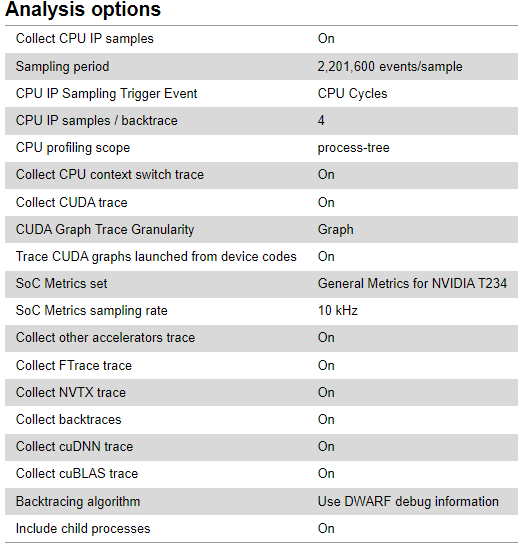
- On Jetson Host
-
Collect other accelerators trace is ON
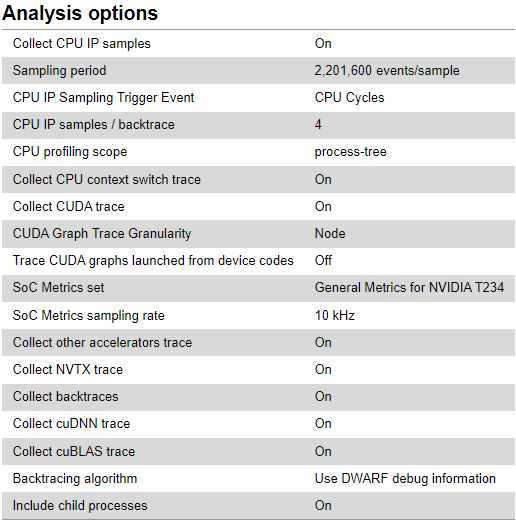
- Inside Container
-
Collect other accelerators trace is not ON
Even inside the docker SoC metrics of DLA can be obtained, so the model run successfully and use DLA also inside docker. However, I cannot obtain DLA profile (other accelerators trace does not exist in the profile).
So, I would like to know how to get DLA profile with Nsight Systems inside a Docker container. I would really appreciate it if I get any suggestions or solutions.
*** Please note that this reply is generated by LLM automatically ***
I understand your concern about not being able to obtain DLA (Deep Learning Accelerator) profile with Nsight Systems inside a Docker container on your Jetson AGX Orin 32GB device with JetPack 6.2. I’ll provide a comprehensive analysis and suggestions to help you resolve this issue.
Comparison of DLA profiling on Jetson Host and Docker Container
You’ve successfully obtained DLA profiles on the Jetson host, but not inside the Docker container. This suggests that the issue is related to the container environment rather than the hardware or JetPack version.
Key differences between Jetson Host and Docker Container
- Nsight Systems installation: You’ve copied the
nsys directory from the Jetson host to the container, which might not be sufficient. Nsight Systems requires a proper installation and configuration to work correctly.
- Container runtime and NVIDIA Container Toolkit: You’re using Docker 28.3.0 and NVIDIA Container Toolkit 1.16.2. Ensure that these versions are compatible and properly configured for GPU acceleration and DLA support.
- Image and script: You’re using the Isaac ROS Dev Base image and running it with the
run_dev.sh script. Verify that this image and script are correctly configured for DLA support and Nsight Systems profiling.
Suggestions and potential solutions
- Reinstall Nsight Systems inside the container: Instead of copying the
nsys directory, try reinstalling Nsight Systems inside the container using the official installation instructions. This will ensure that Nsight Systems is properly configured and integrated with the container environment.
- Verify container runtime and NVIDIA Container Toolkit configuration: Check the Docker and NVIDIA Container Toolkit documentation to ensure that you’re using the correct versions and configurations for GPU acceleration and DLA support.
- Update the Isaac ROS Dev Base image: If you’re using an older version of the Isaac ROS Dev Base image, try updating to the latest version to ensure that it includes the necessary dependencies and configurations for DLA support and Nsight Systems profiling.
- Modify the
run_dev.sh script: Inspect the run_dev.sh script and modify it if necessary to ensure that it correctly sets up the environment for DLA support and Nsight Systems profiling.
- Check DLA support in the container: Verify that DLA is supported and enabled in the container by running
nvidia-smi or other diagnostic tools.
- Nsight Systems configuration: Check the Nsight Systems configuration files (e.g.,
nsys.conf) to ensure that they are correctly set up for DLA profiling.
By following these suggestions, you should be able to resolve the issue and obtain DLA profiles with Nsight Systems inside the Docker container. If you’re still facing issues, please provide more details about your environment and configuration, and I’ll be happy to help you further.
Thank you for a quick reply and suggestions.
I would like to answer/reply to some parts of suggestions.
Key differences between Jetson Host and Docker Container
- Nsight Systems installation: You’ve copied the
nsys directory from the Jetson host to the container, which might not be sufficient. Nsight Systems requires a proper installation and configuration to work correctly.
Suggestions and potential solutions
- Reinstall Nsight Systems inside the container: Instead of copying the
nsys directory, try reinstalling Nsight Systems inside the container using the official installation instructions. This will ensure that Nsight Systems is properly configured and integrated with the container environment.
Actually, at first I installed Nsight Systems in the container by apt-get install nsight-systems, got NVIDIA Nsight Systems version 2024.5.4.34-245434855735v0 and tried to get profile with it. However, I could not get DLA profile with it.
In the document(User Guide — nsight-systems 2024.5 documentation), it is said that the option --accelerator-trace=tegra-accelerators is available in Nsight Systems Embedded Platforms Edition only.
Therefore, I suspected that there might be some difference between two nsys (the one in Jetson host and the one installed by apt-get install in the container) even though they have the same version number, and then I tried to copy the nsys file from Jetson host into the container, but the results was not changed.
Key differences between Jetson Host and Docker Container
2. Container runtime and NVIDIA Container Toolkit: You’re using Docker 28.3.0 and NVIDIA Container Toolkit 1.16.2. Ensure that these versions are compatible and properly configured for GPU acceleration and DLA support.
Suggestions and potential solutions
2. Verify container runtime and NVIDIA Container Toolkit configuration: Check the Docker and NVIDIA Container Toolkit documentation to ensure that you’re using the correct versions and configurations for GPU acceleration and DLA support.
5. Check DLA support in the container: Verify that DLA is supported and enabled in the container by running nvidia-smi or other diagnostic tools.
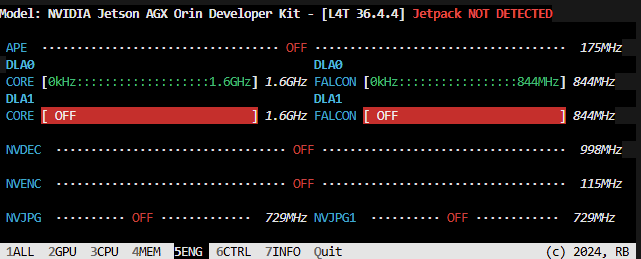
I use jtop and it shows that DLA is turned on when a model run, so I think that DLA is supported and enabled in the container.
(I don`t know why it says “Jetpack NOT DETECTED”)
Suggestions and potential solutions
4. Modify the run_dev.sh script: Inspect the run_dev.sh script and modify it if necessary to ensure that it correctly sets up the environment for DLA support and Nsight Systems profiling.
I think this can be a solution, but I don’t know how to modify for DLA profiling. Are there any directories or files to be mounted on the container to get DLA profile (like /usr/lib/aarch64-linux-gnu/tegra or/usr/bin/tegrastats)?
Or should I modify some options (like -e NVIDIA_VISIBLE_DEVICES=nvidia.com/gpu=all,nvidia.com/pva=all)?
Hi,
Instead, could you try to export the nsight-system directory and profile it inside the container directly?
Ex.
sudo docker ... -v /opt/nvidia/nsight-systems:/opt/nvidia/nsight-systems
Thanks.
Hi, thank you for your suggestion.
Now I tried, but result was not changed.
What I did:
- modify
run_dev.sh to mount /opt/nvidia/nsight-systems
-
actual modification
original run_dev.sh is isaac_ros_common/scripts/run_dev.sh at d068d425efbb285fb0e6c0a82203910503fe1957 · NVIDIA-ISAAC-ROS/isaac_ros_common · GitHub
modification is as below
# Map host's display socket to docker
DOCKER_ARGS+=("-v /tmp/.X11-unix:/tmp/.X11-unix")
DOCKER_ARGS+=("-v $HOME/.Xauthority:/home/admin/.Xauthority:rw")
+DOCKER_ARGS+=("-v /opt/nvidia/nsight-systems:/opt/nvidia/nsight-systems")
DOCKER_ARGS+=("-e DISPLAY")
DOCKER_ARGS+=("-e NVIDIA_VISIBLE_DEVICES=all")
DOCKER_ARGS+=("-e NVIDIA_DRIVER_CAPABILITIES=all")
DOCKER_ARGS+=("-e ROS_DOMAIN_ID")
DOCKER_ARGS+=("-e USER")
DOCKER_ARGS+=("-e ISAAC_ROS_WS=/workspaces/isaac_ros-dev")
DOCKER_ARGS+=("-e HOST_USER_UID=`id -u`")
DOCKER_ARGS+=("-e HOST_USER_GID=`id -g`")
- run
run_dev.sh and get into the container (Image is same as the first post)
- become root by
sudo -s
- run tensorrt model with nsys (step 4 in the tutorial GitHub - NVIDIA-AI-IOT/jetson_dla_tutorial: A tutorial for getting started with the Deep Learning Accelerator (DLA) on NVIDIA Jetson)
- the actual command is as below:
/opt/nvidia/nsight-systems/2024.5.4/bin/nsys profile --trace=cuda,nvtx,cublas,cudla,cusparse,cudnn,tegra-accelerators --accelerator-trace=tegra-accelerators --soc-metrics=true --output=model_gn.nvvp /usr/src/tensorrt/bin/trtexec --loadEngine=model_gn_container.engine --iterations=10 --idleTime=500 --duration=0 --useSpinWait
- profile results is as below:
-
Collect other accelerators trace is still not ON
Hi,
Recently I also work on old Isaac ROS Dev with JetPack 5.1, and when I happened to try the same DLA tutorial inside the container, I noticed that I could obtain DLA profile inside a Docker Container built with this old configuration.
- Configuration
- Hardware Platform : Jetson AGX Orin 32GB
- JetPack : 5.1.5
- Nsight Systems : NVIDIA Nsight Systems version 2024.5.4.116-245435654689v0
- Docker : 26.1.3
- NVIDIA Container Toolkit : 1.11.0
- Image :
nvcr.io/nvidia/isaac/ros:aarch64-ros2_humble_42f50fd45227c63eb74af1d69ddc2970
- profile results inside the container
-
Collect other accelerators trace is On
I don’t know what is the key difference between new and old configurations, but there might be a clue for a solution.
I’ll look into it a bit more when I have time, and will comment again if I find anything.
Hi,
Not sure if this is related, but the driver has been changed to support the Linux Distro.
So you might need some extra settings or mounting on JetPack 6.
We will give it a try on JetPack 6 and share more info with you.
Thanks.
1 Like
Hi,
Sorry for the late update.
When testing this with a TensorRT pipeline, below error is shown, and the SoC metrics section is missing.
# /opt/nvidia/nsight-systems/2024.5.4/bin/nsys profile --trace=cuda,nvtx,cublas,cudla,cusparse,cudnn,tegra-accelerators --accelerator-trace=tegra-accelerators --soc-metrics=true --output=container.nvvp /usr/src/tensorrt/bin/trtexec --onnx=./mnist.onnx --useDLACore=0 --allowGPUFallback --fp16
SoC Metrics: the feature is not supported on this system.
After applying the steps shared in the below doc, the error disappears, and the profiling output can be generated successfully.
Enable Docker Collection
However, the SoC section still does not show up, although the error message is gone.
We need to check this issue with our internal team. Will get back to you later.
Thanks.
Hi,
Thanks for your patience.
We have confirmed that the SoC metric collection can work well inside the container.
Please try if this can work on your side as well.
$ sudo docker run -it --rm --runtime nvidia -v /home/nvidia/bug_5435383:/home/nvidia/bug_5435383 nvcr.io/nvidia/tensorrt:25.06-py3-igpu
# /opt/nvidia/nsight-systems/2024.5.4/bin/nsys profile --trace=cuda,nvtx,cublas,cudla,cusparse,cudnn,tegra-accelerators --accelerator-trace=tegra-accelerators --soc-metrics=true --output=container_0815 /usr/src/tensorrt/bin/trtexec --onnx=./mnist.onnx --useDLACore=0 --allowGPUFallback --fp16
Thanks.
@AastaLLL Hi,
Thank you so much for your investigation and I’m sorry for a late reply. I would like to check that command in my env within this week.
I’m sorry to ask a question before checking it by myself, but I would like to ask you one thing. In the last comment, you said that you can collect SoC metric inside the container, but how about the accelerators trace?
In DLA tutorial, I can collect SoC Metrics but I can’t collect ‘other accelerator traces‘ inside the latest Isaac ROS Dev Docker (in a top comment, there are snapshots of Nsight systems outside and inside the container ( How could I get DLA profile with Nsight Systems on Jetson AGX Orin inside a Docker container ))
Could I expect to get both SoC Metrics and trace data, or only SoC Metrics by the command? In the latter case, would it be valid to use SoC metrics information instead of trace data?
Thanks
Hi,
Does this work on your side as well?
In the test before, we missed the --soc-metrics=true configuration so the SoC metrics are not generated.
After adding the config, we can get the DLA information as expected.
Thanks.