How to update bios in NVIDIA Jetson platform?
Jetsons do not have a hardware BIOS. They do have software equivalent to that, but every normal flash also flashes that “pseudo” BIOS.
If you have an eMMC model of Jetson, then there are a lot of other partitions. Some of those are boot content, some are the equivalent of a BIOS. If you have an SD card model developer’s kit (without eMMC), then that content goes into the QSPI memory on the module itself. Each flash updates that.
For reference, L4T is what gets flashed, and this is just Ubuntu plus NVIDIA content on top of it. JetPack/SDK Manager is the flash software (or at least the front end to flash software) itself. A given release of JetPack/SDKM is usually tied to a particular L4T release, but there are ways for JetPack to see older L4T releases. To see which L4T releases are available:
https://developer.nvidia.com/linux-tegra
That said, if you run the command “head -n 1 /etc/nv_tegra_release”, then you’ll see your L4T release. When you flash or otherwise get to a new L4T release this more or less also updates the “psuedo” BIOS, but one does not normally update that content the way you might a desktop PC.
If you’re trying to do something specific, then you give details and someone can probably provide a more specific answer.
I do not know what that file is from. If I did know, then there would still be a lot of information needed to answer. If this is an SD card model of the original Nano (without eMMC), then probably this would be some part of either a normal flash or a QSPI flash. You’d always want to back up first, but “often” content similar to this goes into the QSPI for SD card models. For an eMMC model it probably goes into one of the binary partitions. In both cases this is a flash procedure since the content is signed as it flashes.
Is the Jetson currently running? If so, what is the output from “head -n 1 /etc/nv_tegra_release”? Is this an SD card model without eMMC?
command not found

Please refer to below topic:
You had a typographic error. There is a space missing between:
- “
head” and “-n 1”, - and a space missing between “
-n 1” and “/etc/nv_tegra_release”.
You can copy and paste this directly unless there is a character set issue:
head -n 1 /etc/nv_tegra_release
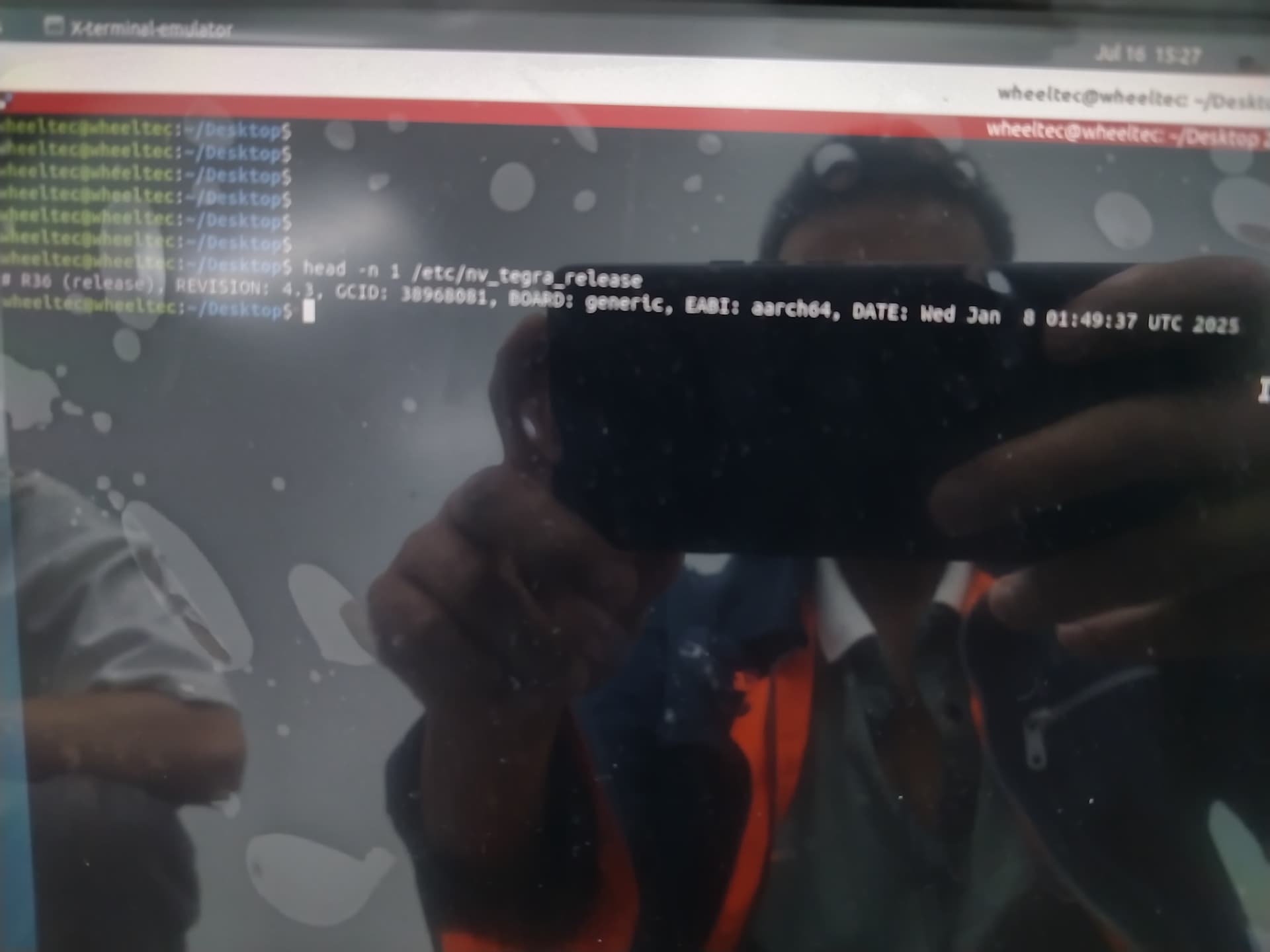
For reference, your L4T release is R36.4.3. Content which is correct for working on that release can be found at:
https://developer.nvidia.com/linux-tegra
You can update UEFI, but that isn’t a true hardware BIOS, it is more or less a software equivalent. Any documents for that particular release in the above URL would be correct content. More documents for customization will only be correct if they are for the correct dev kit model, e.g., documentation on a dev kit model with an SD card on the module will not be valid if the actual Jetson is a commercial module on a third party carrier board (in which case any SD card would be on the carrier board and not on the module). Pick the right model here, and look for customization docs:
https://developer.nvidia.com/embedded/downloads
It is possible that one of the files in the first URL will contain the one you are specifically interested in. Most of the non-rootfs partition content, and QSPI content for dev kits, is originally provided in binary format. If the file happens to be somewhere in your host PC’s “Linux_for_Tegra/” content, then searching for a shortened version of the name from that directory might provide some clues:
cd /where/ever/it/is/Linux_for_Tegra
# Depending on circumstances this might take some time:
sudo find . -iname '*jetson_release.bin'
If you have unpacked sources from that first URL for your specific release, then the same find command might show the file (the use of wildcards for the search is because the content might be compiled and not exist as the binary file until flashed, but I suspect such a file is already compiled into binary format unless you have customized). Customization docs for UEFI should indirectly find that file if this is what it is for.

That’s another typographic error. The space is missing between “-iname” and “jetson_release.bin”. Rather than seeing this as two separate tokens it is combining it into a single larger token.

the bios bin is as follow.
uefi_StandaloneMmJetson_RELEASE.zip (711.5 KB)
In that command the period/dot “.” means “from the current directory”. The “.” is an alias for current directory, and two of them, “..” is an alias for the parent directory of the current directory. For this to find something it would have to be somewherein the Desktop/ directory or its child subdirectories. Note that this is just explaining to first use the “cd” command to go to the location where your “Linux_for_Tegra/” directory exists (this is the flash software location on the host PC):
cd /where/ever/it/is/Linux_for_Tegra
Also, the alias tilde “~” means your home directory. I don’t know the exact subdirectory, but when installed by default via JetPack/SDK Manager you will find a set of directories here:
~/nvidia/nvidia_sdk/
From there there will be one or more directories named after a particular JetPack release:
ls -ld ~/nvidia_nvidia_sdk/JetPack_*/
The “Linux_for_Tegra/” subdirectory is always under one of those “JetPack_*/” subdirectories. Go to "cd ~/nvidia/nvidia_sdk/JetPack_...choose the one you currently use.../Linux_for_Tegra/
From there run that find command again:
sudo find . -iname '*jetson_release.bin'


For reference, this is L4T R36.4.3. This is also not a Jetson Nano, so it is in the wrong forum, but that won’t really matter. The hardware is an NVIDIA Jetson Orin NX according to the screenshot.
I will approach this from a different direction. What is it you want to do when you say you want to flash the BIOS? There is no hardware BIOS, but there is software which is the equivalent. This content is flashed during a normal full flash along with the operating system itself. Is there something specific you want to accomplish? Note that all L4T releases are listed here (L4T is just what you call the Ubuntu after you add NVIDIA drivers; this includes the boot chain and equivalent of a BIOS in every “normal” flash):
https://developer.nvidia.com/linux-tegra
I also want to emphasize that an Orin NX module differs in a developer’s kit versus a commercial module using a third party carrier board. Developer kit NX comes with an SD card slot on the bottom of the module itself, and no eMMC; the commercial module does not have an SD card slot on the module (if any exists it is on the carrier board), but it does have eMMC. The content used and the flash are quite different depending on model. We really must ask if this is a true developer’s kit with the SD card on the module, or if it is a commercial module with eMMC?
If this is a developer’s kit, and the SD card is used for the filesystem (a commercial module using an SD card is very very different). Depending on module that “equivalent to a BIOS” content might be in QSPI memory or it might be in eMMC partitions. A normal full flash is how that content is updated, even for the case of a developer’s kit with QSPI and no eMMC; however, people often update the SD card on a non-eMMC model and do not realize that the module can also be flashed, and this would update all of that boot content.
If any kind of external device is used to boot to, e.g., NVMe or USB device, then things change yet again.
The storage is SSD. and how to update bios in the platform. The orin motherboard was purchased officially
Just a reminder, this is not the Orin forum. Assuming from screenshots that this is an Orin NX, then the correct forum is here:
https://forums.developer.nvidia.com/c/robotics-edge-computing/jetson-embedded-systems/jetson-orin-nx/487
(instructions change quite a bit depending on model; the plain “nano” is around a decade old and is a small form factor TX1; since then there has been TX2, Xavier, Orin, and recently Thor)
Any flash to a non-default storage media uses the “initrd” flash. This is a full flash, and covers the equivalent of a BIOS (there is no simple hardware BIOS). If you need to save content then you should first clone the rootfs partition (this contains the operating system). If you don’t need to save the rootfs partition, just use the initrd flash.
From your screenshot it shows L4T R36.x (more specifically, it shows R36.4.3). The previously mentioned URL is where you get the flash software, and when installing via JetPack/SDK Manager, this also installs the initrd flash content:
https://developer.nvidia.com/linux-tegra
Documentation exists there as well which tells how to use the initrd flash.
Do you need more information on cloning the rootfs partition?