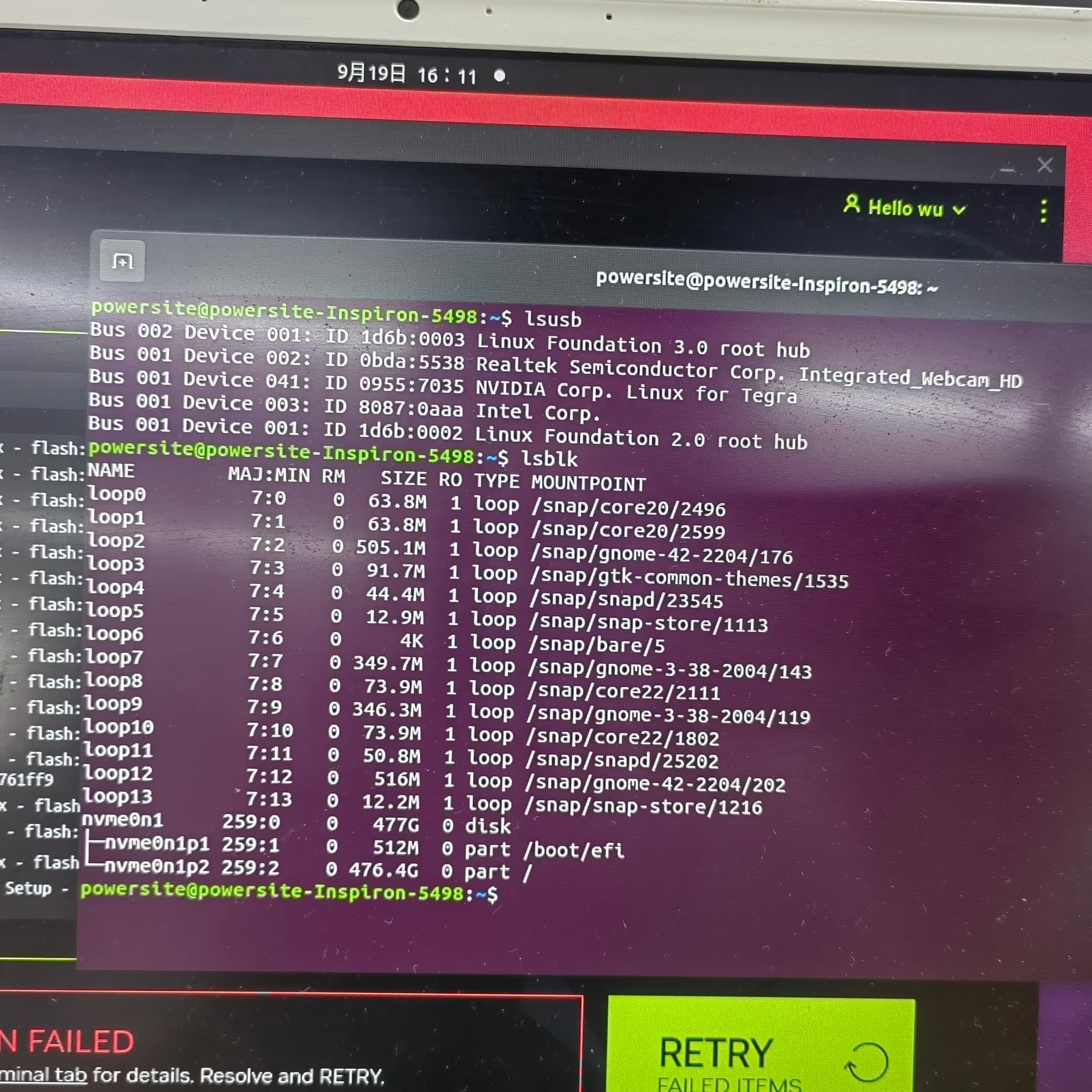
Hi All,
I replaced the USB, but it still doesn’t work
SDKM_logs_JetPack_5.1.4_Linux_for_Jetson_Orin_Nano_modules_2025-09-19_16-03-56.zip (423.9 KB)
What could be a reason for this. What should I try?
Thank you
Hi,
Could you confirm that the flashing cable is properly connected between the host and the device?
Thanks
I replaced the USB, but it still doesn’t work 。
Error::Could not stat device /dev/nvme0n1
Hi,
Please put the device into recovery mode first and then run the lsusbQuick Start guide to confirm whether the device is in recovery mode.
Thanks
Bus 001 Device 041: ID 0955:7035 NVIDIA Corp. Linux for Tegra
My device is already in recovery mode。
$ sudo ./tools/kernel_flash/l4t_initrd_flash.sh --external-device nvme0n1p1 \
  -c tools/kernel_flash/flash_l4t_external.xml -p "-c bootloader/t186ref/cfg/flash_t234_qspi.xml" \
  --showlogs --network usb0 jetson-orin-nano-devkit internal
I ran the above command, but it still failed.
Error:Could not stat device /dev/nvme0n1
My device has already flashed, now I need to flash it again。I don’t know if the configuration environment of SDK Manage has been changed, it shouldn’t have been modified
Hi @1526968447 !
Hope you are doing well.
Which JetPack version are you installing?
sudo ./tools/kernel_flash/l4t_initrd_flash.sh --external-device nvme0n1p1 -c tools/kernel_flash/flash_l4t_external.xml -p '-c bootloader/generic/cfg/flash_t234_qspi.xml' --showlogs --network usb0 cti/orin-nx/boson/fsm-imx464-2cam internal
Can you confirm this file: bootloader/t186ref/cfg/flash_t234_qspi.xml exists? If not you can try using: bootloader/generic/cfg/flash_t234_qspi.xml
Nico
Get Expert NVIDIA Jetson Support – Fast Book a free call now and get expert project consultation and a custom development plan within 2 business days. Book NVIDIA Jetson Consultation Call Bring Up Your Custom Carrier Board Faster Get Your Custom...
Est. reading time: 1 minute
1 Like
elsaco
September 20, 2025, 2:44am
11
The error is Could not stat device /dev/nvme0n1 and there are several like issues reported, when using the SDK flashing to the NVMe storage fails. If the JetPack 6.2.1 was downloaded from the official site the file flash_t234_qspi.xml is there for sure!
2 Likes
Hi,
Thank you for your reply.
I can confirm that the bootloader/t186ref/cfg/flash_t234_qspi.xml file exists
I am installing jetpack 5.1.4,flash failed when using the following command:
$ sudo ./tools/kernel_flash/l4t_initrd_flash.sh --external-device nvme0n1p1 \
  -c tools/kernel_flash/flash_l4t_external.xml -p '-c bootloader/t186ref/cfg/flash_t234_qspi.xml' \
  --showlogs --network usb0 jetson-orin-nano-devkit internal
The error message is as follows:
Error:Could not stat device /dev/mmcblk0 -No such file or directory.
Hi,
There is a flash_t234_qspi.xml file available. However, using the SDK Manager flash device still failed,Could not stat device /dev/nvme0n1.
Thank you, I replaced the disk and it’s okay now
1 Like
system
October 4, 2025, 10:12am
15
This topic was automatically closed 14 days after the last reply. New replies are no longer allowed.