I’m using REALSENSE D435I and JETSON ORIN NANO to do the isaac_ros_visual_slam, after I create the 3D map in RVIZ , then I want to save it by using “ros2 service call /visual_slam/save_map”
, the output like the following picture.
How can I fix it?
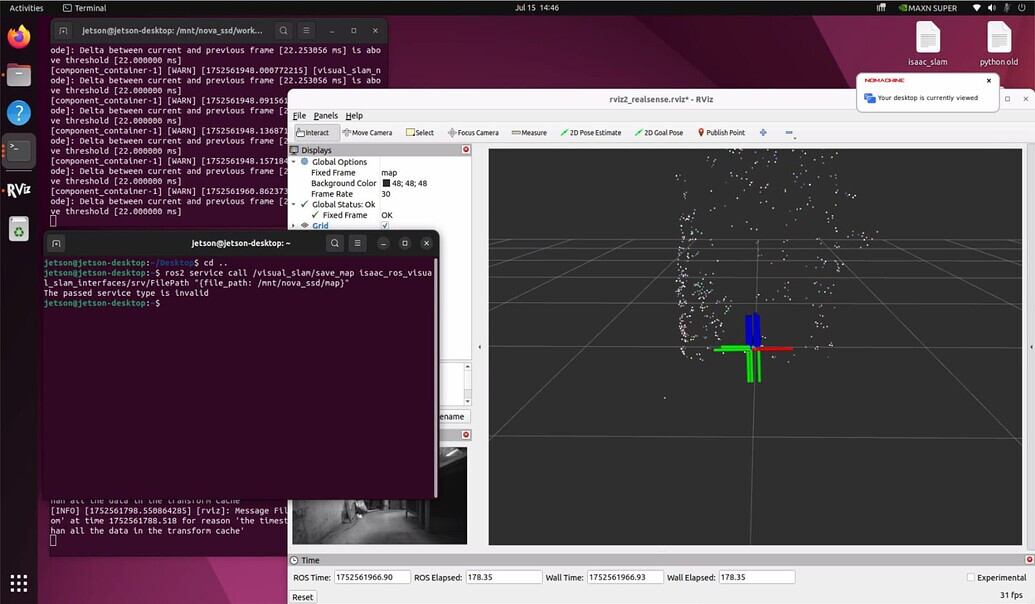
From the picture you should make sure “isaac_ros_visual_slam_interfaces/srv/FilePath” is loaded correctly in your terminal environment.If you are using a docker environment, the command terminal that saves the map should also enter the corresponding docker environment and load the vslam environment.

From the picture, it seems that you have not set the map save path. You can set a command similar to this: ros2 service call /visual_slam/save_map isaac_ros_visual_slam_interfaces/srv/FilePath "{file_path: /workspaces/isaac_ros-dev/isaac_ros_assets/cuvslam_map}". It should be noted that you need to make sure that there is no other content in the cuvslam_map folder.When cuvslam generates the map, it will overwrite the content in the folder. After that, you can see the map data data.mdb in the folder, which is a 3D feature point map.
AFter I save map with the data data.mdb, but when I type " `ros2 service call /visual_slam/load_map isaac_ros_visual_slam_interfaces/srv/FilePath “{file_path: /workspaces/isaac_ros-dev/isaac_ros_assets/cucslam_map/data.mdb}” " there is nothing go out.

Sorry, it seems that your image cannot be loaded. If you want to load the mdb map file, in addition to giving the path, you also need to give an initial positioning point map so that it can be loaded correctly. Similar to the following command:
ros2 service call /visual_slam/localize_in_map isaac_ros_visual_slam_interfaces/srv/LocalizeInMap "
  map_folder_path: '/path/to/save/the/map'
  pose_hint:
    position:
      x: x-position
      y: y-position
      z: z-position
    orientation:
      x: 0.0
      y: 0.0
      z: 0.0
      w: 1.0"