Just for some clarification I am using WSL2 to have an Ubuntu 22.04 terminal.
When I launch Isaac Sim using isaac-sim.selector.bat I am able to establish the connection between Isaac Sim and ROS2 just fine but when I launch a python based version of Isaac Sim there is no connection. And I did check to make sure that the ROS2 bridge is activated when I launch the python version. I am wondering if there is any fix to this.
Yes. Sorry if my terminology was wrong. When I was going through the tutorials in the Isaac Sim documentation I realized that the standalone Isaac Sim script was not connecting to ROS2
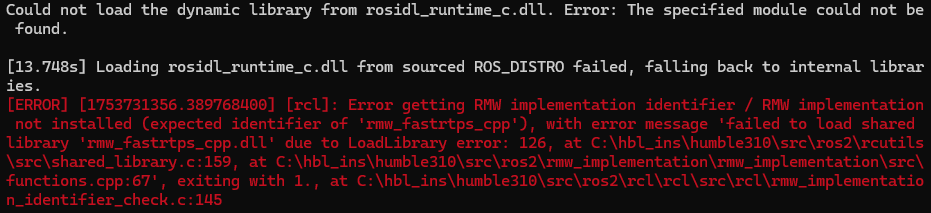
I will try 5.0 to see. But isn’t the PIP install the only current way to download 5.0? If that is the case then I had issues with the 4.5 PIP install which would also not connect to ros2. When i would enter the following then run Isaac Sim i would get the error pictured.
set RMW_IMPLEMENTATION=rmw_fastrtps_cpp
set PATH=%PATH%;C:/env_isaaclab/lib/site-packages/isaacsim/exts/isaacsim.ros2.bridge/humble/lib
I figured it out! (the original problem [still having issues with the PIP install]) I was having a blond moment and did not see the second step. It also took me a second to sorce into the linux folder from command prompt.