Following on our conversation from this thread: Randomizing materials for a randomizer instantiated asset
Sometimes when I run the Randomizer YAML it renders perfect frames and other times it adds the grid lines despite changing absolutely nothing in the code.
See attached file.
cc @wilfried.rakow
Have you tried removing the grid? Image below shows where to go to turn it off.
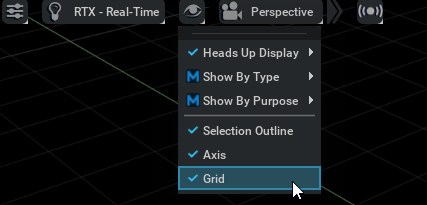
I am running a container, running headless, no UI
Seems to be a bug in render product
Here are logs for the bugged grids and OK grids. No code change just separate runs.
grid-bad.log (43.2 KB)
grid-ok.log (43.1 KB)
have you tried the snippet to toggle Grid visibility programmatically?
import omni.kit.actions.core

action_registry = omni.kit.actions.core.get_action_registry()
action = action_registry.get_action("omni.kit.viewport.actions", "toggle_grid_visibility")
action.execute()
however, i can’t confirm whether it’s potential bugs you may be experiencing or not; i’ll defer to the mods/devs on this.
ultimately, i think it’s because the ground/warehouse floor geom shares the world grid Z axis value (overlapping). so the cleanest (?) solution potentially might be to move the scene up. that said, i am not a frequent user of SDG, so it’s just a workaround that could be worth trying.
My workflow is Replicator YAML so no python scripts are possible - unless you can show me how?
I am running
/isaac-sim/runheadless.native.sh --no-window --/omni/replicator/replicatorYaml/yamlPath=my.yaml
This is so we queue multiple pods in kubernetes to do generations one by one.
I think the grid is visible due to the error in the grid-bad.log linked above.
It says it can’t find prims. Funny, input YAML is exactly the same!
cc @dennis.lynch
Actualy I re-ran it and it gave me the errors but the grid is not there. Perhaps it IS what you are saying @Simplychenable
I believe the error is happening with the empty get.prims
But you can also try setting one or both of these on the command-line
--/app/viewport/grid/enabled=false
--/app/viewport/defaults/guide/grid/visible=false
@dennis.lynch adding those two arguments did not help…
    /isaac-sim/runheadless.native.sh  --no-window \
                                      --/app/viewport/grid/enabled=false \
                                      --/app/viewport/defaults/guide/grid/visible=false \
                                      --/omni/replicator/replicatorYaml/yamlPath=warehouse.yaml
I will file a bug internally and follow-up on this.
Still an issue on nvcr.io/nvidia/isaac-sim:2023.1.1 @dennis.lynch
@Turowicz We have an internal fix. It should be in the next IsaacSim release. (though I can’t put a timeline on that)
