Request for Raycast Python code / Action graph for Omniverse composer application

Good Day,

I am looking to perform a Mouse hover on top of my Objects and Highlight them.

But to perform that, If it was Unity, I would perform a Raycast from mouse position in Update loop and identify the objects.

I am not able to find a similar code for Omniverse.

It would help a lot if I can get the Extension code that performs the required task as mentioned above.

Performing the same on Action graph would also help but I am not able to decide the Raycast node’s inputs and outputs.

Thank you,

Strangely, is this related to this other recent post on the exact same subject? Are you both working together?
Isaac Sim mouse hover mesh highlight - Omniverse / Isaac Sim - NVIDIA Developer Forums

I will look into this.

We have had an engineer take a look at this and he has created some code for you to use.
test.py (3.3 KB)

Hi Richard,

Yeah I notice the query you mentioned is almost similar, But actually, I am trying to use Omniverse Composer and not Isaac Sim and am trying to use the Action graph’s Raycast node to implement the same though.

I noticed the code has Isaac Sim related classes imported, Would it be possible to implement the same using Action graph with the Raycast node.

Since I am not very familiar with the Python classes of Omniverse, I very much prefer to stay with Action graph as much as possible.

So, Sharing the Raycast implementation in Action graph would really help.

Thank you :)

OK let me see what I can find out. In the meantime, do you want to try that code and see if it works?

I spoke to the engineer that wrote that code, and he said it has nothing to do with Isaac Sim specifically. You should just be able to insert that code snippet, and it should work. So give that a go.

I was not able to run the script as it has dependencies on Isaac Sim.

Attaching a screenshot of the error.

Even if I remove the parts where the cube is spawned, I can’t see to make the script work.
When I hover over a Cube I have in my scene, Nothing happens.

Required : Action graph would be preferred for mouse hover items and highlight.

Note : I have already implemented the Click and Highlight module with Action graph.

Ok let me go ask our Actionscript experts and see if they have example code.

Can you try this actionscript code please:

from omni import ui
from omni.kit.viewport.utility import get_active_viewport_and_window
from omni.ui import scene as sc

def on_clicked(sender: sc.Screen):
    def process_query(prim_path: str, world_position, *args):
        print(world_position)
    mouse, _ = viewport.map_ndc_to_texture_pixel(sender.gesture_payload.mouse)
    viewport.request_query(mouse, process_query)
    intersect = sender.transform_space(sc.Space.WORLD, sc.Space.NDC, sender.gesture_payload.ray_closest_point)
    print(sender.transform_space(sc.Space.NDC, sc.Space.OBJECT, intersect))


viewport, window = get_active_viewport_and_window()

Hi Richard,

I took the script shared in the other query (Isaac Sim related) and modified to serve my purpose.

I am able to get the Outlining performed when hovered.

But, The script only works from Script editor.

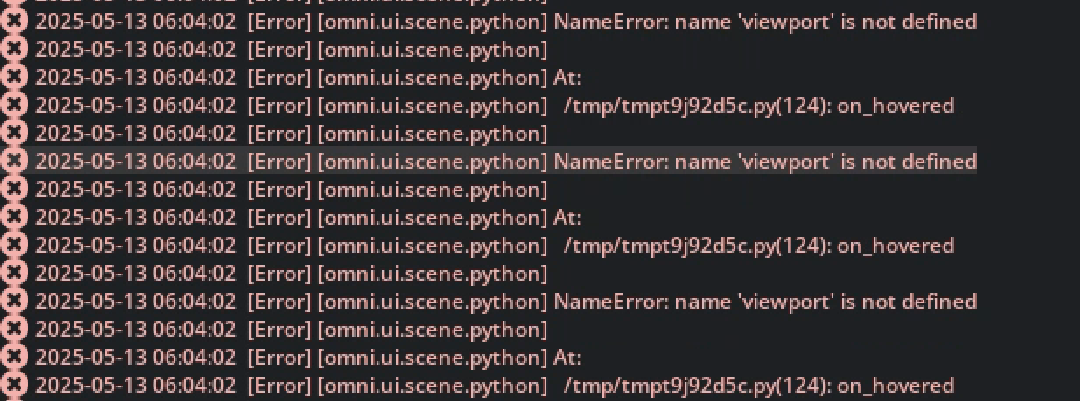
When I try to run the script through the Python scripting component added to an xform, I am getting “viewport not defined” error.

Can you please check the script and help me with updating the code to work as a python scripting component.

import omni.usd
from omni import ui
from omni.ui import scene as sc
from omni.kit.viewport.utility import get_active_viewport_and_window
from pxr import UsdGeom, Gf, Vt

context = omni.usd.get_context()
group_idx = context.register_selection_group()
default_color = Vt.Vec3fArray([Gf.Vec3f(0.0, 0.0, 255.0 / 255.0)])
hit_color = Vt.Vec3fArray([Gf.Vec3f(255.0 / 255.0, 255.0 / 255.0, 0.0)])
context.set_selection_group_outline_color(group_idx, (1, 1, 0, 1))  # Set outline color
context.set_selection_group_shade_color(group_idx, (0, 1, 1, 0)) # alpha 0 for no fill

# Define prim paths for different machines/groups
station2Benchmill = [
    "/prim_path/sample1",
    "/prim_path/sample2"
]

station2RoboticArm = [
    "/prim_path/sample1",
    "/prim_path/sample2"
]

station3Engraver = [
    "/prim_path/sample1",
    "/prim_path/sample2"
]

station3RoboticArm = [
    "/prim_path/sample1",
    "/prim_path/sample2"
]

station4RoboticArm = [
    "/prim_path/sample1",
    "/prim_path/sample2"
]

# Store all machine paths.  Crucially, use a *dictionary* here.
machine_prims = {
    "Machine1": station2Benchmill,
    "Machine2": station2RoboticArm,
    "Machine3": station3Engraver,
    "Machine4": station3RoboticArm,
    "Machine5": station4RoboticArm
}

highlighted_prims = set() #keep track of highlighted prims

def on_hovered(sender: sc.Screen):
    global highlighted_prims # Fix: Declare highlighted_prims as global
    def process_query(prim_path: str, world_position, *args):
        stage = omni.usd.get_context().get_stage()

        # Clear outline from *all* previously highlighted prims
        prims_to_clear = list(highlighted_prims)
        for p in prims_to_clear:
            context.set_selection_group(0, p)
            highlighted_prims.remove(p)

        # Get the prim that was actually hovered on
        hovered_prim = stage.GetPrimAtPath(prim_path)
        if not hovered_prim.IsValid():
            return  # Exit if the hovered prim is invalid

        # Determine which machine group the hovered prim belongs to
        machine_to_highlight = None
        for machine_name, prim_list in machine_prims.items():
            if prim_path in prim_list:
                machine_to_highlight = machine_name
                break  # Found the machine, no need to keep searching

        # If found, highlight all prims in that machine group
        if machine_to_highlight:
            for prim_to_highlight_path in machine_prims[machine_to_highlight]:
                context.set_selection_group(group_idx, prim_to_highlight_path)
                highlighted_prims.add(prim_to_highlight_path)

    mouse, api = viewport.map_ndc_to_texture_pixel(sender.gesture_payload.mouse)
    if api:
        viewport.request_query(mouse, process_query)

viewport, window = get_active_viewport_and_window()
with window.get_frame("HoverHighlight") as hover_frame:
    scene_view = sc.SceneView()
    viewport.add_scene_view(scene_view)
    with scene_view.scene:
        hovered_gesture = sc.HoverGesture(on_changed_fn=on_hovered)
        screen = sc.Screen(gestures=[hovered_gesture])

Error :

Hi @Richard3D,

Can you please provide me with a Extension or Action graph for the above code I had shared before.

Everytime, I load the USD, I have to open Script editor and manually run it once.

I am good if there is a way to automate this for deployment and streaming.

Awaiting your response,

Thanks

We do not know sorry. The way you do this is with script editor. Or you can add it to a scripting node in ActionGraph. But not an xform.

Just load this script on START. Pretty easy. You can even write an extension that loads this script. That is the best way.

Could you please guide me as to how I can run the script automatically at startup?
Because adding the script to script node doesn’t work.

Thanks

You can run a script at the launch of a kit file like this.

repo.bat launch – --exec my_script.py