Operating System:
Windows X
Linux Kit Version:
108
107 (Kit App Template)
106 (Kit App Template)
105 (Launcher) Kit Template:
USD Composer X
USD Explorer
USD Viewer
Custom GPU Hardware:
A series (Blackwell)
A series (ADA) X
A series
50 series
40 series
30 series GPU Driver:
Latest
Recommended (573.xx) X
Other
Main Issue:
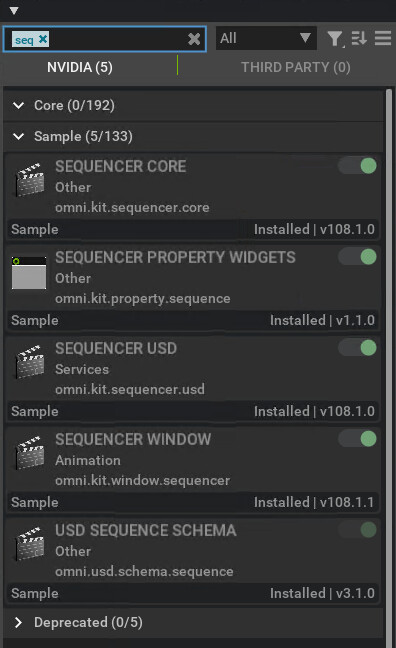
See there sreecshots, why am I missing the Sequencer?
you should be looking for Sequencer Window. that said, i have to clarify that i am using the kit 108 full app, though i am sure there is a way to make it work with the composer based kit app.
you can find the full app in the directory where you set up the kit-app-template: \kit-app-template\_build\windows-x86_64\release\kit\omni.app.full.bat either that or you can add the missing sequencer related extension manually via the extension manager. take it as a grain of salt; Richard will probably have a more straightforward ways to enable it in the composer based app.
So what is this Hub - where can I find more information?
After the update and restart the extension is no more visible, just like Richard said I need to wait for the registry rto update..
But it looks like it takes forever:
I am glad you got it to work. Yes the registry is a bug right now, with the sync speed.
You are mixing threads here, but for your last post on the character you have to also enable “omni.kit.property.skel” and toggle the Mode back and forth one time.