Isaac Sim Version
4.5.0
4.2.0
4.1.0
4.0.0
4.5.0
2023.1.1
2023.1.0-hotfix.1
Other (please specify):
Operating System
Ubuntu 22.04
Ubuntu 20.04
Windows 11
Windows 10
Other (please specify):
GPU Information
- Model: 4060 ti
- Driver Version: 572.83
Topic Description
Detailed Description
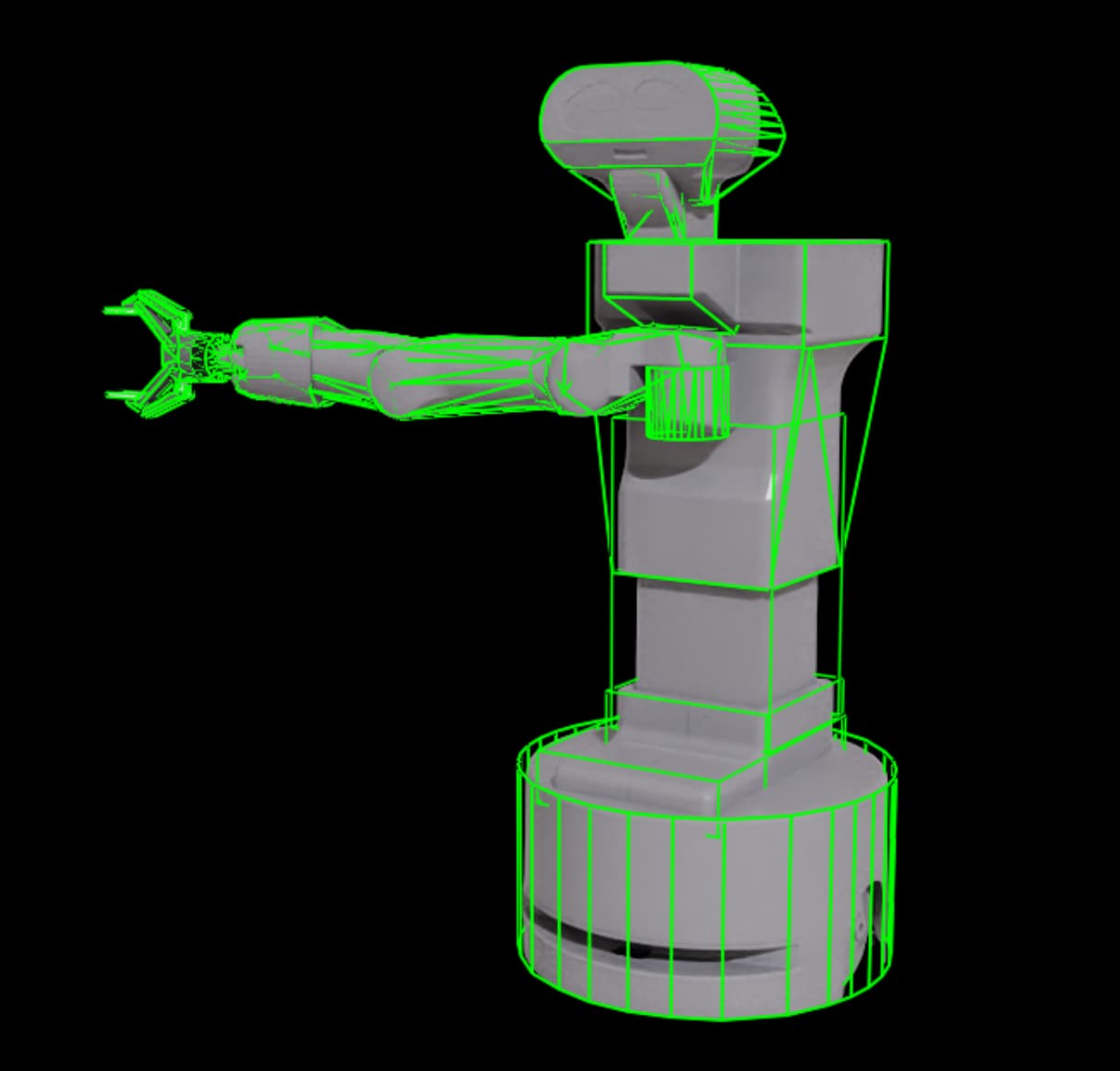
I’m experiencing issues when importing a URDF in Isaac Sim 4.5. The collision meshes appear to be generated incorrectly compared to earlier versions. For example, some links defined as simple boxes (like the torso) are being ignored, and Isaac Sim creates a single large collision mesh that wraps most of the robot.
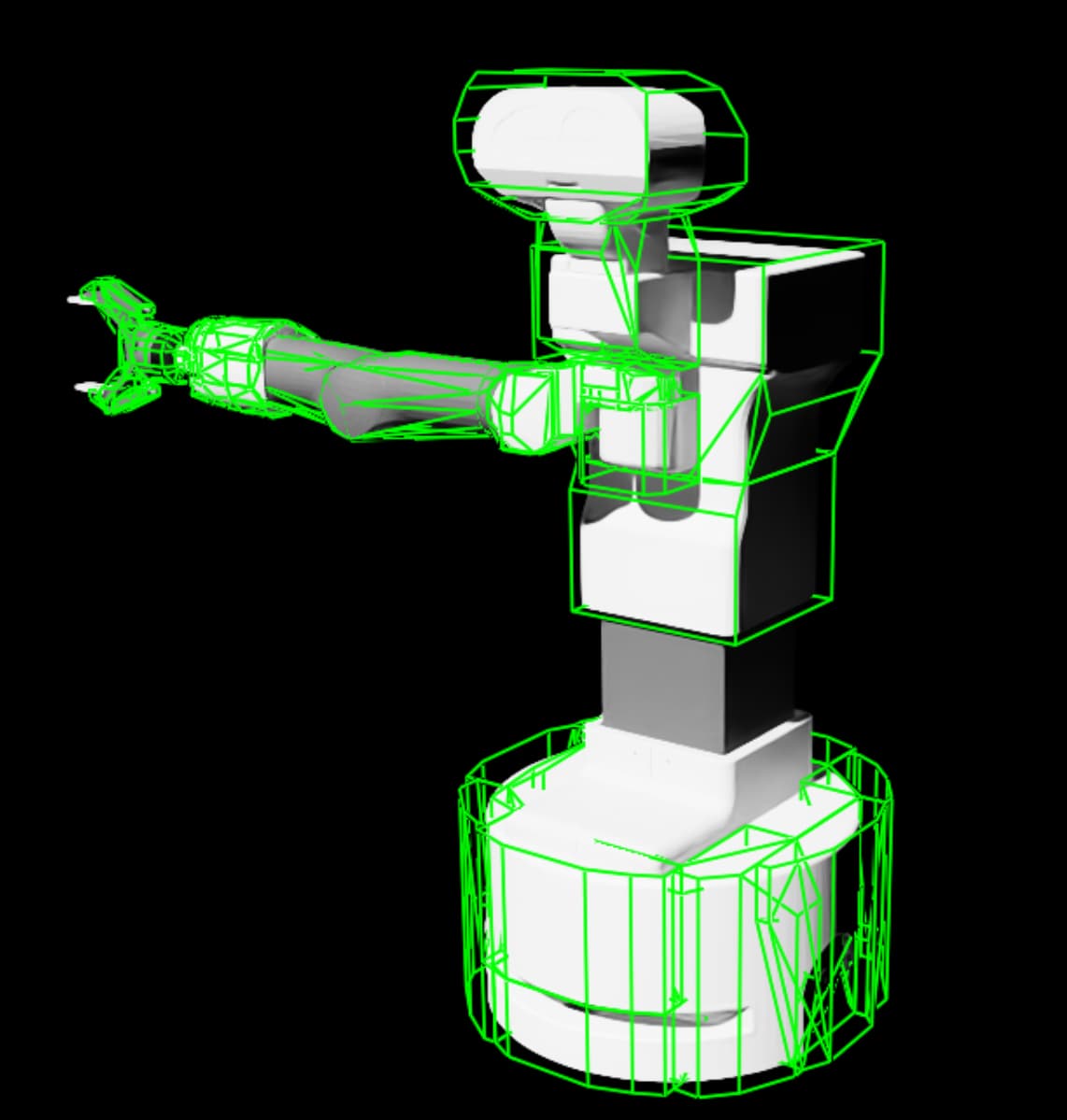
This behavior is quite different from Isaac Sim 4.2, where the same URDF is handled properly: the collision parts are correctly separated per link and seem to use individual convex hulls.
In Isaac Sim 4.5, it appears to combine parts or treat the entire robot as a single mesh in some cases, which causes inaccurate collisions. I would like to replicate the same behavior as in 4.2 without resorting to convex decomposition, as it adds unnecessary complexity to the meshes. The original simple shapes were accurate enough for my application.
Screenshots or Videos
Isaac Sim 4.5:
Isaac Sim 4.2:
Settings used on import (version 4.5.0):
###Example
URDF link with collision set to 2 boxes:
<link name="torso_fixed_link">
    <inertial>
      <origin rpy="0.00000 0.00000 0.00000" xyz="0.02435 -0.00464 0.15900"/>
      <mass value="14.01360"/>
      <inertia ixx="0.38341100000" ixy="0.00036400000" ixz="-0.02438900000" iyy="0.40577300000" iyz="-0.00078200000" izz="0.07699800000"/>
    </inertial>
    <visual>
      <origin rpy="0 0 0" xyz="0 0 0"/>
      <geometry>
        <mesh filename="../meshes/torso/torso_fix.stl" scale="1 1 1"/>
      </geometry>
      <material name="LightGrey"/>
    </visual>
    <collision>
      <origin rpy="0 0 0" xyz="0.09 0.0 0.02"/>
      <geometry>
        <box size="0.4 0.28 0.075"/>
      </geometry>
    </collision>
    <collision>
      <origin rpy="0 0 0" xyz="0 0 0.05"/>
      <geometry>
        <box size="0.255 0.255 0.117"/>
      </geometry>
    </collision>
  </link>
Expected behavior (Isaac sim 4.2):
@rodscoimbra just for the sake of clarity, is the screenshot of the setting from 4.5.0 or 4.2.0?
It’s from version 4.5.0. I’ve updated the original post to clarify. Thanks for pointing that out
i also noticed this issue in my 4.5 setup.
The URDF importer does not respect the collision and visual meshes defined in the urdf file and convex-merge the meshes that are connected with a “fixed joint”.
This is very annoying and i hope NVIDIA will fix this asap, because at the moment i have to rebuild everything by hand using the right colliders :/
1 Like
Hi @rodscoimbra thanks for your question and sorry for the frustration. Most likely what is happening is that the parts that are connected via fixed joints are being convex-merged and then the importer is approximating them with a convex hull. Can you try to import it while selecting the Convex Decomposition for the Collision Type?
@michalin just out of curiosity, is it feasible to do without using convex decomposition if that’s what the OP was hoping to achieve or is that not possible in 4.5.0?
Hi @michalin, I tested it using Convex Decomposition. Besides generating a more complex and conservative structure (with colliders larger than necessary), it completely ignored the torso and didn’t create any structure for it. However, as @Simplychenable mentioned, I’d prefer using a simpler mesh. Convex decomposition adds unnecessary complexity, and the meshes created using convex hulls actually seemed better for this robot.
Hi @rodscoimbra, @Simplychenable, @JeanLesur
Sorry for the delay in the response. In @JeanLesur observation is correct, on 4.5.0 urdf import has a default behavior to merge fixed joint meshes. This has been fixed for the next version release that will happen in June where the default behavior will not merge convexes with fixed joints.
Sorry for the inconveniences in the meantime.
Michael
1 Like
Hello!
We noticed that this topic hasn’t received any recent responses, so we are closing it for now to help keep the forum organized.
If you’re still experiencing this issue or have additional questions, please feel free to create a new topic with updated details. When doing so, we recommend mentioning or linking to this original topic in your new post—this helps provide context and makes it easier for others to assist you.
Thank you for being part of the NVIDIA Isaac Sim community.
Best regards,
The NVIDIA Isaac Sim Forum Team