Dead (almost new) Jetson Nano

Hello everybody,

This is just a hope, who knows I am lucky enough to find a tip here which allows me to fix my dead Jetson Nano. It was mostly unused, the day before it was working nicely, I turned it off and then next day it was… well… “dead”.

  • Does not boot
  • Does not light on the green light (except when cutting the power)
  • No video
  • USB does not turn even the eth lights
  • The bar pins do the same thing as the connector used in the video.

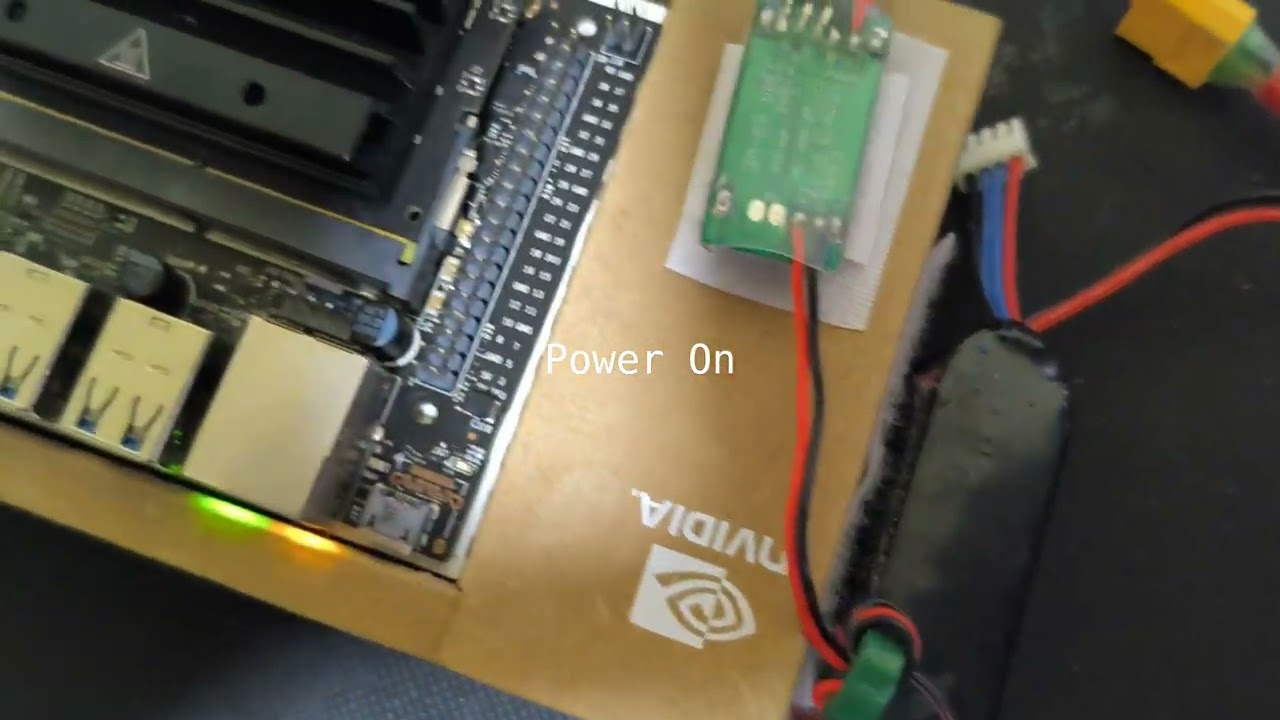
I made this short video to show how it is behaving:

If anyone have a minute to look and maybe give me a tip regarding which components can be fried, or if reflashing could save it, anything helps.

Thank you very much.

Probably you need a serial console log. See:
https://www.jetsonhacks.com/2019/04/19/jetson-nano-serial-console/

Also, do you use the regular shutdown command, or just remove power? If just removing power, then this causes data corruption.

I use a regular shutdown.

Today I plugged a USB-TTL adapter, plugged to the Nano and to the laptop:

Used minicom -D /dev/ttyUSB0 (8N1):

That is, only one char displayed…

I am not 100% certain about this usb-ttl, though…

Should the single char mean something good, at least?

Well, I made further tests, watched a few videos, read further in the forums and my conclusion is: I have a dead Jetson Nano.

Thanks for reading.

How did you connect the usb ttl?

Using a USB to TTL, the USB on the Notebook, then TX on Jetson’s RX, RX on Jetson’s TX, and GND to GND.

Then I run Minicom, set to 8N1 Software flow control, /dev/ttyUSB0.

I turn the Jetson on and the only thing I see is a few unreadable chars (some hexa code), some times only 2, some times 8, but only that.

The SD card is high quality, in perfect state.

  1. Please take a photo of how you connect the board. I mean the usb ttl to which pin on Jetson side.

  2. The video seems a little weird. Does the LED on the ethernet port directly becomes on when you power on the board? And the power LED on the board didn’t turn on?

Here are two pictures:


I don’t 100% trust this TTL adapter and might try with a new one in the near by future.

Thanks for the attention!

Is your serial UART using a 3.3V level? This with settings speed 115200, 8-bit, no parity, and 1 stop bit. Disable any hardware flow control. If that is correct, then it should work, although you’d want to know this worked in general without the Jetson.

To know if it works in general you can use loopback. For the serial UART board, assuming it is 3.3V (this loopback test won’t tell us if signal level is wrong), that small board with the pins for serial UART could have its TX wired to its own RX. At that point typing in the serial console terminal will echo back what you type. If this works, and if it is 3.3V signal level, then you would be correct to say there is probably failed hardware when nothing shows up on serial console (keep in mind that you could monitor this as you turn on the Jetson, both with and without recovery mode, and pretty much any output would show it is alive…but that single character is not it).
Oh, thank you very much for remembering this trick!

Yes, the TTL is working perfectly. And it is set at 3.3V level.

Also, on the picture above, I think I swapped TX with RX, but anyway, on the tests, I tried swapping on different tests.

Thank you very much for your attention.

The TX of one side always goes to the RX of the other side.

Is everything working now?

That mistake was only on the picture, and I also tried both ways.

No, dear, it is dead.

Other than returning it I don’t know what else to suggest. The RMA FAQ is:
https://developer.nvidia.com/embedded/faq#rma-process

This leads to:
https://nvidia.custhelp.com/app/home

Maybe @WayneWWW has another idea to try.

It is weird for me to see the LED on Ethernet port just light up because you power on the board.

Probably a hardware problem.