Please provide the following info (check/uncheck the boxes after creating this topic):
Software Version
DRIVE OS Linux 5.2.6
DRIVE OS Linux 5.2.6 and DriveWorks 4.0
DRIVE OS Linux 5.2.0
DRIVE OS Linux 5.2.0 and DriveWorks 3.5
NVIDIA DRIVE™ Software 10.0 (Linux)
NVIDIA DRIVE™ Software 9.0 (Linux)
other DRIVE OS version
other
Target Operating System
Linux
QNX
other
Hardware Platform
NVIDIA DRIVE™ AGX Xavier DevKit (E3550)
NVIDIA DRIVE™ AGX Pegasus DevKit (E3550)
other
SDK Manager Version
1.9.1.10844
2.1.0.11660
other
Host Machine Version
native Ubuntu 18.04
other
After a weekend I tried to access the board on Monday and something happened to the DRIVE since I’m not able to boot it up. I have the following status around the system:
Led status:
off on on off on on off blinking off
Fans status:
All off
While trying to restart Aurix manually:
NvShell>aurixreset
Info: Executing cmd: aurixreset, argc: 0, args:
NvShell>INFO: PSM_ModMgr: Powering off
Stop task Nvptp_Task_88E6321_2
Stop task Nvptp_Task_88E6321_1
Stop Nvptp_Task_SJA1105Q
INFO: PSM_EthInit: Ethernet peripherals de-initialized
*************** NvShell Initialization Start******************
DRIVE-V5.2.6-E3550-AFW-Aurix-With3LSS-StepA-4.04.01
Compilation date: Apr 6 2021, 00:00:08
Enter ‘help’ to see the available commands.
*************** NvShell Initialized *************************
Press ‘Enter’ for NvShell prompt
INFO: PSM_ModMgr: Powering up
INFO: PSM_IoHwAbs: Power On sequence Triggered.
INFO: PSM_IoHwAbs: Waiting for Voltages to drop below safe margin of 80mV -
INFO: SftyMon_tmon: Temperature sensor initialized
INFO: PSM_PwrCtrl: PSM_PwrCtrl_SysPwrOn_PMIC Reading PG status Timeout Error!
INFO: PSM_PwrCtrl: X2_XB_VDD_SOC_XB_VDD_DDR2_XB_VDD_DDRQ_PG
ERROR: PSM_ModMgr: Critical error reported with error ID: 0x82
ERROR: PSM_ModMgr: MODMGR_ERROR
Sdkmanager error:
5:33:13 INFO: Flash Xavier A+B in parallel - flash: BOARD SKU : 940-63550-2000-100
15:33:13 INFO: Flash Xavier A+B in parallel - flash: Executing bind clean cmd make -f Makefile.bind PCT=linux BOARD=e3550b03-t194a clean
15:33:13 INFO: Flash Xavier A+B in parallel - flash: Executing bind cmd make -f Makefile.bind PCT=linux BOARD=e3550b03-t194a
15:33:17 INFO: Flash Xavier A+B in parallel - flash: Executing bind clean cmd make -f Makefile.bind PCT=linux BOARD=e3550b03-t194b clean
15:33:17 INFO: Flash Xavier A+B in parallel - flash: Executing bind cmd make -f Makefile.bind PCT=linux BOARD=e3550b03-t194b
15:33:20 INFO: Flash Xavier A+B in parallel - flash: Bind partitions done!
15:33:20 INFO: Flash Xavier A+B in parallel - flash: Pre flash script found! Calling scripts/linux_pre_flash.sh
15:33:29 INFO: Flash Xavier A+B in parallel - flash: Running flash command: sudo -E /home/ridgerun/nvidia/nvidia_sdk/DRIVE_OS_5.2.6_SDK_Linux_OSWithSamples_DRIVE_AGX_XAVIER/DRIVEOS/drive-t186ref-foundation//tools/host/flashtools/bootburn_t19x/bootburn.sh -b e3550b03-t194 -B qspi -x /dev/ttyUSB3
15:33:33 INFO: Flash Xavier A+B in parallel - flash: [bootburn]: [executeShellCommand(156)] : {‘cmd’: [‘lsusb’, ‘-d’, ‘0955:’], ‘output’: ‘’, ‘returncode’: 1}
15:33:33 ERROR: Flash Xavier A+B in parallel - flash: command terminated with error
15:33:33 SUMMARY: Flash Xavier A+B in parallel - flash: First Error: Installation failed.
(Because neither Xavier is available in /dev/)
lsusb is not showing the nvidia devices as usual (even if you set both Xavier A and B in recovery mode):
ridgerun@ridgerun-Latitude-E5430-non-vPro:~$ lsusb
Bus 002 Device 002: ID 8087:0024 Intel Corp. Integrated Rate Matching Hub
Bus 002 Device 001: ID 1d6b:0002 Linux Foundation 2.0 root hub
Bus 001 Device 005: ID 08ff:2810 AuthenTec, Inc. AES2810
Bus 001 Device 004: ID 0c45:6449 Microdia
Bus 001 Device 003: ID 413c:8197 Dell Computer Corp.
Bus 001 Device 012: ID 0403:6011 Future Technology Devices International, Ltd FT4232H Quad HS USB-UART/FIFO IC
Bus 001 Device 011: ID 0403:6011 Future Technology Devices International, Ltd FT4232H Quad HS USB-UART/FIFO IC
Bus 001 Device 010: ID 0403:6011 Future Technology Devices International, Ltd FT4232H Quad HS USB-UART/FIFO IC
Bus 001 Device 009: ID 0403:6011 Future Technology Devices International, Ltd FT4232H Quad HS USB-UART/FIFO IC
Bus 001 Device 008: ID 0424:2807 Standard Microsystems Corp.
Bus 001 Device 002: ID 8087:0024 Intel Corp. Integrated Rate Matching Hub
Bus 001 Device 001: ID 1d6b:0002 Linux Foundation 2.0 root hub
Bus 004 Device 001: ID 1d6b:0003 Linux Foundation 3.0 root hub
Bus 003 Device 001: ID 1d6b:0002 Linux Foundation 2.0 root hub
I reflashed the Aurix firmware successfully, version: DRIVE-V5.2.6-E3550-AFW-Aurix-With3LSS-StepA-4.04.01.hex using memtool in a Windows machine with Windows 11. This didn’t help at all to fix the not-booting issue in both Xaviers.
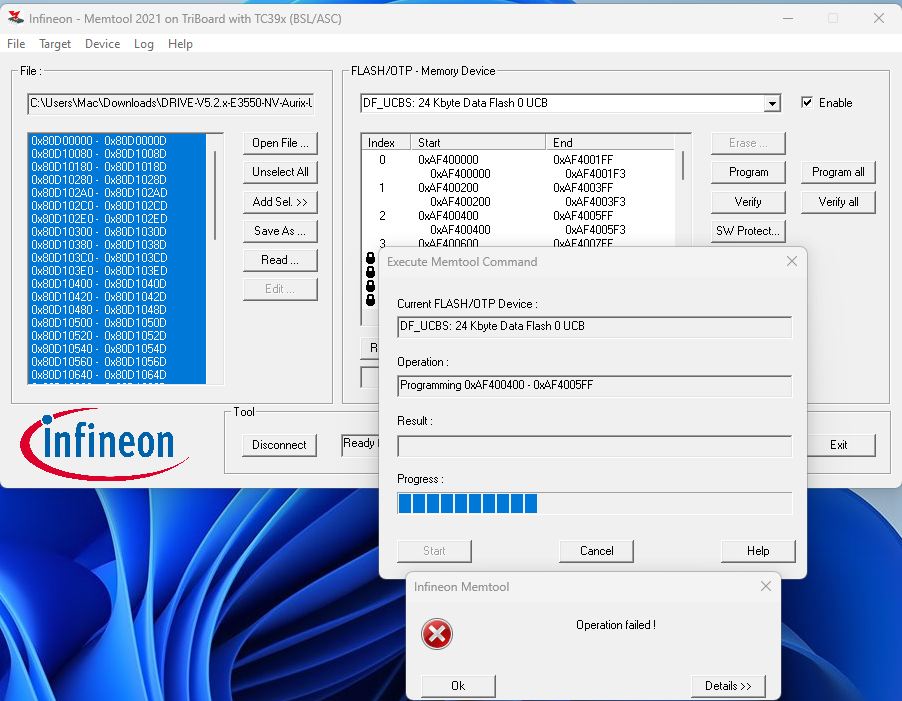
I also tried to flash these files in order to be able to run the command showvoltages in my Aurix shell:
DRIVE-V5.2.x-E3550-NV-Aurix-IFW-StepA-1.29.16.hex
DRIVE-V5.2.x-E3550-NV-Aurix-UPDATE-StepA-1.29.16.hex
But the flash process failed:
At this point, I’m stuck with the development on this platform so anybody has experienced this issue after checking all the other forums available here?