Jetson AGX Thor Not Booting - Boot Partition Missing, Flash Attempts Failing

My Jetson AGX Thor is failing to boot and drops into UEFI Interactive Shell. The boot partition appears to be missing or corrupted, with no EFI directory found on any filesystem. I’m attempting to reflash the device but encountering detection issues with SDK Manager.

Boot Error Details:

When powering on, I see the following errors before dropping to UEFI shell:

  • “Android image header not seen”

  • “Failed to boot recovery:0 partition”

  • HTTP Boot errors: “Could not retrieve NBP file size from HTTP server” and “Server response timeout”

  • “PXE-E21: Remote boot cancelled”

  • Multiple PXE over IPv4/IPv6 boot attempts failing

After these errors, the system enters UEFI Interactive Shell v2.2.

In UEFI shell, I ran diagnostics:

  • map -r shows multiple filesystems (fs0:, fs1:, fs2:)

  • Checked all filesystems - no EFI directory found on any partition

I tried reflashing following the Re-enable USB stick installation — Jetson AGX Thor Developer Kit - User Guide but it again goes to the same boot failure.

SDK Manager (V 2.3.0) Detection Issue:

  1. SDK Manager does NOT detect the board
  2. Device is visible in lsusb with ID 0955:7045
  3. Tried running sudo sdkmanager - still no detection

Please help, I have already spent hours trying to resolve this.

Thanks

1 Like

@WayneWWW Kindly help. I shared complete details in this post.

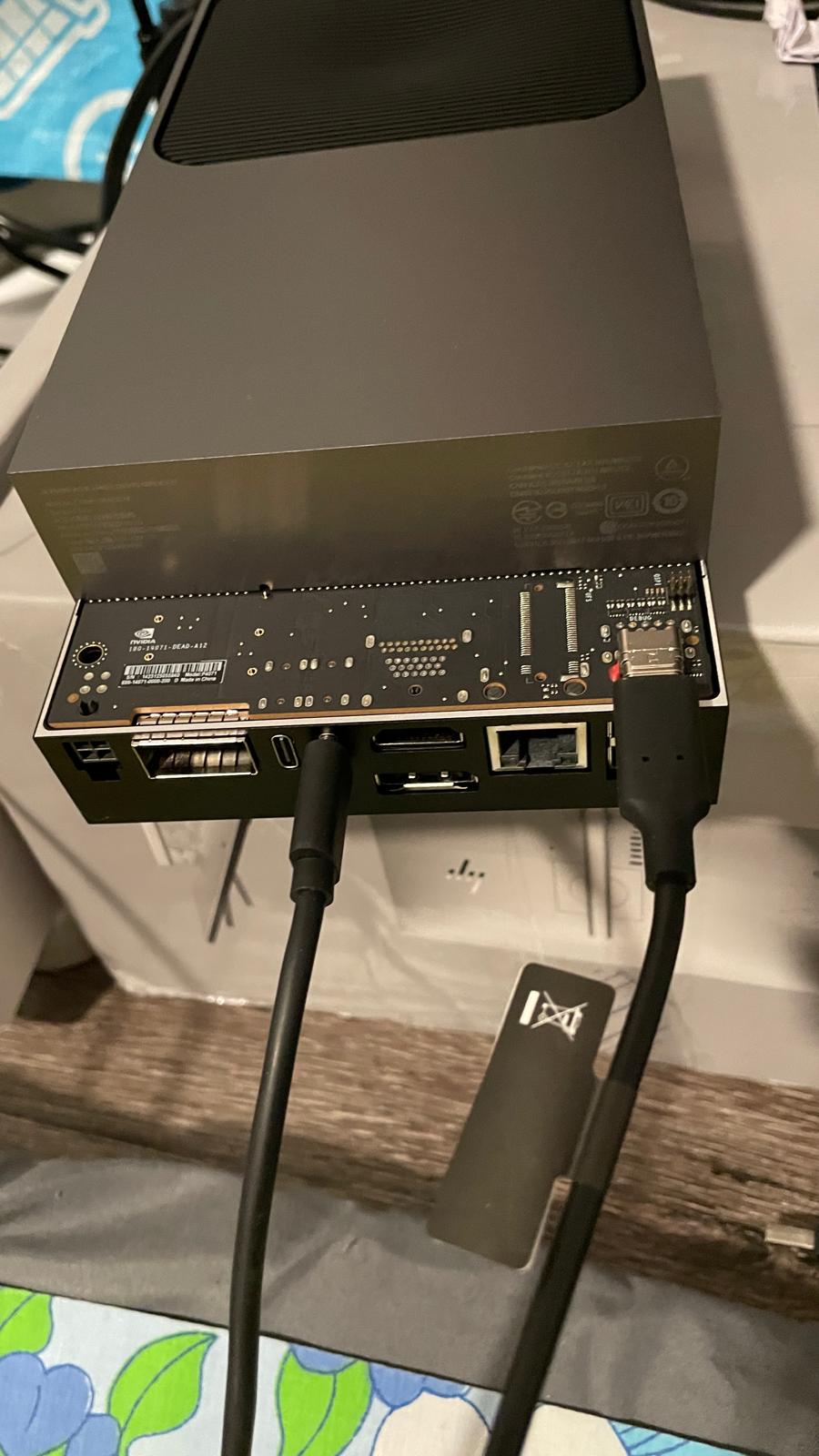
Could you take a picture of how your cable got connected to the board?

@WayneWWW Thank you for your prompt reply. I am attaching pictures below.

This is when I am trying to boot or in general I connected. Power Cable, Display Cable, LAN, Keyboard and Pendrive, I have connected.

When I am connecting to my laptop to flash through SDK manager, I have just the power cable and USB C to my laptop.

Kindly help me resolve this issue.

Thanks

Farhana

I think the bottom picture shows the error. You are connected to the debug port.

Instead plug the nvidia usbc cable into the usbc port next to the usbcPower connection on the Thor.

Plug other end in to your laptop. Then while holding the middle button, hit the power button, then release both. Then use sdkmanager to flash you Thor.

@whitesscott

Thank you for your response. I tried reflashing by changing port too.

Thanks

Farhana

I am also facing a similar issue using Nvidia SDK manger I am unable to flash Jetson Thor. Jetson Thor refuses to go into recovery mode and it shows Could not detect a board even though it shows up in lsusb

After all the struggle, I was able to flash jetson using the SDK manager. But the SDK manager was able to flash only os image file and I had to manully install the SDK components.

Thanks

Farhana

@WayneWWW It looks like I’m having a similar issue. Sudo apt update && sudo apt upgrade - now unbootable - #3 by richard228

This topic was automatically closed 14 days after the last reply. New replies are no longer allowed.