I purchased the Jetson Nano Dev kit from Amazon 3 months ago. I downloaded the sdk and setup the unit and it worked fine. The unit stopped working and wouldn’t boot past the white NVIDIA screen. I flashed multiple SD cards, tried a usb connection to another computer but not even a power light. If I plug it into the supplied power supply, the unit powers on but still will not boot or even recognize the sd card. I believe the unit is faulty.
The description does not show that this unit has problem. We’ve seen lots of such comment but turn out pure software issue.
The unit stopped working and wouldn’t boot past the white NVIDIA screen.
If boot still shows NV logo, then I feel it is still under software issue situation.
I flashed multiple SD cards, tried a usb connection to another computer but not even a power light
Your attempt didn’t truly do any full flash to that board actually. Sdcard image does not really full reflash the board.
To full reflash the board, you have to use sdkmaanger from another x86 host PC to flash your Jetson. And you have to put Jetson in recovery mode before doing flash.
As this is Jetson nano, only Ubuntu 18.04 could be used.
I did try to connect the nano to another x86 computer via usb. It doesn’t show any signs of life and the ask manager software doesn’t see the board. Thank you for the reply!
The Jetson needs to be in recovery mode to be correctly seen, and if you are using a “charger” cable instead of a quality micro-B USB (sometimes called “OTG”), then there will also be a failure of the host PC to read the existence of the Jetson. Cables matter a lot for the older micro-OTG connectors when they are transferring data instead of merely providing power.
On the host PC I recommend you run “dmesg --follow”, and then plug in what you think is a recovery mode Jetson just to see if there is a USB message. Any activity from the plug-in event pretty much says it is alive.
I am using a regular USB cord for a PC, not a charging cable. How do I get it into recovery mode?
There is a header with pins exposed. On a Nano these are a bit hidden. The module itself has a header under the module, and instead of the pins being perpendicular to the module, they are right angle and end up parallel on the side closest to the edge of the carrier board. If you peek under that edge, then the pin on the right is pin 1. Pins 9 and 10 are recovery pin and ground pin. If you hold recovery pin shorted to ground either (A) as power is applied, or (B) as power is reset, then it will be in recovery mode (it works like a shift key on a keyboard, but instead of capital letters it modifies power up mode). You do not need to hold recovery pin shorted for any length of time. Just remove the short as soon as power was reset or applied and it should be in recovery mode.
There is an image in this document:
https://developer.nvidia.com/embedded/dlc/jetson_nano_developer_kit_user_guide
The header number is “J50”. Beware that there are I think two revisions of this board, but the J50 header is the same on all of them if they are from NVIDIA.
Once the Jetson is in recovery mode it should show up in lsusb. I think “lsusb -d 0955:7020” is probably the one which will show just that Nano.
Note: If this is not being flashed from an older Ubuntu distribution then JetPack might not show the flash as possible even if the Jetson itself is there and showing under recovery mode with lsusb. JetPack has a range of Ubuntu on the host it can use, and this intersects with the requirements for the version of the L4T release being flashed. Command line won’t have those restrictions. The real work is getting the Jetson into recovery mode and seeing it with lsusb on the host PC; if this occurs, then your Jetson has not failed and it can be flashed.
Nothing. With the jumpers in place I applied power and saw a blue light. Then disconnected the ground. Tried to pair to it in the SDK manager and it still does not see it.
Please take a photo for how are your jumper, power cable and usb cable connected.
Also confirm which USB connector you are using in flash and whether there is a HUB between the Jetson and host PC or not.

If you are using a jumper on the 40-pin header, then it is the wrong header. See:

J50 is parallel to the module, sandwiched between module and carrier board. The 40-pin header is perpendicular to the carrier board and on the carrier board itself. The header is nearly invisible as it stops at the edge of the PCB.
For J50, in the image, it marks J50 from the end which is pin 1.
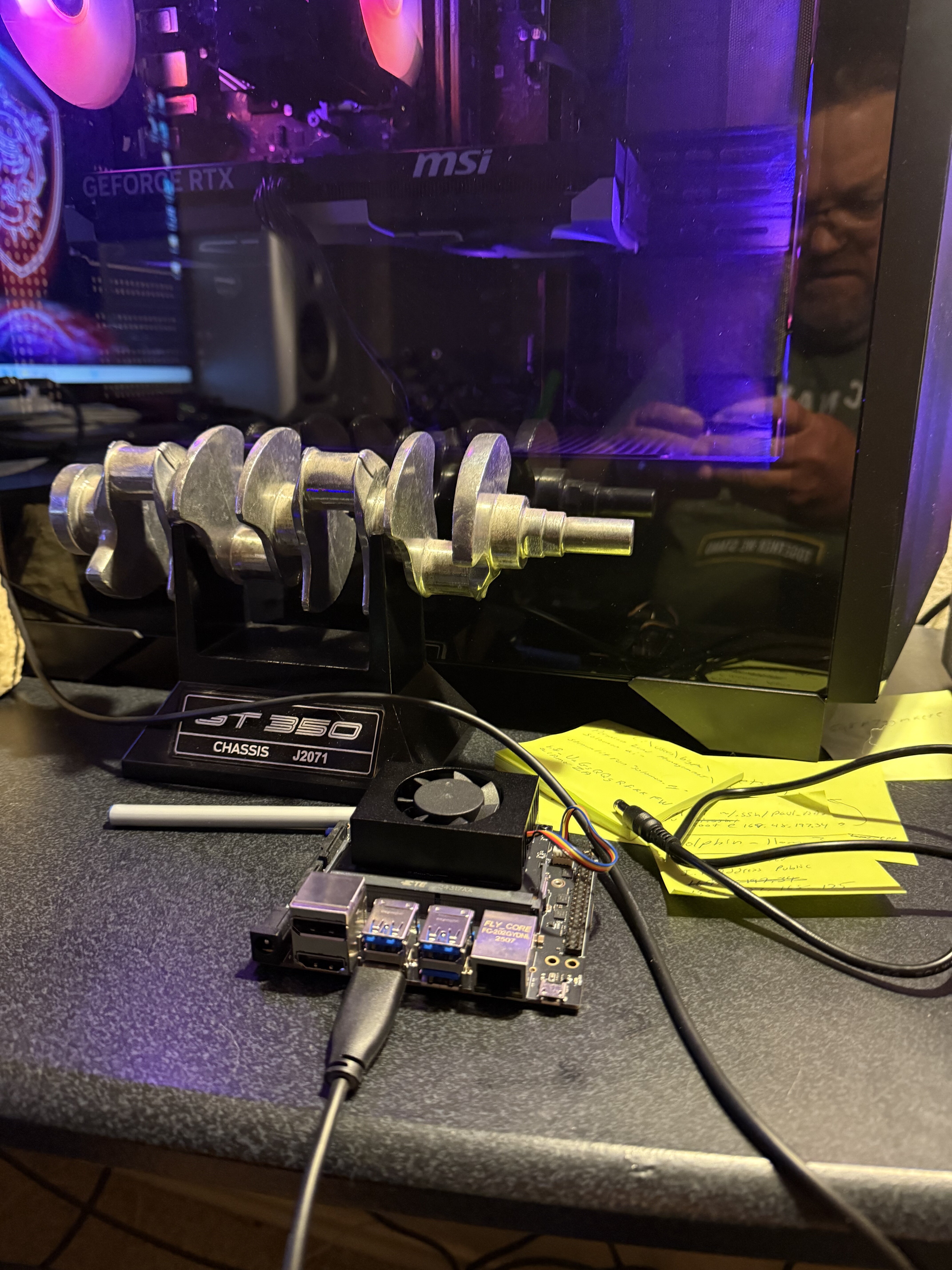
I tried the correct pins from the diagram you sent me. That didn’t help. I am attaching the usb pic as promised.
Paul
J50 is on the side opposite to the USB connectors. It is sandwiched between the module and the carrier board. The end of the J50 closest to the corner of the module is pin 1. Pins 9 and 10 are the ones to be shorted temporarily while either turning the unit on or resetting power, and then the short removed. At that point the Jetson should be in recovery mode. Is that the pair of pins you’ve shorted?
Also, there are two revisions of the developer kit carrier board. Take a look here:
https://blog.arducam.com/nvidia-jetson-nano-b01-update-dual-camera/
I’m going to copy images from the above URL for the a01 and b02 revision carrier board diagrams:


I’ve been assuming you have the second carrier board with J50. Can you verify this has the header I’m referring to? If not, then does it have the J40 header instead? Maybe I’ve been referring to the wrong revision, so let’s verify if you have the a01 or b02 revision.
I found the header you told me. I applied power with 9&10 jumped the removed the ground. No change.
What is your USB connection there? We need your whole picture when you try to connect your Jetson to host PC and also also the recovery pin.
You could put the recovery pin during the whole flash process. No need to remove jumper.

You didn’t connect your flash USB port to anything out.
Is this truly what you did when flashing the board?
Flash port is J28. Only this micro USB port could be used to flash the board.
What do you mean? I flashed the card, multiple times then inserted the card. When that didn’t work I downloaded the sdk manager and connected the usb as instructed. It doesn’t read my board. So what do you mean is that what I really did?
How did you connect your Jetson to your host PC?
Your photo shows that you didn’t connect it with a valid usb port.
I downloaded the sdk manager and connected the usb as instructed
What “instruction” did you follow there when using sdkmanager?
Just to clarify. Please forget about sdcard. Sdcard image won’t really reflash your board.
You need to use sdkmanager to flash your board. But I don’t know if you really connect your host to your Jetson correctly. From your photo, I saw you didn’t connect anything to the flash port.