Driver Version: 4.8.0? Whatever the 2nd newest version was in the Ubuntu driver installer
Topic Description
Detailed Description
I’m trying to implement holonomic control on Omnigraphs for a 4 wheeled mecanum robot I’m using for research. I added the isaacmecanumwheel:angle and isaacmecanumwheel:radius attributes at -135 and .055 respectively on each wheel, which I did because I was following the troubleshooting info provided in this forum post "USD Setup Holonomic Robot" node not working for holonomic robot. Now i get a “list index out of range” error at line 86 of the OgnHolonomicRobotUsdSetup.py file, which appeared to be an expected error response from the catch statement at that line. I dont know why the error is happening though, and my best guess is that maybe something is wrong with my model or mesh or some prim path issue. The node is pointing towards the base link of the robot for comPrim, and the robot for the robotPrim. Any help on this matter would be greatly appreciated, thank you kindly.
I tried using print statements in the .py file to see where it might be freaking out, but none of them outputted anything. I’m not sure where its supposed to be outputting if I did print something, I’m guessing console?
Hi @amjack1234! Isaac Sim 4.2 has reached its EOL. Could you please try Isaac Sim 4.5 or Isaac Sim 5.0? The official release of Isaac Sim 5.0 should come out by the end of this month.
Got it, I will try updating to 4.5. Do you have any specific directions for updating from 4.2 to 4.5? Is there any way I can solve the USD Setup Node problem in 4.2 so I don’t have to update? If I have no choice but to update, I want to make sure the update to 4.5 is as clean as possible so that I can avoid any potential errors. Keep in mind, avoiding an update to 4.5 all together would make things much easier on my end.
Hi @zhengwang ! I ended up updating to 4.5.0, and I loaded my old .usd that I had from 4.2.0. I remade the omnigraph and managed to replicate the error I had before. I tried changing the custom radius and angles attributes from uniform to varying, and I changed the values in those attributes as well. I’ll try making a whole new usd, but my URDF that worked fine in 4.2.0 is not working in 4.5.0 because some of the prims are null for some reason. I read in the forum posts I linked earlier about the root prim being wrong? I have no idea if thats the issue, but if so, how do I check which prims are the comPrim and the robotPrim that the node is asking for? Anyway, thanks for the help!
@zhengwang The file I uploaded above is just the folder that was created from the old 4.2.0 urdf importer tool. The USD should be in there, but I don’t know how it will run on 4.5.0. On my 4.5.0 the usd opened fine, but thats as far as I got with trying to run my omnigraph.
@zhengwang I just made a new USD file all in 4.5.0, added the attributes on each wheel link, and ran the omnigraph. I managed to replicate the same error. Here is the usd. Thank you so much for your time so far!
@zhengwang ok so I’ve done some digging, and I think the issue is with how my links are set up in Isaacsim. I looked at the class that was being referenced by the node, and put some debugging print statements in there. It keeps spitting out that /turtlebot3_waffle/wheel_left_link has no targets. This is strange to me, as the wheel_right_joint DOES have valid prim paths for Body0 and Body1. Here is my urdf so that you can see what Isaacsim got when I imported it and opened the USD it created.
Oh i guess urdfs don’t upload, so here is a relevant snippet of it (all of the wheels and links are the same as the one I am sharing).
Edit: for some reason, the code I’m pasting isn’t pasting correctly, so I am using a .png of the code instead
Hi all! So I still have the issue, but right now I’m trying to fix it by making sure my base footprint is tied to a “world” link to see if that works. However, I’m not exactly sure how to do that, as when I define the world link, it gets an error saying “null prim.” I also can’t define a joint for it as there is not world joint, and I just wanna make sure my actual joints have the right targets.
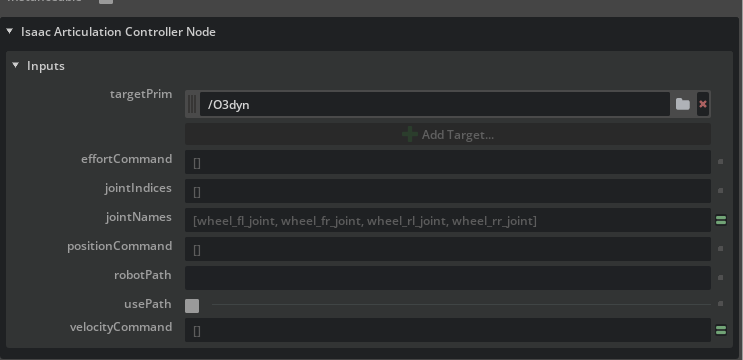
@zhengwang thanks for the response! About the joint names in the articulation controller, I thought the USD Holonomic Robot Setup node handles that by making a connection between DOF joint and Articulation Controller Joint Indicies? Also about the rigid body, what can I do in my URDF to change it so that the wheels are individually their own thing (and not a rigid body)?
also @zhengwang, the wheel radius, wheel orientations, wheel positions, and other stuff are all outputs of the node I’m having a problem with. I’m aware that the other two nodes do not have the inputs they need because the inputs they need come from the node that isn’t working (the USD Setup Holonomic Robot node). The thing that I was unaware of though was the rigid body modeling in problem 3. Do you have any guidance for how to fix that?
IMPORTANT UPDATE: Thanks everyone for your help, especially @zhengwang, but I ended up solving the problem on my own. It seemed to have nothing to do with the possible issues presented here. The problem was that my URDF was being imported as an instance or payload for some reason, which threw off the node’s traversal of the articulation tree.
FIX: Import the urdf in stage (not as a referenced file) so that its just treated as a prim without references or payloads (the robot prim didn’t have any arrow on it when I got it to work). From here, build the omnigraph as normal. It finally recognized the correct targets and worked fine.