Hello everyone,
i have now a Raspberry Pi HQ Camera and i want to run it on jetson nano. I use Jetpack 4.6 on my Jetson nano.
But when I execute this command :
gst-launch-1.0 nvarguscamerasrc sensor_id=0 ! ‘video/x-raw(memory:NVMM),width=3280, height=2464, framerate=21/1, format=NV12’ ! nvvidconv flip-method=2 ! ‘video/x-raw, width=816, height=616’ ! nvvidconv ! nvegltransform ! nveglglessink -e
This warning pops :
Setting pipeline to PAUSED …
Using winsys: x11
Pipeline is live and does not need PREROLL …
Got context from element ‘eglglessink0’: gst.egl.EGLDisplay=context, display=(GstEGLDisplay)NULL;
Setting pipeline to PLAYING …
New clock: GstSystemClock
Error generated. /dvs/git/dirty/git-master_linux/multimedia/nvgstreamer/gst-nvarguscamera/gstnvarguscamerasrc.cpp, execute:740 No cameras available
Got EOS from element “pipeline0”.
Execution ended after 0:00:00.388221041
Setting pipeline to PAUSED …
Setting pipeline to READY …
Setting pipeline to NULL …
Freeing pipeline …
Do you know what is wrong ?
Thank you.
hello jules.lepaih,
please confirm you’d execute Jetson-IO to configure CSI connector to enable IMX477.
you should also review kernel init messages, $ dmesg > klogs.txt to ensure sensor has register correctly.
BTW,
did you setup environment variable before running this gst pipeline?
for example, $ export DISPLAY=:0
Hello JerryChang
Thank you for your answer, what is Jetson-IO ? Because I don’t use Arducam driver, do I have to install it ?
Yes, i did setup environment variable before.
root@gauss08-desktop:/etc/apt# gst-launch-1.0 nvarguscamerasrc sensor_id=0 ! \
‘video/x-raw(memory:NVMM),width=3280, height=2464, framerate=21/1, format=NV12’ !
nvvidconv flip-method=2 ! ‘video/x-raw, width=816, height=616’ !
nvvidconv ! nvegltransform ! nveglglessink -e
Setting pipeline to PAUSED …
Using winsys: x11
Pipeline is live and does not need PREROLL …
Got context from element ‘eglglessink0’: gst.egl.EGLDisplay=context, display=(GstEGLDisplay)NULL;
Setting pipeline to PLAYING …
New clock: GstSystemClock
Error generated. /dvs/git/dirty/git-master_linux/multimedia/nvgstreamer/gst-nvarguscamera/gstnvarguscamerasrc.cpp, execute:740 No cameras available
Got EOS from element “pipeline0”.
Execution ended after 0:00:00.118775157
Setting pipeline to PAUSED …
Setting pipeline to READY …
Setting pipeline to NULL …
Freeing pipeline …
This is all my terminal.
I also have a problem when I try : sudo apt install (libcanberra-gtk-module) for example.
And the message in the terminal :
root@gauss08-desktop:/etc/apt# sudo apt -y install libv4l-dev
Lecture des listes de paquets… Fait
Construction de l’arbre des dépendances
Lecture des informations d’état… Fait
E: Impossible de trouver le paquet libv4l-dev
I can’t send my source.list because i am new on the website.
Thank you
hello jules.lepaih,
please refer to developer guide, Configuring the CSI Connector.
you may also gather kernel init message to review device probing status, $ dmesg > klogs.txt
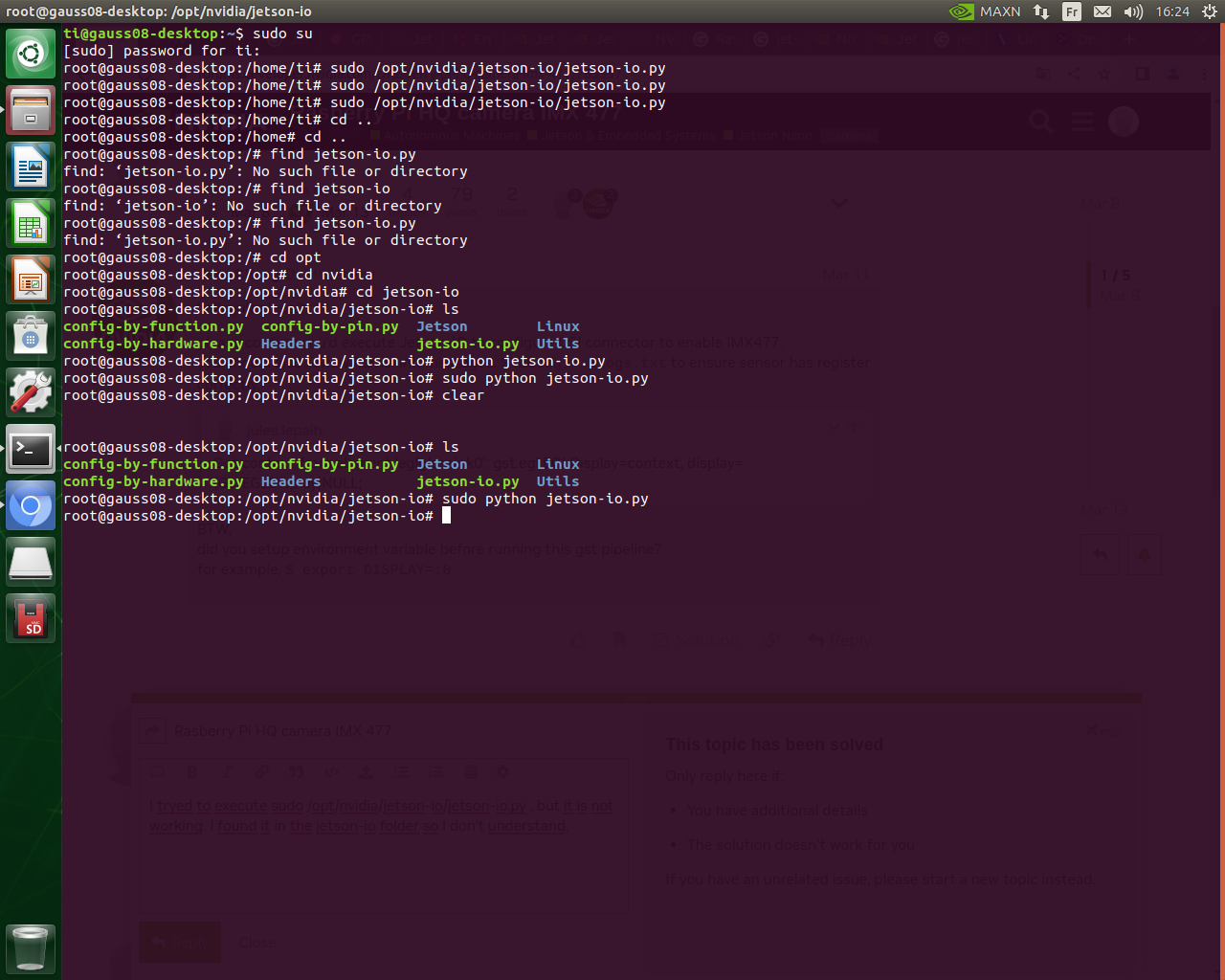
I tryed to execute sudo /opt/nvidia/jetson-io/jetson-io.py , but it is not working. I found it in the jetson-io folder so I don’t understand.
It actually launches and I can see the interface of “jetson-io”, but it doesn’t even last 1 second.
hello jules.lepaih,
may I know which Jetson Nano you’re using? this utility works with Jetson Nano 4GB only.
hence, you may revise the device tree to enable that.
please see-also Using the Main Platform Device Tree File.
thanks