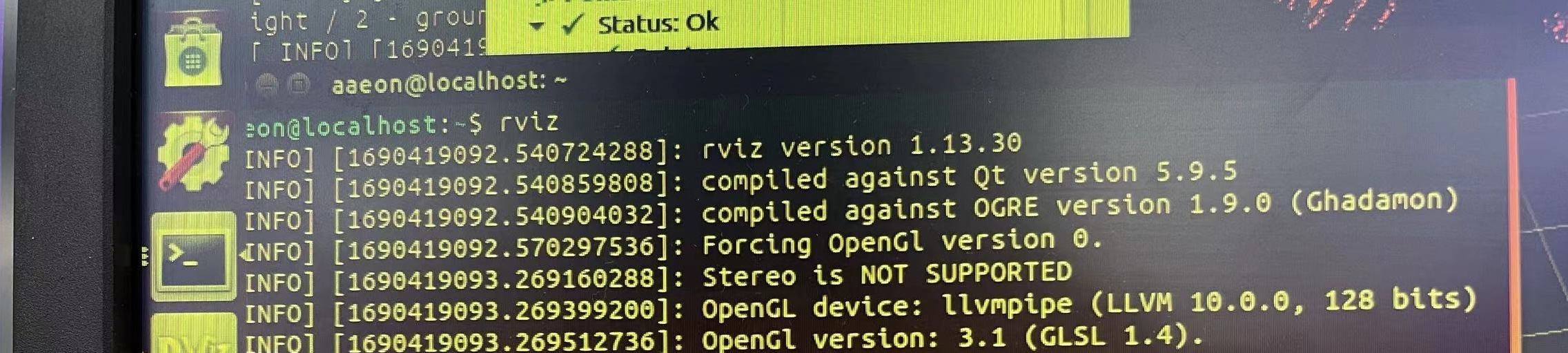
since your question isn’t specific to Jetson, you may want to post about RVIZ on the ROS forums . Or perhaps some community members may be able to share their experiences.
Hi,
If the driver is ok, the Graphics information after the device restarts should be NVIDIATegra Xavier (nvgpu)/integrated, but now the Graphics is llvmpipe (LLVM 10.0.0, 128 bits) after the device is powered up.
Hi xixi99,
Rviz depend on GPU or not should be configured on Rviz itself, I think ,maybe not supported actually, you should query this issue on ROS community.
and my concern is why run rviz on Xavier?
you can run it on host which in the same local network to monitor anything on Xavier.
Hi,
Reinstalled jetpack 4.6.2 still doesn’t work.
The jtop information on the customer board is as follows(it can work on this board, I don’t know if it is helpful):
Hi,
After reinstalling the system and jetpack, only the root account can enter the desktop, and the Graphics(NVIDIA Tegra Xavier (nvgpu)/integrated) is ok.
But other accounts cannot enter the desktop.
What needs to be configured?