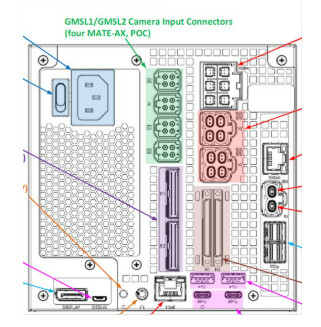
DRIVE AGX Orin Developer Kit (not sure its number)
SDK Manager Version
other
Host Machine Version
native Ubuntu Linux 20.04 Host installed with DRIVE OS Docker Containers
Issue Description
Hi,
I’m using Drive OS 6.0.10 and I’m having trouble connecting cameras of different types.
I can successfully read 3 cameras of the same type on Port A, which corresponds to NB3 in the rig file.
However, I’m not able to read the front camera (NB2) defined in the rig file and assigned to Port D.
I can only read NB2 when it’s connected to Port A using the sample camera app.
But I can’t get both NB3 and NB2 (different camera types) to work together on the same port (Port A), or across Ports A and D or C .
Has anyone managed to get different camera types (like NB2 and NB3) working on different ports at the same time?
When you run NB2 camera alone , is it working?
Could you check running 2 instances of nvsipl_camera for port A and D in parallel where NB3 is connected to port A and NB2 connected to port D. This confirms if there is any issue from NVSIPL. Also, see if modifying format=processed,output-format=yuv to output-format=processed helps?
The configuration I used is included in the rig file. Unfortunately, I still haven’t resolved the issue of reading cameras of different types. If there are any solutions or suggestions you can share, I’d really appreciate it.
Does that mean,
you have ran two instances on nvsipl_camera in two different terminal with no display.NB2 is connected to port D and NB3 connected to port A. Please share the nvsipl_camera logs with -v 4 (verbose mode) and also /var/log/syslog for further investigation. Note that, sample_Camera is expected to work only when nvsipl_camera works in the same configuration.