Flickering, graphics corruption, and loss of signal with Nvidia 4090 and 5K2K screen (LG 45GX950A-B.AUS)

I recently purchased an LG 45GX950A-B.AUS monitor and the Nvidia Linux drivers, at least with the 4090, seem to have some trouble with it. I’m encountering two main issues:

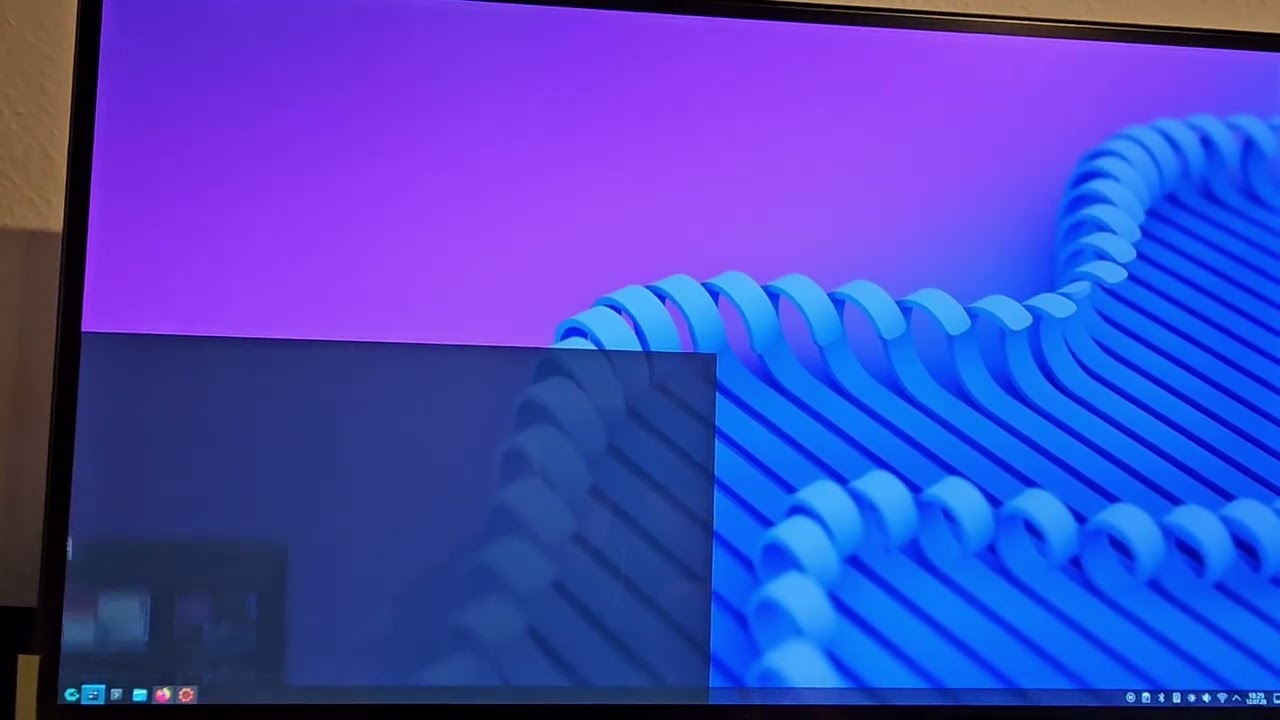
  1. When connected via DisplayPort (1.4), the native resolution and refresh rate is detected (5120x2160@165Hz), but there’s very noticeable flickering and graphics corruption on the bottom right portion of the screen.

    I’m unsure if this is related to DSC. Toggling VRR and HDR make no difference, but dropping the refresh rate down to 100Hz or 60Hz seems to prevent the issue from occurring.

    This is what the issue looks like: https://youtu.be/j-DoxsEJdkE
    Bug report with 575.51.02 proprietary drivers (GSP disabled): nvidia-bug-report.log.575.51.02_displayport_proprietary_no_gsp.gz (1.5 MB)
    Bug report with 575.51.02 open drivers: nvidia-bug-report.log.575.51.02_displayport_open.gz (531.7 KB)

    (The same issue occurs with 570.133.07 as well.)

  2. When connected to HDMI 2.1, the display defaults to only 3440x1440@85Hz, but the monitor constantly pops up an “Out of Range” warning and says that the input is 17Hz. This already starts to occur during boot before the login screen or desktop environment is loaded.

    When setting the resolution to 5120x2160@165Hz, the monitor is unable to get a signal at all. 60Hz and 100Hz seem to always work.

    Bug report with 575.51.02 open drivers and 3440x1440@17Hz: nvidia-bug-report.log.575.51.02_hdmi_3440x1440@17Hz.gz (623.0 KB)
    Bug report with 575.51.02 open drivers and 5120x2160@165Hz (captured over SSH because monitor has no signal): nvidia-bug-report.log.575.51.02_hdmi_5120x2160@165Hz.gz (671.4 KB)

With the same hardware on Windows (576.02), neither issue occurs.

I’ve also filed a kwin bug report for the flickering (when using DP 1.4). I don’t know if the root cause is in the Nvidia drivers or in kwin, but I did find that it stops happening when I change the color accuracy setting from Prefer efficiency to Prefer color accuracy.

1 Like

I can reproduce issue 2 on my 5090 but not issue 1, even though I have the same monitor.

1 Like

I have the exact same issues RTX4080 + LG 45GX950: Artifacts with DP + 165hz not working with HDMI 2.1 - #2 by YetAnotherUsername

I have filed below 2 bugs for tracking purpose. Shall attempt for local repro and get back to you if required any additional information.

5301317 Flickering and graphics corruption with Nvidia 4090 and 5120x2160@165Hz screen (LG 45GX950A-B.AUS) with driver 570.133.07
5301333 Loss of signal with Nvidia 4090 and 5120x2160@165Hz screen (LG 45GX950A-B.AUS) with driver 570.133.07

1 Like

Hi All,
We have below updates on the following bugs.

5301317 Flickering and graphics corruption with Nvidia 4090 and 5120x2160@165Hz screen (LG 45GX950A-B.AUS) with driver 570.133.07

Status Update: We do have inhouse repro but all of sudden not seeing such issue on repro setup, could someone please verify from your end and update.

5301333 Loss of signal with Nvidia 4090 and 5120x2160@165Hz screen (LG 45GX950A-B.AUS) with driver 570.133.07
Status Update: We have local repro for it and engineering team has root caused the issue. Fix will be available in future releases.

Thank you very much!

Unfortunately, I can no longer help test 5301317 because I returned the monitor. Hopefully other folks here can help test that.

I also have the flicker problem (KDE 6.3.6 Wayland VRR 5120x1440 240 Hz) with the Samsung Odyssey G9 Neo via DisplayPort and driver 575.64.5. The lower right half of the screen flickers, especially when Firefox has a Twitch PiP window open and the PiP window is on the right side and the Firefox window on the left side.

Hi @chenxiaolong

Could you please help to test with latest 580 release driver and share test results.

Thanks for the fixes!

Unfortunately, I had to return the monitor so I can no longer help test. Hopefully other folks can test with the 580 release.

Hello, I have a similar issue even with the new driver. I have a 4090 card and an asus 480 hz monitor. The flickering happens with 360 and with 480 hz.

1 Like

I still have the Monitor (EU Model, RTX4080 + LG 45GX950: Artifacts with DP + 165hz not working with HDMI 2.1 - #2 by YetAnotherUsername )

But I can’t choose to install the latest 580 via mintdrivers or ubuntu-drivers. I’ll let you know once I’m able to test it.

vendor : NVIDIA Corporation
model : AD103 [GeForce RTX 4080]
driver : nvidia-driver-570-server-open - distro non-free
driver : nvidia-driver-565 - third-party non-free
driver : nvidia-driver-565-open - third-party non-free
driver : nvidia-driver-535-server-open - distro non-free
driver : nvidia-driver-570 - third-party non-free
driver : nvidia-driver-550-open - distro non-free
driver : nvidia-driver-535-open - distro non-free
driver : nvidia-driver-570-open - third-party non-free
driver : nvidia-driver-570-server - distro non-free
driver : nvidia-driver-550 - distro non-free
driver : nvidia-driver-575 - distro non-free
driver : nvidia-driver-575-open - distro non-free recommended
driver : nvidia-driver-575-server - distro non-free
driver : nvidia-driver-535 - distro non-free
driver : nvidia-driver-575-server-open - distro non-free
driver : nvidia-driver-535-server - distro non-free
driver : xserver-xorg-video-nouveau - distro free builtin

Hi @Mukio

Thank you for sharing test results, could you please share NVIDIA bug report.

I will retry for local repro on my test systems.

Sure

nvidia-bug-report.log (1.1 MB)

Thank you, shall match the config and retry for local repro.

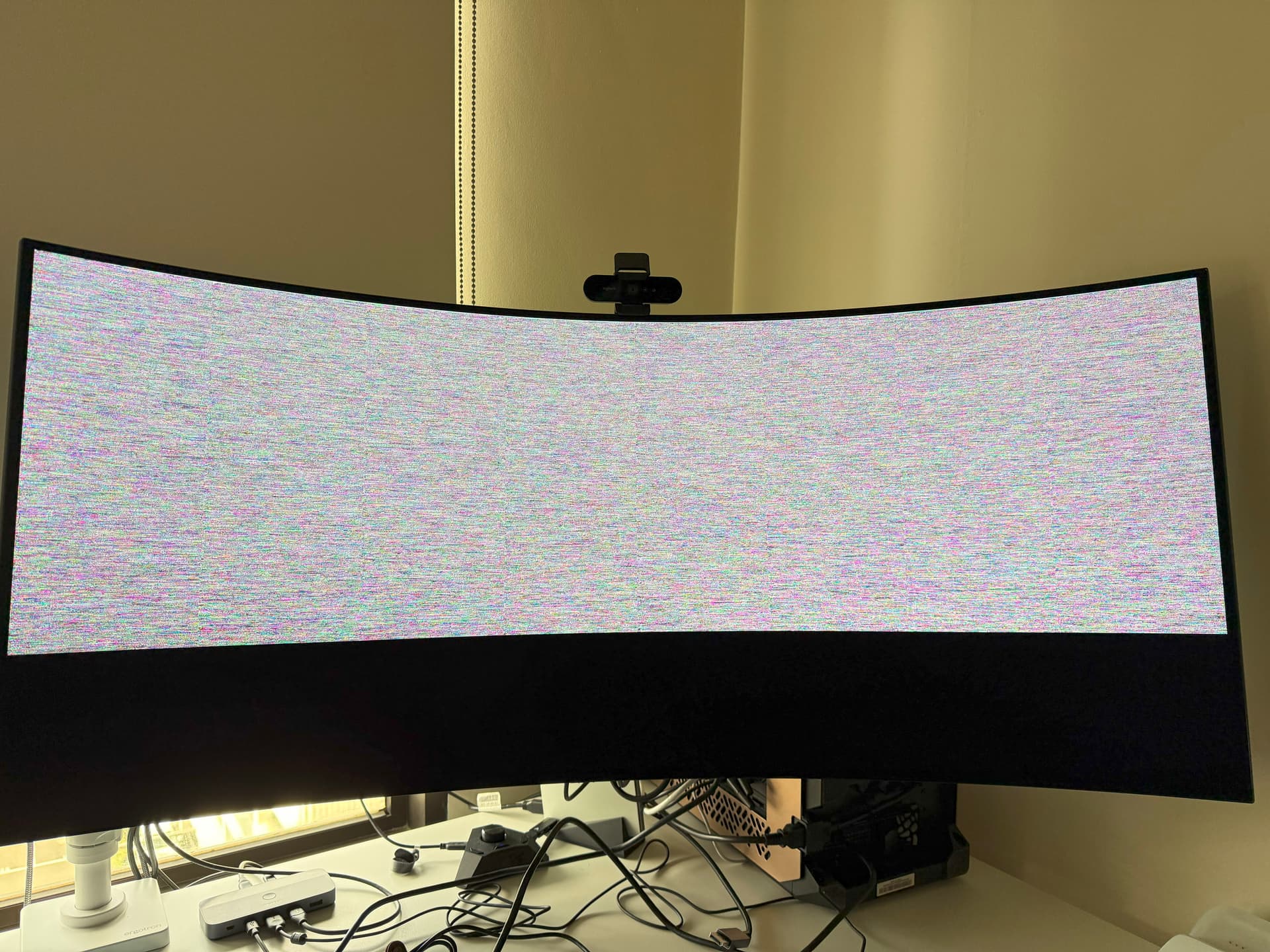
I have a 5090 and LG 45GX950A and it can’t run 5k2k at 165Hz on driver 580. Tested on Arch.

Could you be more specific? Does the option not show up? Are you using hdmi or display port? Have you tried both? Please include more details.

I tested this using hyprland and sway by manually setting the resolution and refresh rate in the configs. Before upgrading from a 4080 to a 5090 I had the error where it was out of mode and it would never show anything. Since going to the 5090 I can set the setting to 5120x2180@165 but that would result in corrupted output (photo attached)

There is no issue with DisplayPort however DP causes very poor resolution when POSTing and in UEFI mode.
I can install 580 today. I get a segfault error in dmesg when changing from HDMI 100hz to 165hz

[ 45.574715] Bluetooth: RFCOMM ver 1.11
[ 45.697953] usb 5-2.2: reset high-speed USB device number 3 using xhci_hcd
[ 46.225681] r8169 0000:04:00.0 enp4s0: Link is Up - 2.5Gbps/Full - flow control rx/tx
[ 48.253465] systemd-journald[694]: /var/log/journal/2e2eeba6e36142bc82acffb089e65aaa/user-1000.journal: Journal file uses a different sequence number ID, rotating.
[ 49.043450] Loading of module with unavailable key is rejected
[ 49.224832] kauditd_printk_skb: 141 callbacks suppressed
[ 49.224835] audit: type=1400 audit(1757093395.304:155): apparmor=“STATUS” operation=“profile_load” profile=“unconfined” name=“docker-default” pid=2913 comm=“apparmor_parser”
[ 49.262011] evm: overlay not supported
[ 49.344515] Initializing XFRM netlink socket
[ 76.016777] cinnamon-settin[3456]: segfault at 7fff1bad7ff8 ip 00007bcc07c60d57 sp 00007fff1bad8000 error 6 in libc.so.6[7bcc07c28000+188000] likely on CPU 15 (core 7, socket 0)
[ 76.016789] Code: fa 16 00 e8 bb a5 fd ff 66 2e 0f 1f 84 00 00 00 00 00 90 f3 0f 1e fa 8b 47 20 85 c0 0f 84 9a 00 00 00 55 48 89 e5 41 56 41 55 <41> 54 49 89 d4 53 48 85 d2 74 7e 49 89 fd 49 89 f6 48 8b 7f 08 eb
[ 140.454354] cinnamon-settin[3925]: segfault at 7ffce1ddaf80 ip 000075aa92c690a7 sp 00007ffce1ddaf60 error 6 in libc.so.6[75aa92c28000+188000] likely on CPU 13 (core 5, socket 0)
[ 140.454365] Code: 00 66 90 f3 0f 1e fa 55 48 89 e5 41 57 41 56 49 89 d6 41 55 49 89 fd 41 54 41 89 cc 53 48 89 f3 48 89 df 48 81 ec f8 04 00 00 <48> 89 b5 00 fb ff ff be 25 00 00 00 89 8d 0c fb ff ff 64 48 8b 04
(base) user@mint:~$ nvidia-smi
Fri Sep 5 19:32:36 2025
±----------------------------------------------------------------------------------------+
| NVIDIA-SMI 580.76.05 Driver Version: 580.76.05 CUDA Version: 13.0 |
±----------------------------------------±-----------------------±---------------------+
| GPU Name Persistence-M | Bus-Id Disp.A | Volatile Uncorr. ECC |
| Fan Temp Perf Pwr:Usage/Cap | Memory-Usage | GPU-Util Compute M. |
| | | MIG M. |
|=========================================+========================+======================|
| 0 NVIDIA GeForce RTX 4080 Off | 00000000:0A:00.0 On | N/A |
| 0% 33C P5 21W / 320W | 1188MiB / 16376MiB | 38% Default |
| | | N/A |
±----------------------------------------±-----------------------±---------------------+

±----------------------------------------------------------------------------------------+
| Processes: |
| GPU GI CI PID Type Process name GPU Memory |
| ID ID Usage |
|=========================================================================================|
| 0 N/A N/A 2115 G /usr/lib/xorg/Xorg 459MiB |
| 0 N/A N/A 2936 G cinnamon 419MiB |
| 0 N/A N/A 3523 G /usr/bin/nextcloud 3MiB |
| 0 N/A N/A 4251 G /usr/lib/firefox/firefox 229MiB |
±----------------------------------------------------------------------------------------+

Using DP@165hz I also still get the artifacts, feels less than I remember, but still

1 Like

I have the same issue and have found temporal solution change Prefer efficiency to Prefer color accuracy.

Driver Version: 580.82.07