Isaac Sim Version
Test on Isaacsim 4.5 and Isaacsim 5.0
Operating System
Ubuntu 22.04
GPU Information
Topic Description
I have a USD file where I spawn the robot at (–3, 0, 0.35) by setting the Transform “Translate” property. After hitting Play, the world pose of my base_link looks correct (see screenshot below).
I also set up an Isaac Compute Odometry node in Omnigraph, but its output
position isn’t the world position I want. It seems the odometry node is computing the movement of
base_link relative to the world and treating
base_link itself as the odometry origin (the
z value in the Outputs
position stays near zero).
After moving the robot, the Odometry node appears to be working correctly as well.
After moving the robot, the Odometry node appears to be working as well (
global_vel stays zero through).
I’m not sure if this is expected behavior. Is there another way to publish the
base_link world pose in an action graph, or is my method of spawning the robot incorrect?
@revesreveilles Yep that is expected! You can try to visualize your TF tree using the command ros2 run tf2_tools view_frames and you should see the TF odom->base_link (similar to the screenshot I attach here). The odometry is computed under the odom frame and its origin is where you spawn the robot.
If you want to get the robot pose in the world frame, you will need to know the TF world->odom, which is based on the position you initially spawn the robot. Then you can do some transformation to get the robot pose in the world frame.
Thank you for your reply!
I followed the tutorial from ROS2 Transform Trees and Odometry to set up the world -> odom TF. And i have changed the odomFrameId to map, which I believe shouldn’t cause any issues. The specific TF looks like the image below.
frames_2025-08-05_12.10.28.pdf (15.1 KB)
Here is the .usd file of my OmniGraph — maybe you can take a look and see if there’s anything wrong?
Attached below is the OmniGraph .usd file I’m using to publish odometry.
Graph_test.zip (4.6 KB)
Hey @revesreveilles I am not sure I fully understand your question.
Please change the name of odomFrameId to odom instead of map because that would be a little bit confusing.
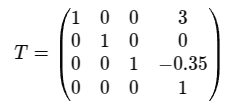
Let’s say the odomFrameId is odom, then the odometry data is calculated under the frame odom. The origin ofodom frame is where you spawn your robot when starting the simulation. In your case, it is (–3, 0, 0.35) under the world frame. So the transformation matrix from world to odom is
So before you move your robot, the output of odometry should give you position (0,0,0) because it is under odom frame. The position would change while you are moving the robot.
If you want to know the odometry in world frame, you can do the conversion with the transformation matrix.
So maybe I misunderstood your question, could you please clarify more? Thanks!
Hi @zhengwang,Thank you for your reply!
You are right — setting odomFrameId to map can indeed be a bit confusing. The reason I did this initially is that I wanted to obtain the robot’s true pose in the map frame, and treating map as the global frame. So I added a world -> map in Raw Transform Tree Nodeand kept the translation set to its default value because I wanted the map and world frames to coincide.
After reading your reply,I realized that this approach was indeed not ideal. So I changed the odomFrameId to odom to avoid confusion.
Tf tree is shown below:
frames_2025-08-14_14.39.59.pdf (15.0 KB)
Now the situation is:
As you mentioned, the odometry output is indeed in the odom frame, so the position starts at (0, 0, 0).I could manually add the transform matrix to the /odometry topic data to convert it to the world frame, but this kind of hardcoding doesn’t feel very elegant.
I wonder if there is a better way to get the robot’s (base_link) position and velocity directly in the world frame and publish them through a ROS2 topic — or something similar to GetEntityState in Gazebo service.
I hope i have make that clear.Please let me know if you have any questions.
Any pointers or examples would be greatly appreciated!
Hi @revesreveilles! Thanks for your explanation! Maybe you can take a look at the matrix multiply node. You can set up your transformation matrix based where you spawn your robot and the vector based on the odom pose.
Hello there, @zhengwang thank you for your reply, and sorry for getting back to you so late.
I tried the “read prim attribute” method you suggested. However, I found that this approach can only read the xformOp::translate, which seems to be the local coordinates (the values shown in the Translate field of the prim), rather than the _worldPosition values shown in my previous screenshot. Please see the figure below:
I was following this tutorial on Publish Object Pose. Perhaps I missed a step somewhere?
Hey @revesreveilles sorry my bad. It is not pose in world frame. It is pose in parent frame. You will still need to transform it into world frame if your robot’s parent frame is not world frame. Let me edit my previous reply.
Just for clarification, is mm_ur3_ogn your robot? For the read prim attribute node, why don’t you use /World/mm_ur3_ogn?
Thank you for the reminder! @zhengwang
I have already tried setting /World/mm_ur3_ogn as the input Prim for the Read Prim Attribute Node. However, the output is not the robot’s pose in the world frame as I expected. Instead, it only gives me the fixed value of the robot’s initial position under Translation, and this value does not change even when the robot moves, as shown in the second image below.
And the output stills
@revesreveilles could you please share your USD file with the Read Prim Attribute Node?
Hi @zhengwang ,I’ve sent you a private message with the requested USD file. Thank you for your interest, and please feel free to let me know if you need any further assistance.
Hey @revesreveilles ! Sorry to get back to you late. I tried your files and it seems working fine. In the video, I moved the robot around (translation and rotation), the Read Prim Attribute Node gives the world pose. Not sure if I misunderstood you in some way.
Hi @zhengwang ! Thank you for your reply, and sorry for getting back to you so late - just got back from my vacation. From your video, it does seem that the ‘world pose’ is being correctly output. I’ll go back and check where the issue might be in my setup.
Hello!
We noticed that this topic hasn’t received any recent responses, so we are closing it for now to help keep the forum organized.
If you’re still experiencing this issue or have additional questions, please feel free to create a new topic with updated details. When doing so, we recommend mentioning or linking to this original topic in your new post—this helps provide context and makes it easier for others to assist you.
Thank you for being part of the NVIDIA Isaac Sim community.
Best regards,
The NVIDIA Isaac Sim Forum Team