So, is it possible to run the nano with a Lipo3S → UBEC 5V3A → GPIO pin?
Does the board require a jumper for that aswell?
I’m running the Nano with a Lipo 2S and a Pololu 5V5A buck regulator. You probably want to get something that can handle at least 4A, preferably more.
Would you be kind enough to post a link with pictures and/or wiring diagram. I am sure it will be helpful to a lot of us (who are a bit scared about h/w in general)
I think
I posted it earlier, but I think it got lost in these pages of discussions. Here it is again:
Other things I use, but you can do whatever you want:
-
JST EH 5-pin right angle header
https://www.digikey.com/products/en?mpart=S5B-EH(LF)(SN)&v=455 -
JST EH 5-pin plug
https://www.digikey.com/products/en?mpart=EHR-5&v=455 -
crimps for plug above
https://www.digikey.com/catalog/en/partgroup/eh-series/8652 -
PA-09, crimp tool for above plug
ENGINEER PA-09 Precision Micro Connector Crimping Pliers 175mm. Made in Japan. Crimp AWG #32 to #20 Wires across 100 Different Terminals & D-Sub Connectors Contacts - Electrical Crimper Micro - Amazon.com -
5.5x2.1 pigs, cut short to avoid voltage drops, crimp into VOUT/GND above (sigh I wish NVIDIA didn’t use stupid barrel connector, XT30U or screw terminals would have been great choices)
Amazon.com : SIM&NAT Male DC 2.1mm x 5.5mm Wire Power Pigtails Adapter Barrel Plug Socket Cables for CCTV Security Camera, DVR, Car Rearview Monitor System Video, LED Strip Light, Surveillance (20 inch / 50 cm) : Electronics -
Use whatever power input pig or connector/cable for VIN/GND that connects to your Lipo. Make sure you make proper crimps. I also suggest making +/- wires very slightly different lengths so that if it gets pulled out of the crimp they will not short because of being the same length.
-
You don’t need to connect EN.
@wuxiekeji Thanks for the links. If possible please show us a picture of your full setup too (i.e LIPO battery polou regulator barrel jack … nano).
Seems to be withing tolerances for the connector in any case it’s been fine for a month now.
@tobias.kreidl I agree that 4A would be enough for normal operations, peripherals like keyboard & mouse; I wonder whether it would suffice when we power hungry cameras & HDDs. Hence, it would be great if @Nvidia could come up with details of overdraw protections to know how far we can push.
I’ve seen with Raspberry pi that I always find something needing more power than the adapter could provide.
Does Jetson nano display anything equivalent to the ‘lightning symbol’ as in RPi when the power is not sufficient?
@jithu83
Here’s my setup. It’s a robot so there’s more stuff in there than you need to get going obviously.
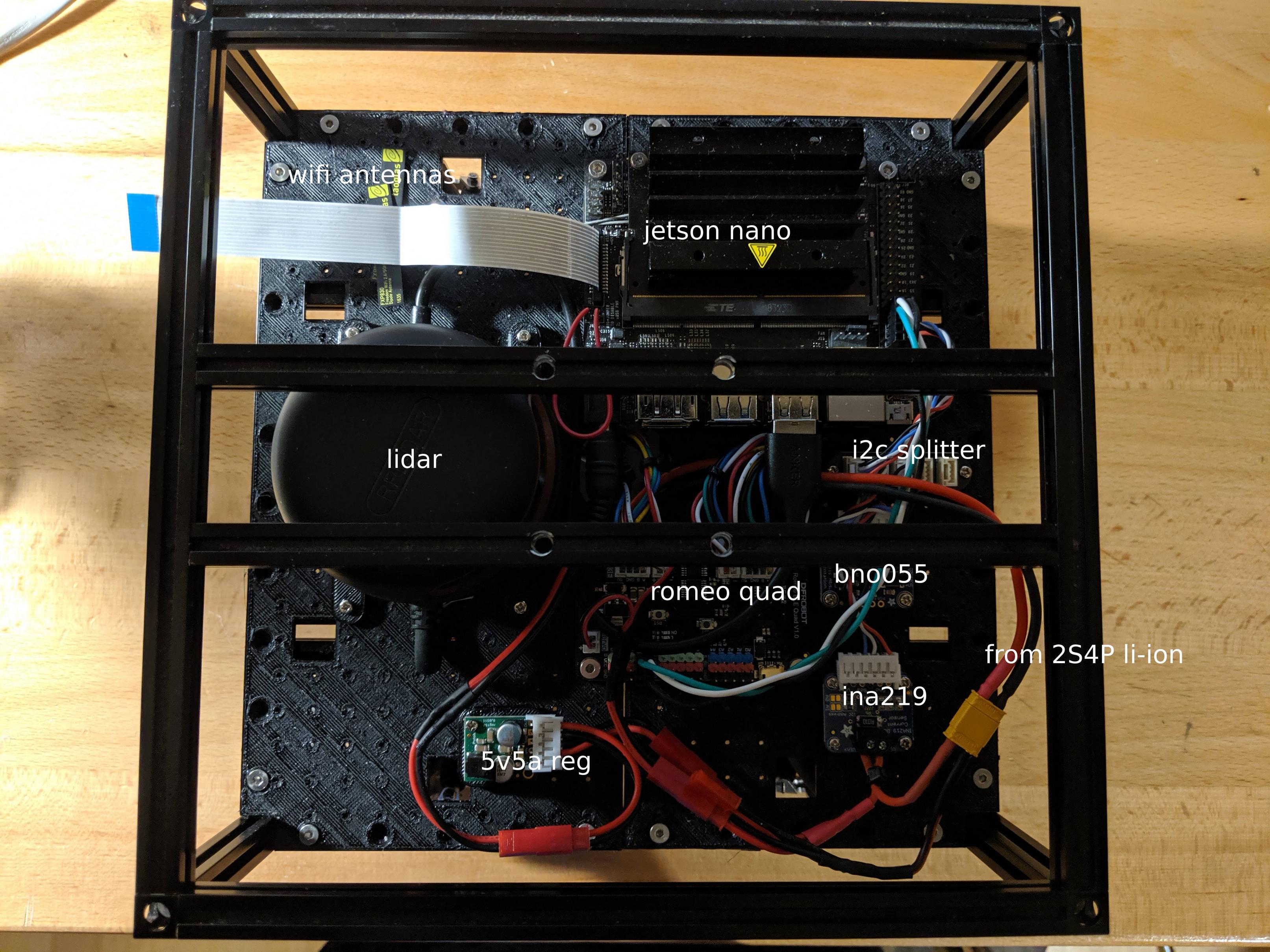
Power from Li-Ion comes at the “from 2S4P Li-Ion” wire. The Li-Ion battery is on the bottom of the robot so you can’t see it from above.
There’s an INA219 current monitor right after the Li-Ion. You can skip that. Then I split into 3 JST-RCY connectors to power various other things. You can skip that too. There is also a JST-RCY mated connector after the 5V5A you can skip. You can go straight from 5V5A regulator to barrel connector.
Hi, we are facing issues with the Jetson Nano. When powered with micro-USB the Nano is almost unusable. It crashed several times and is just turning off, e.g. during software update. The mouse don’t move when running a Full HD Video on Youtube. The overall experience with Ubuntu is bad and everything is very laggy. I tested multiple chargers with 2.4A. Mouse and Keyboard are connected via an active USB hub.
Is this a normal behavior that can occur when charing via USB or is sth. broken with my Nano?
Thanks in advance!
IS the powerjack secured against reverse polarity?
Hi ar3k, have you tried this recommended Micro-USB power supply from the Supported Componets list?
You could also try measuring the voltage of your current power supply, if it dips below 4.75V under load, then the Nano may brownout and shutdown. We have noticed some Micro-USB power supplies do not have stable voltage regulation (presumably because those supplies are meant for charging cell phones)
@ar3k Many supplies have thin wires that cause excessive voltage drop when the full current is drawn, hence the need to check the voltage under load.The first supply I tried had this problem.
Well, I can drive my nano into a wall, with Chrome and IDEA running. Chrome is a gigantic memory hog. Also, I already have /home on an external SSD to reduce load on the microSD card, which really isn’t the fastest of intefaces. It can get laggy, sometimes. Also, what I noticed is that the airwaves around the nano are not very clean, making it hard for a bluetooth mouse to work properly. But what do you expect from unshielded electronics working at GHz speeds… ;) If you intend to use it as a small workstation, try using a barrel jack PSU, it has thicker wires and should deliver up to 4A. Please consider that peripherals can also consume power, easily up to 10 Watts, which would be above the allowed power envelope (5V 4A). Usually it’s just computing away, though.
It is not protected against reverse polarity and reverse polarity will damage the board, so when using the DC barrel jack please take care to use a power supply that is center-pin positive.
Wouldn’t it be ok to use a power supply that is rated for a higher amperage than 4a as long as the output is 5v? Computer PSU’s have 5v that typically is ~20a. https://c1.neweggimages.com/NeweggImage/ProductImageCompressAll1280/17-104-075-20.jpg
I would think this would be ok…?
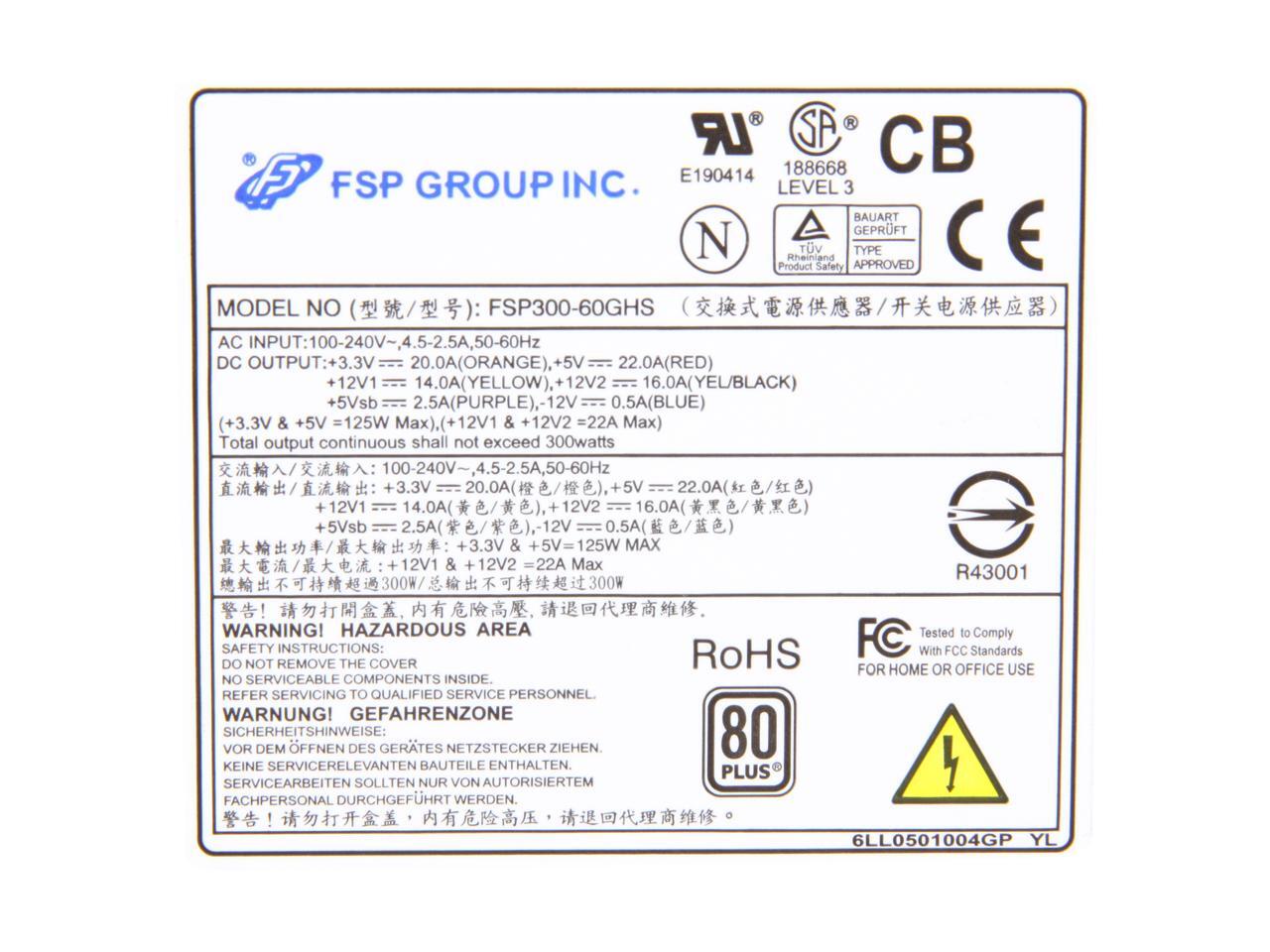
You can probably do that but it is overkill – you just made your “Nano” 50X bigger. Also you need to jumper two ATX pins to have it turn on.
I would seriously test the Computer PSU by putting a 2.5 Ohm, 10 Watt load resistor on the 5 Volt output and measure the voltage. That is a 2 amp load.
Most Computer PSU’s have poor regulation at light loads. And the 5 Volt output is not the primary output so I would think that it has even poorer regulation.
You can make a 2.5 Ohm Load by connecting 2, 5.0 Ohm, 5 Watt resistors in parallel.
Good Luck!
I decided to just order this and call it good. Thanks for the advice!
https://www.amazon.com/gp/product/B07K9Q4DV1/ref=ppx_yo_dt_b_asin_title_o01_s00?ie=UTF8&psc=1
@drewqm96r: Let us know how that works out for you, please.
Thanks in advance,
Over-current can damage the IC, if the the IC is not protected against overdraw, hence I’ve been asking @Nvidia about overdraw protection in nano (#99,#107) but they haven’t replied to it yet; but they have mentioned that DC barrel jack has over voltage protection (#59) so at-least voltage is not an issue.
If the current draw is limited by a fuse or voltage monitoring chip like in Raspberry pi then it cannot take in more current than what it is limited by. In that case, higher Amp power supply is just waste & perhaps it’s best if we use recommended power supply for quality reasons (as most high Amp 5V supply are of generic brands).
We need to have a maximum power draw document for basic board & for all USB ports like RPi has.