Hi,
I tried to increase the rate at which /imu topic is published in order to run OpenVins. Currently is the frame rate limited by the fps (which is around 20 due to 2 cameras).
I found:
But I could not make this work with ROS2. What do I need to do, to increase it to e.g 100hz?
I have set the following as mentioned:

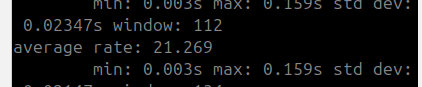
But I still only get around 20Hz which is the FPS of isaac sim
Thanks for your guidance
I have tried to use what is written here(On physics step in the omnigraph): https://docs.isaacsim.omniverse.nvidia.com/4.5.0/physics/simulation_fundamentals.html#stepping-an-omnigraph-short-with-physics, as I was not able to use any other python script and this looked like it would actually solve the problem directly.
However, the rate at which the imu data is published is still limited by the fps of the renderer:
I have now figured out that one can make it work with the omnigraphs.
For others here the solution:
- Can use Omnigraph
- Use On Physics Step and not On Playback as ticking element in the graph
- In the setting of the graphs who should use Physics time change the pipelineStage to use OnDemand
- Under Layer → physicsScene set the Time Steps Per Second to a high enough value (somehow does not correlate 1-1 to the rate then observed during publishing. E.g using 800 yields 180fps with 2 cameras publishing and 280 fps with one)
However, the published messages are extremely tightly after each other with a long pause in between the bursts:
What is the proper solution to mitigate this?
The above kind of worked in 2023.1.1, but when I try to do the same in 4.5 is the IMU data not published at a higher rate than the fps from the renderer.
How can one publish imu data in 4.5 with around 100hz? This is the key to be able to use VIO together with isaac sim and should therefore not be so hard to setup.
After now going back to 2023.1.1 does also this no longer work and the rate of the imu is again capped at the rate of the renderer.
Hi @yhofmann I can replicate what you are seeing. Let me reach out to the internal team and see what is missing here.
Hi @yhofmann! How are you checking the frequency of the imu message? Are you using ros2 topic hz? This one only calculates the frequency based on wall time and this is different from the simulated time. If you do ros2 topic echo, you would find that the time stamp aligns with the frequency you want the IMU to be published.
You can also check the time by creating a clock graph using ROS2 Publish Clock and On Physics Step.
Here is an example
Hi @zhengwang,
Thanks a lot, yes I was using that and sometimes this showed also higher rates than what was coming from the fps of the renderer, however not the rate from the physics step but some intermediate rate. I have set Time Steps per Second = 100.
I have my IMU graph which reads the sim time and uses on physics step
I also have the clock graph like you have shown which uses on physics step as well
Finally do I have the camera graph which creates the render and publishes the images with on playback tick
If I look now at the nsec of the timestamp of the imu and camera topic have both in the nsec message of the header the 0.01s step which I would expect for the IMU. However I do not want/expect it for the camera topics as they should be published a lot less frequently. Furthermore, here the Isaac Simulation Gate omnigraph element does not work at all.
Coming back to the timestamps, alse the IMU data is still not published at 100HZ, as one can see in the plot are there times which have for roughly 0.07s, what makes me believe then, that the imu data is not published at a stable rate and does not match with what to robot is experiencing (acceleration).
Here a plot showing for both on the one hand that if I use the time from the header the rate is now 100hz (which should not be for the camera) and that using the recording time they are again both back at the render time
What changes are required such that the imu data is reliably published at 100hz and the camera at a way lower rate (which I can specify)? And that the timestamps for each of them are actually the ones where the data is from.
Finally, I have observed that increasing the Time Steps per Second makes it that the simulation plays like slow-motion. As far as I have understood/experienced it does this setting somehow change the speed at which time passes. Is that correct and are there other consequences one should keep in mind next to the fact that the robots “move/fall down slower”?
May I know how you get the data imu/camera_frequency_received_rate? Did you calculate it or is it from foxglove setting?
@zhengwang, i get it by taking the time from when the message is received in foxglove (meaning from the bag, of course there is some offset but for the frequency calculation does this not matter):
const t = event.receiveTime.sec + event.receiveTime.nsec * 1e-9;
and for the header one by taking:
const t = event.message.header.stamp.sec + event.message.header.stamp.nsec * 1e-9;
@yhofmann Please don’t use the time you receive the message because this is the wall time. Please use the timestamp in the message header. Since you increase the IMU publish rate, the sim time may not align with real time.
@zhengwang, Alright so one should use the header time for both the camera and IMU topic. Therefore one could use rosbags but not the realtime simulation for further processing pipelines. One would then need to have two ros2 clocks to have a higher rate for the imu and a lower for the camera, where the problem of the simulation gate not working to lower the rate of the camera beeing rendered would still exist.
In consequence would this also mean that the simulation starts to slow down with higher number of timesteps per second for physics if one wants a high rate for the IMU.
Can you confirm that this is the best way to have use Isaac Sim to get high rate IMU data and rendered images?
Yes. When you are constraint on computation power but you want to achieve high frequency data, your simulation would be slower than real time. On the ROS2 side, please also make sure use_sim_time is true to align with Isaac Sim.
Hello!
We noticed that this topic hasn’t received any recent responses, so we are closing it for now to help keep the forum organized.
If you’re still experiencing this issue or have additional questions, please feel free to create a new topic with updated details. When doing so, we recommend mentioning or linking to this original topic in your new post—this helps provide context and makes it easier for others to assist you.
Thank you for being part of the NVIDIA Isaac Sim community.
Best regards,
The NVIDIA Isaac Sim Forum Team


