Hi @Richard3D and team,
I put 2 RTX 4060 into a windows 10 machine.
When starting USD composer or any other omnkit based app, such as web viewer, the CPU utilization goes to 100% and the apps are just stuck at startup.
Any advice?
Thanks,
Robert
Hi there and thanks for your question. The first thing to do is disable one card in the device manager and try again with just one card. If that works, then at least you know the system is working and kit is working.
Then, if that works, add in the second card. See how that goes. If make take some time to make the shader cache but not more than a minute or so.
Are you getting the RTX LOADING screen?
You may be using the latest drivers. That is normal, but you may have to drop back to older drivers.
As kit tries to start, look at the command prompt output and look at what it is stuck on. It will tell you exactly what it is doing.
Thank you @Richard3D ,
I’m using driver 537.58 on windows 10.
537.58-notebook-win10-win11-64bit-international-nsd-dch-whql
It’s a bit challenging to track the right version down.
Because of slightly different versioning and naming, it’s a bit confusing what’s recommended and what you can actually download.
I tried many. The 537.58 was the only one I could get to work.
What version is the right one and where can I download it?
I installed 2 GPU cards, and Composer starts.
It just takes a few minutes.
Both GPUs are recognized by the NVIDA control panel and the RTX desktop manager.
I set the preferred CPU for Composer to GPU 0, and for my 2 viewer server apps to GPU 1.
However, all 3 always use GPU 0, and after some time crash.
The CPU utilization overall is around 80% as soon as the kit applications run.
Occasionally, the 2nd GPU is used but then the viewer app produces an error.
I have to reproduce it but it was some connection error with !=1
How can I make the 3 apps use the available GPUs properly?
Thanks,
Robert
OK thanks for the information. Some questions.
-
You mentioned your driver is a notebook driver? You are on a desktop right?
-
Why are you setting the configuration manually in the control panel? That is for a very advanced set up and I don’t know that’s how kit will react to that. I would not advise trying to custom set GPU 0 for one thing and GPU 1 for another. Just completely reset the configurations back to default. Kit has its own way of handling this. The issue is that ALL templates run from one “kit.exe”. So it’s not really possible to say composer is app 1 and viewer is app 2. It’s all one app, Kit.exe.
-
Finally, you’re saying that you’re trying to run not one, not two, but three separate kit apps at the same time? This is almost impossible. This will, of course, cause any computer to crash. Kit is VERY demanding. I can barely run two kit apps, let alone three. I’m not sure what you’re trying to achieve, but I would just stick with running Composer only. Or running one viewer. But not three separate kit apps.
-
The final thing to point out is that you only have 4060s so you don’t have a lot of vram. There will be a limit to how much you can run at once. We really don’t recommend less than 12GB of ram. You have 8GB per card and you cannot combine them in kit.
Based on these questions, I am thinking that you are just are trying to do too much at once.
Why don’t you start by telling me your workflow and we can try to figure out what you should be running concurrently.
Hi @Richard3D
Thanks so much for taking the time and the detailed response.
The hardware is a Dell 5810, 64GB with two RTX 3060 (4 was a typo), 12 GB each.
I thought that the VRAM would add app if I install more GPUs and I can distribute VRAM hungry
apps across multiple GPUs.
How does kit use multiple GPUs?
Or asked differently, what’s a scalable architecture with many kit apps running?
Either with separate kit executables or shared kit executables.
2 kit apps run fine with one RTX card, e.g. USD composer and one viewer server app.
Running a third makes the apps crash, the computer is fine. I see that the GPU card
is hitting 10 Gigs with 2 apps.
I have 3 separate kit.exe that I run by just duplicating the whole kit directory structure. I resolve the symbolic links.
But maybe, it’s better to run them separately in docker containers, one per GPU?
I am creating a USD file with Composer and want render them in the 2 viewer apps.
I save 2 USD files and read them in the viewer apps.
My idea was to add another GPU and run Composer on one, and the viewer apps on the other. I understand you don’t recommend that.
Either way, the 2nd GPU isn’t used, if I run 1, 2, or 3 kit apps.
Independently if I set the preferred option or not.
That’s what I find weird.
This is the message I get when running a second viewer:
[Warning] [carb.livestream-rtc.plugin] onClientEventRaised: NVST_CCE_DISCONNECTED when m_connectionCount 4294967292 != 1
Thank you!
what’s strange is, is that I can run 3 kits with one GPU.
The rendering flickers a bit but nothing crashes.
When I run the same with two GPUs, the whole computer crashes, sometimes only the apps.
I followed your advice and use the shared kit.exe for all 3 apps in a 2 GPU system. I reset to defaults for preferred GPU
The first 2 apps start fine,
The 3rd, USD composer, gets beyond the RTX loading screen and I see the grid but then the whole computer crashes.
It’s really curious. With one GPU the system doesn’t crash when running 3 kit.exe applications, and is stable, just the rendering flickers.
With 2 GPUs, I haven’t found a configuration yet, that is stable.
Ok so the first point to make is that we cannot “stack” vram memory like that, no. You could have 8 GPUs and it still remains at the LEAST amount of memory available. This is because we can only use multiple gpus for processing, not for memory stacked together. If you have a really complex task, the kit software can efficiency distribute the processing requests across multiple gpus, BUT, it all has to fit in the smallest card vram you have.
For example, we have people that have a 3060 8Gb and then they add a 24Gb 4090 and wonder why it is only using 8Gb. It is because we look to the weakest card. All cards have to share the file, so all cards must bend to the weakest card. Solution: Remove the weakest card.
In your case at least you have the 12GB versions, but a 3060 is just barely on the threshold of what we can use. And because they don’t stack, 12Gb is it.
Moving on, I am still completely unsure as to why you need so many kit apps open. I have used kit everyday for 2 years. Always with one kit app open, USD Composer. Very rarely I had to test it with USD Viewer at the same time. I have a 3090. It barely worked. 3 apps would certainly make my system crash. It certainly explains why your CPU is at 100%
So hardware aside for moment. What three apps and why? What is your intended workflow?
And finally, if things are more stable with just one card, then just use one card. Disable the second card in the Device Manager, or just remove it completely from the system if that is all you are trying to use it for.
That’s great information @Richard3D, thank you!
I’m authoring with composer and streaming different camera positions with the viewers.
Maybe there’s a more efficient way to do that?
Composer and viewer have to be on the same machine so the written files can be shared and kept open all the time.
I couldn’t find another way.
You are just watching camera views? So just watch them directly IN Composer. There is no need to stream viewports from one app to another on the SAME computer. That is used to stream viewports remotely to someone or somewhere else. If you just want to watch different cameras at the same time, just open up more viewports. 1, 2, 3, 4. As many as you want but all in ONE Composer. If you have multiple GPUs the kit app automatically assigns viewport 1 to gpu 1 and viewport 2 to gpu 2. There is no need to use external viewers.
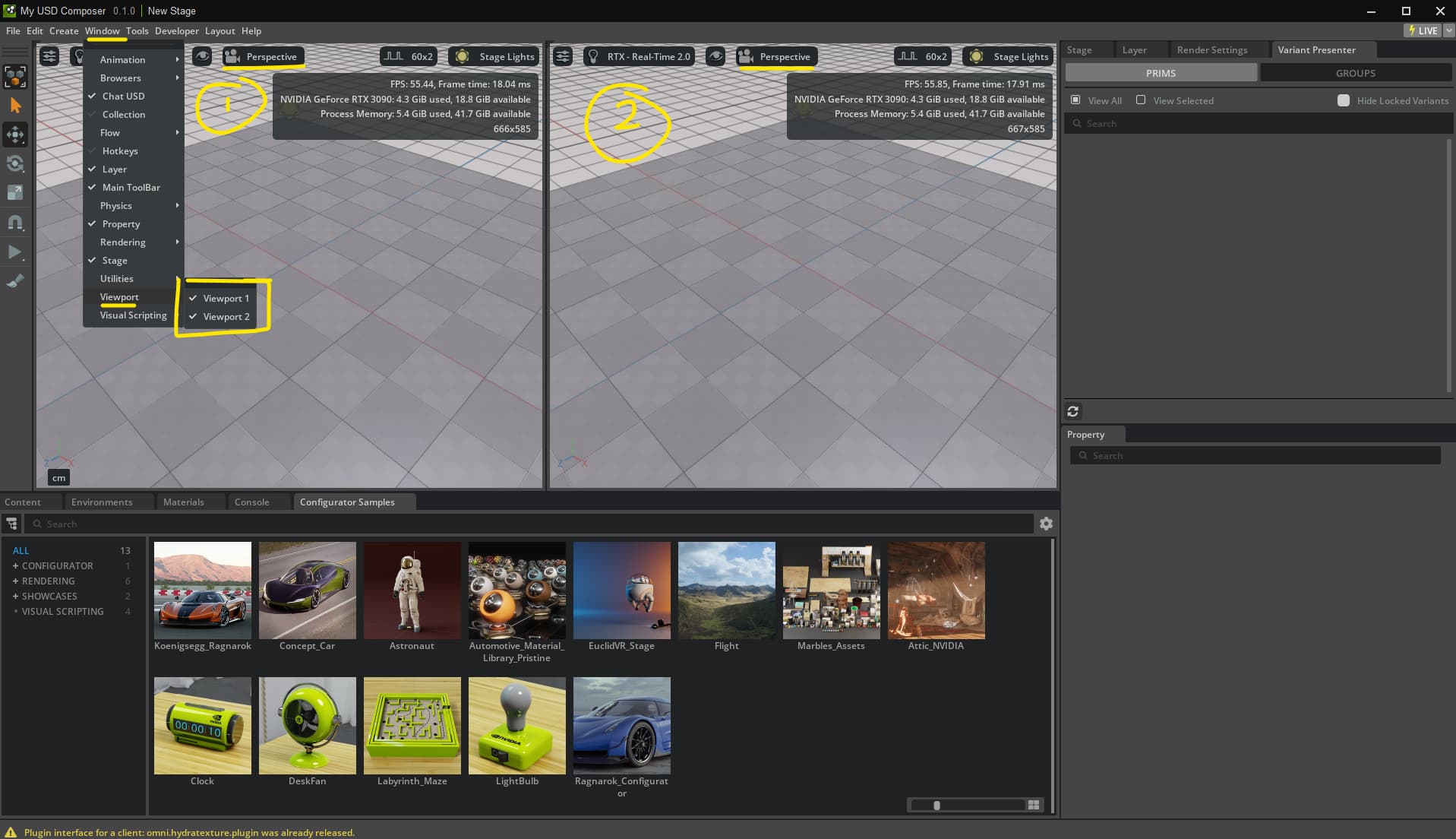
That’s good to know @Richard3D Thank you.
However, i need to stream those different views to other machines.
Yes that is fine. Streaming to another machine is using a second CPU and GPU. It can handle the load. But viewing your stream on the same machine, whilst a good initial test, is ultimately too much on the same system. That is why when you do this, you want to run the first session, “headless”, meaning no window. So now you know it works, boot up another machine and stream it there. But to be honest, you do not need USD Viewer for that. Just open a web browser. We are really focused on web streaming. USD Viewer can do it, but is is not required.
Following this tutorial
@Richard3D What do you mean by “just open a web browser”?
I thought the USD viewer streaming app, i built it from the github templates, is required?
I’m not sure how I would get the created USD that is continuously updated in composer to be viewable on another machine.
Also, even when I do not run the browsers for viewing on the same machine but just composer,
the 2 viewing servers and apps, they crash, because the run of of memory.
So I’m not sure how running the browsers that load the viewer apps, on a different machine would hell
Well it is all in that video. Streaming is best done from a kit app directly to a web browser. On the same machine you can do it “headless” so you are only running one visual session. We have built special code just for that. GitHub - NVIDIA-Omniverse/web-viewer-sample: This sample demonstrates how a front-end client can present a streamed Omniverse Kit application and how to send messages between the two apps.
No, you do not need a second kit app like USD Viewer to receive a stream from a kit app. You can just send it over an http IP. See video.
I know. I am using that sample and I have the kit app and the webviewer up and running.
Here’s summary of the architecture:
Machine A runs:
USD Composer - authors and updates USD file
1st web server kit app - reads the USD file (backend)
2nd web server kit app - reads the USD file
1st web viewer vite app - receives stream from 1st (frontend)
2nd web viewer vite app - receives stream from 2nd
with a 12 GB GPU 3060 I am able to run 2 kit apps.
e.g. Composer, 1st web server kit app, 1st web viewer vite app
running the 2nd viewer pair, crashes the system
Adding another GPU reduces stability a lot.
Machine B runs:
1st Browser window connecting to 1st web viewer
2nd Browser window connecting to 2nd web viewer
Ok thanks for the details. So we only can support ONE viewer, per stream, per session. We do not support multiple streams from the same kit session, nor multiple viewers. So one kit, into one, stream, into one browser. It is a direct Peer-to-Peer system. There is no “wide band” solution.
So based on this you cannot have a 1st and 2nd web server or web viewer. You can have one.
Why don’t you go further and tell me what it is you are actually building. Not how it works, but what it is? Are you an Enterprise client? Are you building a custom app? Custom solution? For what platform? Cloud? These details help me understand your workflow and intent, not the technical issues right now. Because currently your approach will not work. For example, there is not need to have a web server and a web viewer. Why? Just have a web viewer, viewing the kit app. And why would you need two copies?
I’m still exploring and trying to understand architecture and capabilities of Omniverse.
Despite reading the documentation , watching tutorials, Omniverse is a huge ecosystem with a lot of details to discover.
Just to clarify. I think what I call web server, you call kit app.
The github example has 2 parts: the backend server (kit app - GitHub - NVIDIA-Omniverse/kit-app-template: Omniverse Kit App Template) and the frontend (vite based - GitHub - NVIDIA-Omniverse/web-viewer-sample: This sample demonstrates how a front-end client can present a streamed Omniverse Kit application and how to send messages between the two apps.).
At least that’s my understanding and that’s how I got it to work according to
Overview — Guide: Embedded Web Viewer
In my understanding they run as a pair, each pair providing a stream.
I can run multiple pairs on the same machine, limited by GPU VRAM.
I want to serve different camera perspectives without manually selecting one, so I need one pair for each camera. Maybe there’s a simpler way.
Any hint would be appreciated.
Thanks!