When I combine the thick_glass_v2 and OmniSurfaceBase materials using OmnisurfaceblenderBase and output them on mdl:surfaces, why can adjusting the base of OmniSurfaceBase, when its weight is higher, control the translucency of the object? It seems that light can penetrate the object and illuminate the cube behind it. But when I increase the weight of thick_glass_v2, although the object gains a glass texture, it can no longer transmit light, and the object behind the glass cannot be illuminated. How can I make the object both appear to have a glass texture and allow light to pass through?

HI @shilelieming
this part of the forum is only for vMaterials, not materials in general.
I informed a moderator to redirect your post. So you will get a better answer about how to set up this material and the scene.
Otherwise, I show you vMaterials and RTX -Accurate (Iray). I build a quick scene that replicates your scenario.
Iray and vMaterials are made for physically correct behavior. Out of the box, it works.

I think the issue is that you’re trying to blend two separate glasses together each one with its own unique properties. You are better off sticking to a standard pre-built glass. The standard glass should allow light transmission and refraction correctly.
@shilelieming Super. A better area to get a good answer.
Thank you very much. I tried to find the list and materials shown in your picture, but I can not find the same items in my isaac sim. I installed 2 versions of isaac sim. One is in Ubuntu, isaac sim 2022.2.1, here i can find the Material tab page at the bottom of the window, however, there is no VMATERIALS_2 and only VMATERIALS and there is also no material under the VMATERIAL, so i cannot find the material you used.
Furthermore, the situation of my isaac sim on Windows, whose version is 2023.1.1 is much worse. I cannot even find a material tab page in the main window of my isaac sim.
i show the situation snaps into one picture here, i would appreciate if you could do me a favor.

I actually want to simulate a scenario where there is a flexible glass with a pattern on it. However, when I tried to set up the scene, I encountered two problems. The first is that the glass I created is not transparent and even casts shadows just like base materials. In other words, when the light source is on the same side as the camera, I cannot see through the glass to observe the sticker on the other side of the glass or objects behind the glass.
The other problem is that I don’t know how to simulate the sticker. I want to attach the sticker to only one surface of the glass block (which has six surfaces) and have it visible from the other surfaces.
Those bother me for about 2 weeks, I sincerely hope someone can help me solve these problems. Thank you very much.
i also provide a very very simple usd file example to show my problem. the glass material here i used is OmniGlass.
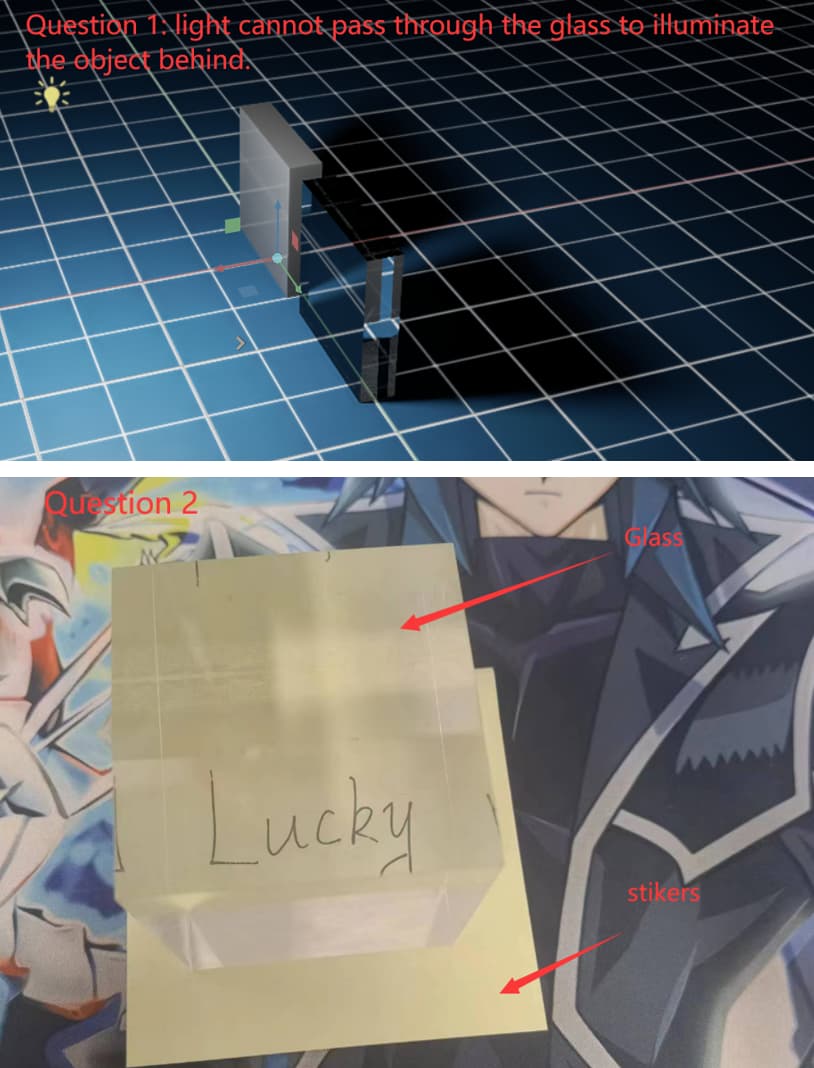
usd4forum.zip (3.5 KB)
Ah… you are using Issac Sim. This is the issue for sure. Issac Sim, whilst built on the same RTX platform, is not nearly as powerful for actual rendering as USD Composer. Issac Sim is amazing for simulation of the physical world and robotics, but for more advanced rendering features you are much better off downloading USD Composer.
The realistic shadows through glass can be better acheived by turning “fast refraction shadows” on the mesh itself and using Path Tracing to render.