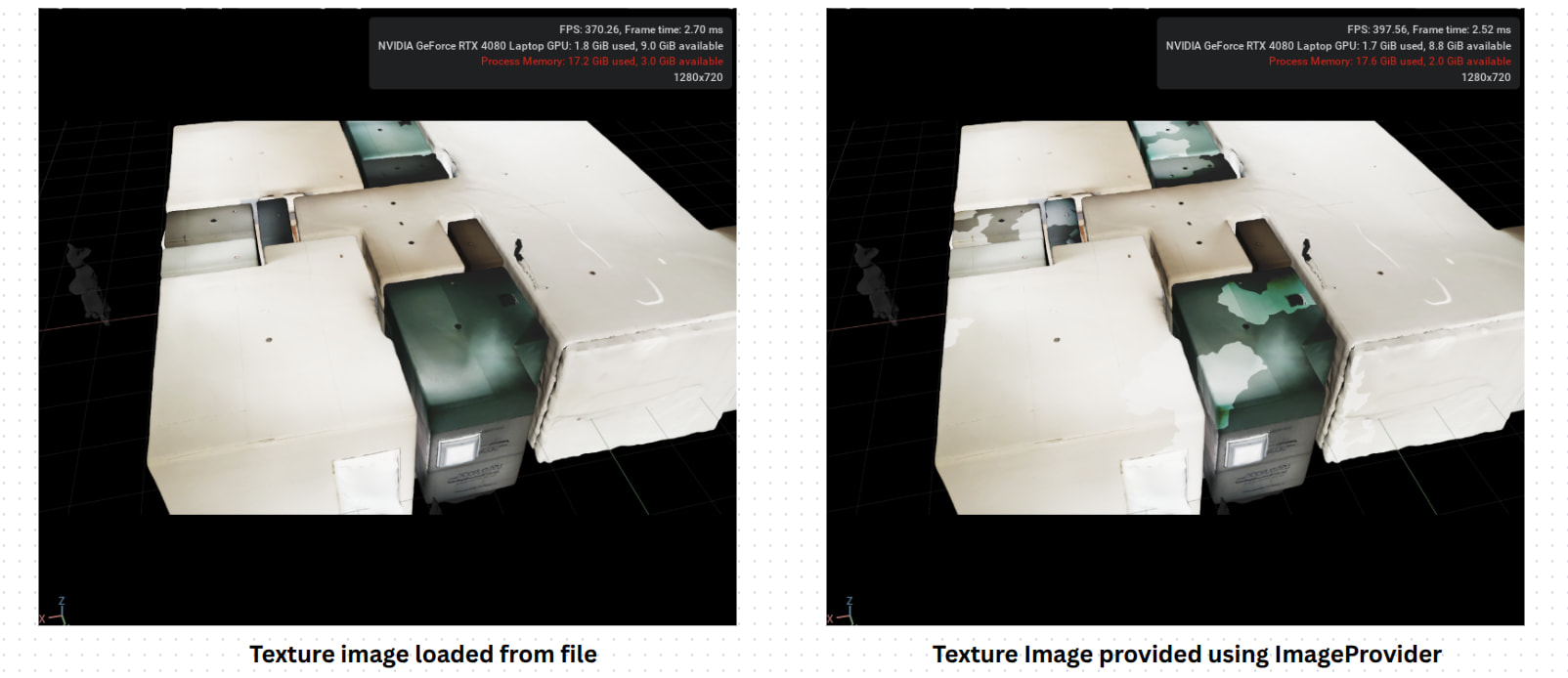
I’m seeing texture issues when I apply a material using a dynamic URI. As shown in the image, after running the attached script in the Script Editor, the texture appears washed out / lighter than expected.
This was tested in Isaac Sim 4.2. I’ve also attached the USD file (included in the zip) for reference.
Please change the path of textures_path as required.
site_merged.zip (25.3 MB)
import sys, os, cv2
import numpy as np
import omni.usd
from pxr import UsdGeom, Usd, UsdShade, Sdf
import asyncio
import omni.ui as ui  # pylint: disable=E0401,R0402
import warp as wp  # pylint: disable=E0401


def _upload_to_gpu(img_np, texture_provider):
    """Upload numpy array to GPU and update texture provider - GPU-only version"""
    # Convert to Warp tensor and store as the single source of truth
    gpu_texture = wp.array(img_np, dtype=wp.float32, device="cuda:0")
    texture_width, texture_height = img_np.shape[:2]
    texture_provider.set_bytes_data_from_gpu(
        gpu_texture.ptr,
        (texture_width, texture_height),
        format=ui.TextureFormat.RGBA32_SFLOAT,
    )

async def _set_diffuse_async(mat_path: str, uri: str):
        await omni.kit.app.get_app().next_update_async()
        await omni.kit.app.get_app().next_update_async()
        stage = omni.usd.get_context().get_stage()
        mat = UsdShade.Material.Define(stage, mat_path)
        shader_path = f"{mat_path}/Image_Texture"
        shader_prim = stage.GetPrimAtPath(shader_path)
        shader = UsdShade.Shader.Get(stage, Sdf.Path(shader_path))

        omni.kit.commands.execute(
            "CreateUsdAttributeCommand",
            prim=shader_prim,
            attr_name="inputs:file",
            attr_type=Sdf.ValueTypeNames.Asset,
        )

        input_attr_dt = shader.GetInput("file")
        input_attr_dt.Set(Sdf.AssetPath(uri))

async def update_async():
    await omni.kit.app.get_app().next_update_async()
    await omni.kit.app.get_app().next_update_async()

uri = f"dynamic://spraytexture_test01"
texture_provider = ui.DynamicTextureProvider(uri[10:])

mat_path = "/root/_materials/material_1"
asyncio.ensure_future(_set_diffuse_async(mat_path, uri))
asyncio.ensure_future(update_async())

texture_01 = "421fe07076d71f722b60b86b86fd493b_color.jpg"
textures_path = "/root/sim_ws/src/10xSim/site_merged/textures"

img_np = cv2.imread(os.path.join(textures_path, texture_01))

# img_np should be in RGBA format with 0-1 range
img_np = cv2.cvtColor(img_np, cv2.COLOR_BGR2RGBA)
img_np = img_np.astype(np.float32) / 255.0
print("shape of img_np: ", img_np.shape)
img_np[:, :, 3] = 1.0
_upload_to_gpu(img_np, texture_provider)