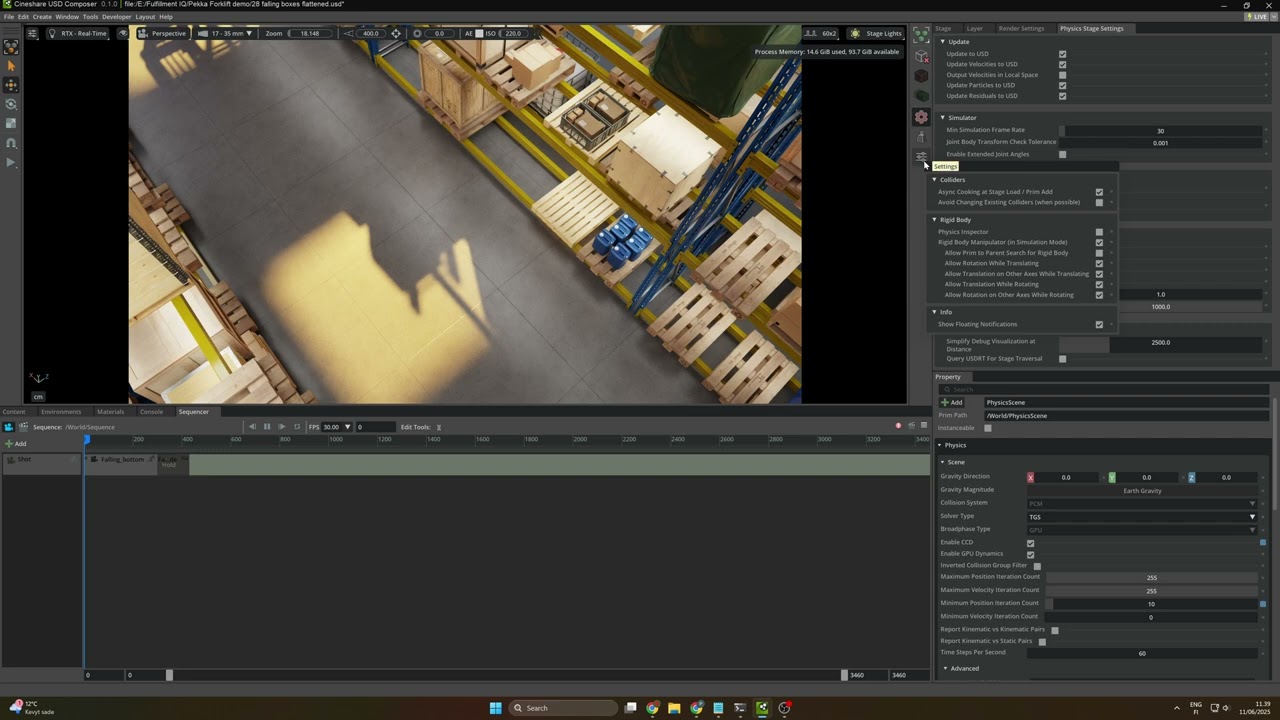
Does the physics scene still run ok? It still works fine? Do you have the physics bundle installed? You can just go to the master physics scene settings which is part of the Physics Bundle. Make sure there are no filters on the Stage Tree. Click the 3 lines button and turn on all of the other modes to make sure it not hidden.
Thanks! Yes it runs ok, and I think the installation of Physics Bundle did bring the needed windows and setting to raise the accuracy..
See here:
I still cannot see the “PhysicsScene” -element in my stage, but I now see the window called:
Physics Stage settings so I shoudl be able now to follow the doc to raise the sim accuracy?
I think this should help with the collision clipping that I sometimes see with this scene:
"
Collision Geometry Choice
The simpler the collision geometry, the faster the simulation. For example, an SDF mesh collider will be more expensive than a simple sphere.
"
But where is that setting?
What else is effecting the possible clipping of geometry? You know sometimes they rest in place after falling down in a way that 2 containers overlap / clip on geometry..
First of all you need to understand the different types of colliders. They are not all the same and they work differently. You can read about SDF and colliders here Rigid-Body Simulation — Omniverse Extensions
Secondly, you can change the type of collider on a object here by right clicking on the “dynamic collider” button here
I found out that all the sim ready assets that I have dragged to my scene are on SDF by default.
I tried to find the “collider” tab under the Physics window, but I do not see it anywhere.
Please see this video:
So I just ticked the “Enable CCD” and hoped that made my sim more accurate.
Can you help me to find this “collider” tab?
I boot my kit 107.3 with the command repo.bat launch --dev-bundle
My humble opinion is that the basic usage of simulation ( and baking that, since I still wait for your answer on that case ) is a bit too complex to learn since there are so many extensions to be activated, and I have used weeks to do even the most basic simulations..